

CNN-based model more lightweight? Just take the smaller version of that model, right? Like with ResNet, for instance, if ResNet-152 feels too heavy, why not just use ResNet-101? Or in the case of DenseNet, why not go with DenseNet-121 rather than DenseNet-169? — Yes, that’s true, but you would have to sacrifice some accuracy for that. Basically, if you want a lighter model then you should expect your accuracy to drop as well.
Now, what if I told you about a model that’s more lightweight than its base but can still compete on accuracy? Meet CSPNet (Cross Stage Partial Network). You’ll be surprised that it can effectively reduce computational complexity while maintaining high accuracy — no tradeoff! In this article we are going to talk about the CSPNet architecture, including how it works and how to implement it from scratch.
A Brief History of CSPNet
CSPNet was first introduced in a paper titled “CSPNet: A New Backbone That Can Enhance Learning Capability of CNN” written by Wang et al. back in November 2019 [1]. CSPNet was originally proposed to address the limitations of DenseNet. Despite already being computationally cheaper than ResNet, the authors thought that the computation of DenseNet itself is still considered expensive. Take a look at the main building block of a DenseNet in Figure 1 below to understand why.
In a DenseNet building block — called dense block — every convolution layer takes information from all previous layers, causing it to have a lot of redundant gradient information that makes training inefficient. We can think of it like a student taught by 5 different teachers for the same material. It’s actually good since the student can get multiple perspectives about that specific topic. However, at some point it becomes redundant and thus inefficient. In the case of DenseNet, we can see the deeper layers as students and all the tensors from shallower layers as teachers. In the example above, if we assume H₄ as our student, then the x₀, x₁, x₂, and x₃ tensors act as the teachers. Here you can just imagine how that student would get overwhelmed by all that information!
Before we get into CSPNet, I actually have a whole separate article specifically talking about DenseNet (reference [3]), which I highly recommend you read if you want the full picture of how this architecture works.
Objectives
The objective of CSPNet is to enable a network to have cheaper computational complexity and better gradient combination. The reason for the latter is that most gradient information in DenseNet consists of duplicates of each other. It is important to note that CSPNet is not a standalone network. Instead, it is a new paradigm we apply to DenseNet.
Now let’s take a look at Figure 2 below to see how CSPNet achieves its objectives. You can see the illustration on the left that the number of feature maps gradually increases as we get deeper into the network. If you have read my previous article about DenseNet, this is essentially something we can control through the growth rate parameter, i.e., the number of feature maps produced by each convolution layer within a dense block. In fact, this increase in the number of feature maps is what the authors see as a computational bottleneck.

By applying the Cross Stage Partial mechanism, we can basically make the computation of a DenseNet cheaper. If we take a look at the illustration on the right, we can see that we have an additional branch coming out from x₀ that goes directly to the so-called Partial Transition Layer. There are at least two advantages we get with this mechanism, which are in accordance with the objectives I mentioned earlier. First, we can save lots of computations since the number of feature maps processed by the dense block is only half of the original one. And second, the gradient information becomes more diverse since we got an additional path with unprocessed feature maps that avoids the redundant gradient information. So in short, the idea of CSPNet eliminates the computational redundancy of DenseNet (through the skip-path) while at the same time still preserves its feature-reuse property (through the dense block).
The Detailed CSPNet Architecture
Speaking of the details, the original feature map is first divided into two parts in channel-wise manner, where each of them will be processed in different paths. Suppose we got 64 input channels, the first 32 feature maps (part 1) will skip through all computations, whereas the remaining 32 (part 2) will be processed by a dense block. Although this splitting step is pretty easy, the merging step is actually not quite trivial. You can see in Figure 3 below that we got several different mechanisms to do so.
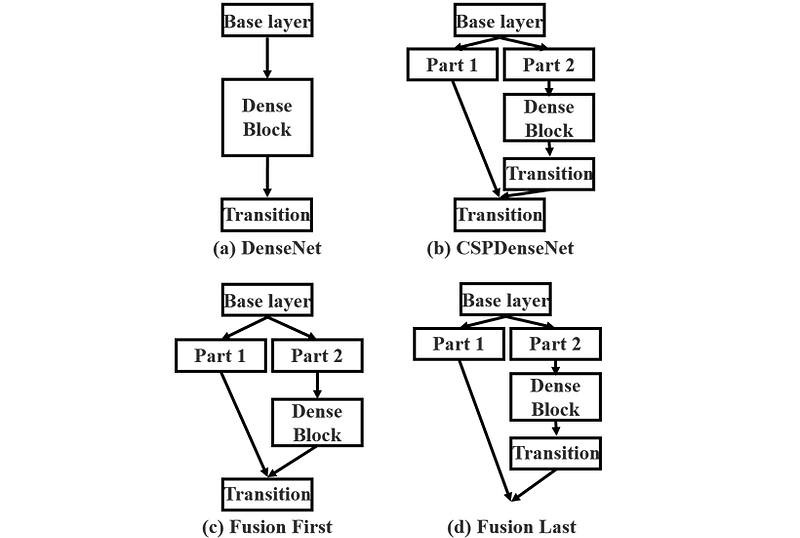
In the structure referred to as fusion first (c), we concatenate the part 1 tensor with the part 2 tensor that has been processed by the dense block prior to passing them through the transition layer. So, option (c) is actually pretty straightforward to implement because the spatial dimension of the two tensors is exactly the same, allowing us to concatenate them easily.
In my previous article [3], I mentioned that the transition layer of a DenseNet is used to reduce both the spatial dimension and the number of channels. In fact, this property requires us to rethink how to implement the fusion last (d) structure. This is essentially because the transition layer will cause the part 2 tensor to have a smaller spatial dimension than the part 1 tensor. So technically speaking, we need to either apply something like a pooling with a stride of 2 to the part 1 branch or simply omitting the downsampling operation in the transition layer. By doing this, the spatial dimension of the two tensors will be the same, and thus they are now concatenable.
Instead of just using a single transition layer placed either before or after feature combination, the authors also proposed another method which they refer to as CSPDenseNet (b). We can think of this as a combination of (c) and (d), where we got two transition layers placed before and after the tensor concatenation process. In this particular case, the first transition layer (the one placed in the part 2 branch) will perform channel reduction by cross-channel pooling, i.e., a pooling layer that operates across channel dimension. Meanwhile, the second transition layer will perform both spatial downsampling and channel count reduction. So basically, in this approach we reduce the number of channels twice — well, at least that’s what I understand from the paper about the two transition layers, as the detailed processes within these layers are not explicitly discussed.
Experimental Results
Talking about the experimental results regarding these feature combination mechanisms, it is explained in the paper that fusion last (d) is better than fusion first (c), where the former can significantly reduce computational complexity while only suffers from a very slight drop in accuracy. Variant (c) actually also reduces computational complexity, yet the degradation in accuracy is also significant. Authors found that variant (b) obtained an even better result than the two. Figure 4 below displays several experimental results showing how the three feature combination mechanisms performed compared to the base model. However, instead of using DenseNet, they somehow decided to use PeleeNet to compare these structures.
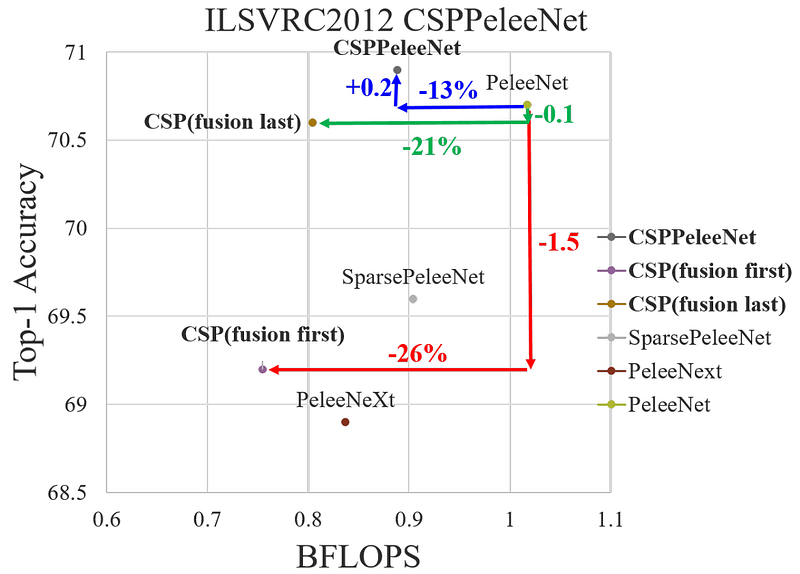
Based on the above figure, we can see that the CSP fusion last (green) indeed performs better compared to the CSP fusion first (red). This is based on the fact that its accuracy only degrades by 0.1% from its base model while having 21% smaller computational complexity. Meanwhile, even though CSP fusion first successfully reduces computational complexity by 26%, but the accuracy drop is pretty significant as it performs 1.5% worse than the base PeleeNet. And the most impressive structure is the CSPPeleeNet variant (blue), i.e., the one that utilizes two transition layers. Here we can clearly see that although the computational complexity is reduced by 13%, the accuracy of the model actually improves by 0.2% — again, no tradeoff!
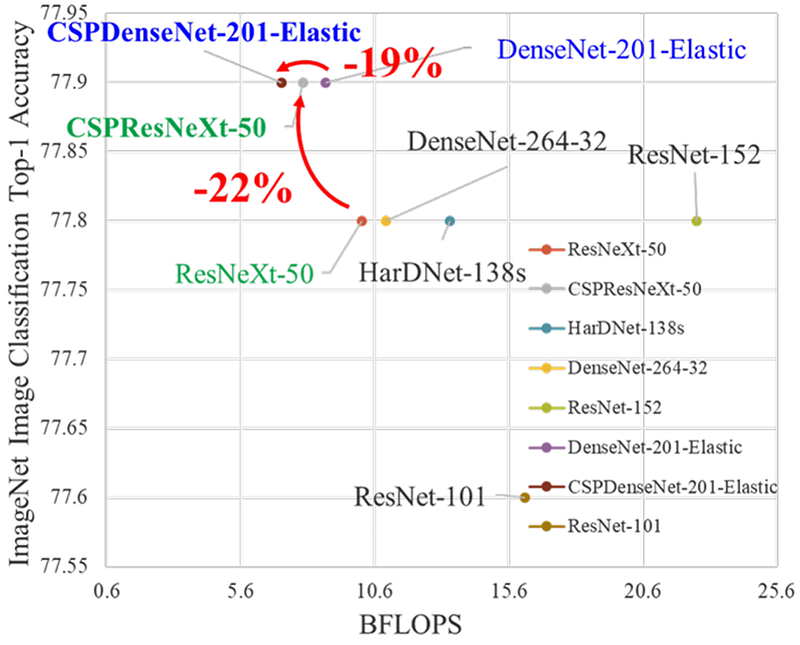
Not only that, but the authors also tried to implement CSPNet on other backbone models. The results in Figure 5 below shows that the CSPNet structure successfully reduces the computational complexity of DenseNet -201-Elastic and ResNeXt-50 by 19% and 22%, respectively. It is interesting to see that the accuracy of the ResNeXt model improves despite the reduction in model complexity, which is in accordance with the result obtained by CSPPeleeNet in Figure 4.
The Mathematical Expression of CSPDenseNet
For those who love math, here I got you some notations that you might find interesting to know. Figures 6 and 7 below display the mathematical expressions of DenseNet and CSPDenseNet blocks during the forward propagation phase.
In the DenseNet block, x₁ corresponds to the tensor produced by the first conv layer w₁ based on the input tensor x₀. Next, we concatenate the original tensor x₀ with x₁ and use them as the input for the w₂ layer (or to be more precise, w is actually the weights of the conv layer, not the conv layer itself). We keep producing more feature maps and concatenating the existing ones as we get deeper into the network. In this way, we can basically say that the outputs of all previous layers become the input of the current layer.

The case is different for CSPDenseNet. You can see in the notation below that we got x₀’ and x₀’’, which we previously refer to as the part 1 and part 2. The x₀’’ tensor undergoes processing like the one in DenseNet block until we got xₖ. Next, the output of this dense block is then forwarded to the first transition layer, which is denoted as wᴛ. The resulting tensor xᴛ is then concatenated with the part 1 tensor x₀’ before eventually being passed through the second transition layer wᴜ to obtain the final output tensor xᴜ.

CSPDenseNet Implementation
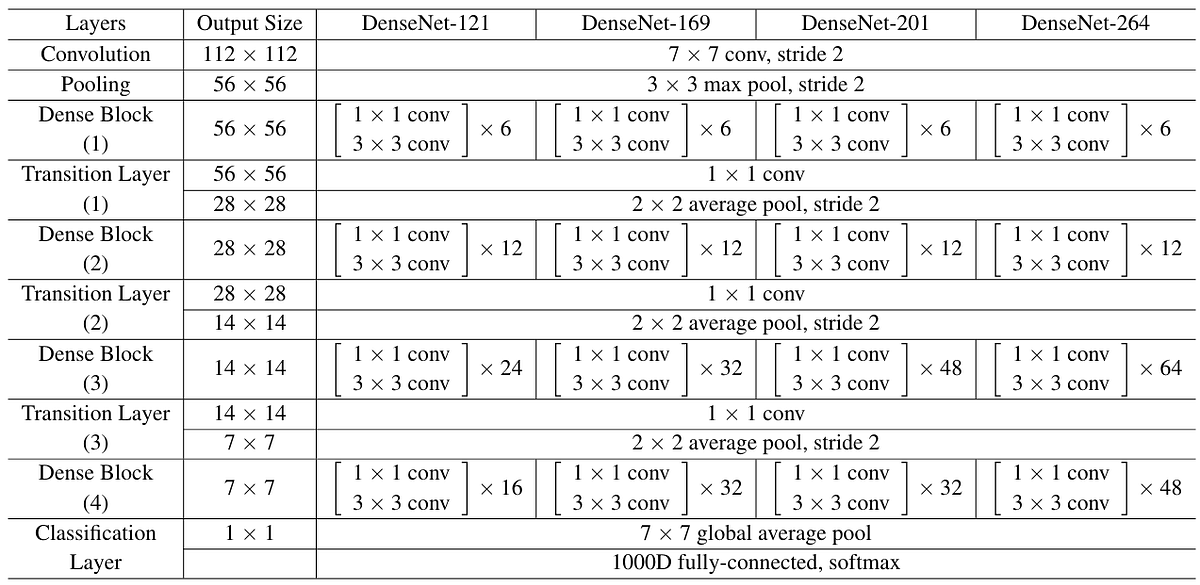
Now let’s get even deeper into the CSPNet architecture by implementing it from scratch. Although we can basically apply the CSPNet structure to any backbone, here I am going to do that on the DenseNet model to match it with the illustrations and equations I showed you earlier. Figure 8 below displays what the complete DenseNet architecture looks like. Just remember that every single dense block in this architecture originally follows the DenseNet structure in Figure 3a, and our objective here is to replace all these dense blocks with CSPDenseNet block illustrated in Figure 3b.
The first thing we do is to import the required modules and initialize the configurable parameters as shown in Codeblock 1. The GROWTH variable is the growth rate parameter, which denotes the number of feature maps produced by each bottleneck within the dense block. Next, CHANNEL_POOLING is the parameter we use to adjust the behavior of the channel-pooling mechanism in our first transition layer. Here I set this parameter to 0.8, meaning that we will shrink the number of channels to 80% of its original channel count. The COMPRESSION parameter works similarly to the CHANNEL_POOLING variable, yet this one operates in the second transition layer. Finally, here we define the REPEATS list, which is used to set the number of bottleneck blocks we will initialize within the dense block of each stage.
# Codeblock 1
import torch
import torch.nn as nn

GROWTH          = 12
CHANNEL_POOLING = 0.8
COMPRESSION     = 0.5
REPEATS         = [6, 12, 24, 16]
Bottleneck Block Implementation
Below is the implementation of the bottleneck block to be placed within the dense block. This Bottleneck class is exactly the same as the one I used in my DenseNet article [3]. I directly copy-pasted the code from there since we don’t need to modify this part at all. Just keep in mind that a bottleneck block comprises a 1×1 convolution followed by a 3×3 convolution.
# Codeblock 2
class Bottleneck(nn.Module):
    def __init__(self, in_channels):
        super().__init__()

        self.relu = nn.ReLU()
        self.dropout = nn.Dropout(p=0.2)

        self.bn0   = nn.BatchNorm2d(num_features=in_channels)
        self.conv0 = nn.Conv2d(in_channels=in_channels,
                               out_channels=GROWTH*4,
                               kernel_size=1,
                               padding=0,
                               bias=False)

        self.bn1   = nn.BatchNorm2d(num_features=GROWTH*4)
        self.conv1 = nn.Conv2d(in_channels=GROWTH*4,
                               out_channels=GROWTH,
                               kernel_size=3,
                               padding=1,
                               bias=False)

    def forward(self, x):
        print(f'originalt: {x.size()}')

        out = self.dropout(self.conv0(self.relu(self.bn0(x))))
        print(f'after conv0t: {out.size()}')

        out = self.dropout(self.conv1(self.relu(self.bn1(out))))
        print(f'after conv1t: {out.size()}')

        concatenated = torch.cat((out, x), dim=1)
        print(f'after concatt: {concatenated.size()}')

        return concatenated
The following testing code simulates the first bottleneck block within the dense block. Remember that the very first conv layer in the architecture (the one with 7×7 kernel) produces 64 feature maps, but since in the case of CSPNet we only want to process half of them (the part 2 tensor), hence here we will test it with a tensor of 32 feature maps.
# Codeblock 3
bottleneck = Bottleneck(in_channels=32)

x = torch.randn(1, 32, 56, 56)
x = bottleneck(x)
# Codeblock 3 Output
original : torch.Size([1, 32, 56, 56])
after conv0 : torch.Size([1, 48, 56, 56])
after conv1 : torch.Size([1, 12, 56, 56])
after concat : torch.Size([1, 44, 56, 56])You can see in the resulting output above that the number of feature maps becomes 44 at the end of the process, where this number is obtained by adding the input channel count and the growth rate, i.e., 32 + 12 = 44. Again, you can just check out my DenseNet article [3] if you want to get a better understanding about this calculation.
Dense Block Implementation
Now to create a sequence of bottleneck blocks easily, we can just wrap it inside the DenseBlock class in Codeblock 4 below. Later on, we can just specify the number of bottleneck blocks to be stacked through the repeats parameter. Again, this class is also copy-pasted from my DenseNet article, so I am not going to explain it any further.
# Codeblock 4
class DenseBlock(nn.Module):
    def __init__(self, in_channels, repeats):
        super().__init__()
        self.bottlenecks = nn.ModuleList()

        for i in range(repeats):
            current_in_channels = in_channels + i * GROWTH
            self.bottlenecks.append(Bottleneck(in_channels=current_in_channels))

    def forward(self, x):
        print(f'originalttt: {x.size()}')

        for i, bottleneck in enumerate(self.bottlenecks):
            x = bottleneck(x)
            print(f'after bottleneck #{i}tt: {x.size()}')

        return x
In order to check if our DenseBlock class works properly, we will test it using the Codeblock 5 below. Here I am trying to simulate the part 2 tensor processed by the first dense block, which contains a sequence of 6 bottleneck blocks.
# Codeblock 5
dense_block = DenseBlock(in_channels=32, repeats=6)
x = torch.randn(1, 32, 56, 56)

x = dense_block(x)
And below is what the output looks like. Here we can clearly see that each bottleneck block successfully increases the feature maps by 12.
# Codeblock 5 Output
original             : torch.Size([1, 32, 56, 56])
after bottleneck #0  : torch.Size([1, 44, 56, 56])
after bottleneck #1  : torch.Size([1, 56, 56, 56])
after bottleneck #2  : torch.Size([1, 68, 56, 56])
after bottleneck #3  : torch.Size([1, 80, 56, 56])
after bottleneck #4  : torch.Size([1, 92, 56, 56])
after bottleneck #5  : torch.Size([1, 104, 56, 56])
First Transition
Remember that the CSPDenseNet variant in Figure 3b uses two transition layers. In this section we are going to discuss the first transition layer, i.e., the one used to process the tensor in the part 2 branch. Here we will not perform spatial downsampling, which is the reason why you don’t see any pooling layer within the __init__() method in Codeblock 6 below. Instead, here we will only perform cross-channel pooling, which can be perceived as a standard pooling operation yet is done across the channel dimension. To implement it, we can simply use a 1×1 convolution (#(2)) and specify the number of output channels we want (#(1)). We can think of it like this: in a spatial downsampling process, we can basically do that by using either pooling or a strided convolution layer, which in the latter case it will aggregate the pixel values with specific weightings from the local neighborhood. In the case of cross-channel pooling, since we don’t have a specific PyTorch layer for that, we can simply replace it with a pointwise convolution layer, which by doing so we can basically aggregate pixel values across the channel dimension.
# Codeblock 6
class FirstTransition(nn.Module):
    def __init__(self, in_channels, out_channels):
        super().__init__()

        self.bn   = nn.BatchNorm2d(num_features=in_channels)
        self.relu = nn.ReLU()
        self.conv = nn.Conv2d(in_channels=in_channels,
                              out_channels=out_channels,   #(1)
                              kernel_size=1,               #(2)
                              padding=0,
                              bias=False)
        self.dropout = nn.Dropout(p=0.2)

    def forward(self, x):
        print(f'originaltt: {x.size()}')

        out = self.dropout(self.conv(self.relu(self.bn(x))))
        print(f'after first_transitiont: {out.size()}')

        return out
The result given in the Codeblock 5 Output shows that the part 2 tensor will have the shape of 104×56×56 after being processed by the dense block. Thus, in the testing code below I will use this tensor shape to simulate the first transition layer within that stage. To adjust the number of output channels, we can simply multiply the input channel count with the CHANNEL_POOLING variable we initialized earlier as shown at line #(1) in Codeblock 7 below.
# Codeblock 7
first_transition = FirstTransition(in_channels=104,
                                   out_channels=int(104*CHANNEL_POOLING)) #(1)

x = torch.randn(1, 104, 56, 56)
x = first_transition(x)
Now as the code above is run, we can see that the number of feature maps shrinks from 104 to 83 (80% of the original).
# Codeblock 7 Output
original		        : torch.Size([1, 104, 56, 56])
after first_transition  : torch.Size([1, 83, 56, 56])
Second Transition
The structure of the second transition layer is quite a bit the same as the first one, except that here we also have an average pooling layer with a stride of 2 to reduce the spatial dimension by half (#(1)).
# Codeblock 8
class SecondTransition(nn.Module):
    def __init__(self, in_channels, out_channels):
        super().__init__()

        self.bn   = nn.BatchNorm2d(num_features=in_channels)
        self.relu = nn.ReLU()
        self.conv = nn.Conv2d(in_channels=in_channels,
                              out_channels=out_channels,
                              kernel_size=1,
                              padding=0,
                              bias=False)
        self.dropout = nn.Dropout(p=0.2)
        self.pool = nn.AvgPool2d(kernel_size=2, stride=2)    #(1)

    def forward(self, x):
        print(f'originaltt: {x.size()}')

        out = self.pool(self.dropout(self.conv(self.relu(self.bn(x)))))
        print(f'after second_transitiont: {out.size()}')

        return out
Remember that the tensor coming into the second transition layer is a concatenation of the part 1 and the part 2 tensors. This is essentially the reason why in the testing code below I set this layer to accept 32 + 83 = 115 feature maps. Similar to the first transition layer, here we multiply this number of feature maps with the COMPRESSION variable (#(1)) to reduce the number of channels even further.
# Codeblock 9
second_transition = SecondTransition(in_channels=115,
                                     out_channels=int(115*COMPRESSION))  #(1)

x = torch.randn(1, 115, 56, 56)
x = second_transition(x)
In the resulting output below we can see that the spatial dimension halves thanks to the average pooling layer. At the same time, the number of feature maps also decreases from 115 to 57 since we set the COMPRESSION parameter to 0.5.
# Codeblock 9 Output
original                : torch.Size([1, 115, 56, 56])
after second_transition : torch.Size([1, 57, 28, 28])
The CSPDenseNet Model
With all the components ready, we can now build the entire CSPDenseNet architecture, which I break down in Codeblocks 10a, 10b, and 10c below. Let’s now focus on the Codeblock 10a first, where I initialize all the layers according to the structure given in Figure 8. Here you can see at line #(1) that we initialize a 7×7 convolution layer, which acts as the input layer of the network. This layer is then followed by a maxpooling layer (#(2)). These two layers use the stride of 2, meaning that the spatial dimensions of the input tensor will be reduced to one-fourth of its original size.
# Codeblock 10a
class CSPDenseNet(nn.Module):
    def __init__(self):
        super().__init__()

        self.first_conv = nn.Conv2d(in_channels=3,         #(1)
                                    out_channels=64,
                                    kernel_size=7,
                                    stride=2,
                                    padding=3,
                                    bias=False)
        self.first_pool = nn.MaxPool2d(kernel_size=3, stride=2, padding=1)  #(2)
        channel_count = 64


        ##### Stage 0
        self.dense_block_0 = DenseBlock(in_channels=channel_count//2,
                                        repeats=REPEATS[0])

        self.first_transition_0 = FirstTransition(in_channels=(channel_count//2)+(REPEATS[0]*GROWTH),
                                                  out_channels=int(((channel_count//2)+(REPEATS[0]*GROWTH))*CHANNEL_POOLING))

        channel_count = (channel_count - (channel_count//2)) + int(((channel_count//2)+(REPEATS[0]*GROWTH))*CHANNEL_POOLING)

        self.second_transition_0 = SecondTransition(in_channels=channel_count,
                                                  out_channels=int(channel_count*COMPRESSION))

        channel_count = int(channel_count*COMPRESSION)
        #####


        ##### Stage 1
        self.dense_block_1 = DenseBlock(in_channels=channel_count//2,
                                        repeats=REPEATS[1])

        self.first_transition_1 = FirstTransition(in_channels=(channel_count//2)+(REPEATS[1]*GROWTH),
                                                  out_channels=int(((channel_count//2)+(REPEATS[1]*GROWTH))*CHANNEL_POOLING))

        channel_count = (channel_count - (channel_count//2)) + int(((channel_count//2)+(REPEATS[1]*GROWTH))*CHANNEL_POOLING)

        self.second_transition_1 = SecondTransition(in_channels=channel_count,
                                                  out_channels=int(channel_count*COMPRESSION))

        channel_count = int(channel_count*COMPRESSION)
        #####


        ##### Stage 2
        self.dense_block_2 = DenseBlock(in_channels=channel_count//2,
                                        repeats=REPEATS[2])

        self.first_transition_2 = FirstTransition(in_channels=(channel_count//2)+(REPEATS[2]*GROWTH),
                                                  out_channels=int(((channel_count//2)+(REPEATS[2]*GROWTH))*CHANNEL_POOLING))

        channel_count = (channel_count - (channel_count//2)) + int(((channel_count//2)+(REPEATS[2]*GROWTH))*CHANNEL_POOLING)

        self.second_transition_2 = SecondTransition(in_channels=channel_count,
                                                  out_channels=int(channel_count*COMPRESSION))

        channel_count = int(channel_count*COMPRESSION)
        #####


        ##### Stage 3
        self.dense_block_3 = DenseBlock(in_channels=channel_count//2,
                                        repeats=REPEATS[3])

        self.first_transition_3 = FirstTransition(in_channels=(channel_count//2)+(REPEATS[3]*GROWTH),
                                                  out_channels=int(((channel_count//2)+(REPEATS[3]*GROWTH))*CHANNEL_POOLING))

        channel_count = (channel_count - (channel_count//2)) + int(((channel_count//2)+(REPEATS[3]*GROWTH))*CHANNEL_POOLING)
        #####


        self.avgpool = nn.AdaptiveAvgPool2d(output_size=(1,1))             #(3)
        self.fc = nn.Linear(in_features=channel_count, out_features=1000)  #(4)
Still with the above codeblock, here I group the layers I initialize based on the stage they belong to. Let’s now focus on the part I refer to as Stage 0. Here you can see that we got a dense block (dense_block_0) and the first transition layer (first_transition_0). These two components are responsible to process the part 2 tensor. Next, we initialize the second transition layer (second_transition_0), which is used to process the concatenation result of the part 1 and part 2 tensors. Since the channel count is dynamic depending on the GROWTH, CHANNEL_POOLING, COMPRESSION, and REPEATS variables, we need to keep track of the channel count after each step so that the model can adaptively adjust itself according to these variables. We do the same thing for all the remaining stages, except in Stage 3 we don’t initialize the second transition layer since at that point we won’t reduce the channels and the spatial dimension any further. Instead, we will directly pass the concatenated part 1 and part 2 tensors to the average pooling (#(3)) and the classification (#(4)) layers. And that ends our discussion about the Codeblock 10a above.
Before we get into the forward() method, there is another function we need to create: split_channels(). As the name suggests, this function, which is written in Codeblock 10b below, is used to split a tensor into part 1 and part 2. The if-else statement here is used to check if the number of channels is odd or even. In fact, it would be very easy if the channel count is an even number as we can just divide them into two (#(4)). But if the channel count is odd, we need to manually determine the size of each part as seen at line #(1) and #(2) before eventually splitting them (#(3)).
# Codeblock 10b
    def split_channels(self, x):

        channel_count = x.size(1)

        if channel_count%2 != 0:
            split_size_2 = channel_count // 2            #(1)
            split_size_1 = channel_count - split_size_2  #(2)
            return torch.split(x, [split_size_1, split_size_2], dim=1)  #(3)

        else:
            return torch.split(x, channel_count // 2, dim=1)            #(4)
As we have finished defining the __init__() and the split_channel() methods, we can now implement the forward() method in Codeblock 10c below. Generally speaking, what we do here is simply forward the tensor sequentially. But now let’s pay attention to the part I refer to as Stage 0. Here you can see that after the tensor is passed through the first_pool layer (#(1)), we then split it into two using the split_channels() function we declared earlier (#(2)). From there, we now obtain the part1 and part2 tensors. We will leave the part1 tensor as is all the way to the end of the stage. Meanwhile, for the part2 tensor, we will process it with the dense block (#(3)) and the first transition layer (#(4)). Next, we concatenate the resulting tensor with the part1 tensor to create the skip-connection (#(5)). And then, we finally pass it through the second transition layer (#(6)). The same steps are repeated for all stages until we eventually reach the output layer to make classification. Just remember that the Stage 3 is quite different because here we don’t have the second transition layer.
# Codeblock 10c
    def forward(self, x):
        print(f'originalttt: {x.size()}')

        x = self.first_conv(x)
        print(f'after first_convtt: {x.size()}')

        x = self.first_pool(x)      #(1)
        print(f'after first_pooltt: {x.size()}n')


        ##### Stage 0
        part1, part2 = self.split_channels(x)    #(2)
        print(f'part1tttt: {part1.size()}')
        print(f'part2tttt: {part2.size()}')

        part2 = self.dense_block_0(part2)        #(3)
        print(f'part2 after dense block 0t: {part2.size()}')

        part2 = self.first_transition_0(part2)   #(4)
        print(f'part2 after first trans 0t: {part2.size()}')

        x = torch.cat((part1, part2), dim=1)     #(5)
        print(f'after concatenatett: {x.size()}')

        x = self.second_transition_0(x)          #(6)
        print(f'after second transition 0t: {x.size()}n')


        ##### Stage 1
        part1, part2 = self.split_channels(x)
        print(f'part1tttt: {part1.size()}')
        print(f'part2tttt: {part2.size()}')

        part2 = self.dense_block_1(part2)
        print(f'part2 after dense block 1t: {part2.size()}')

        part2 = self.first_transition_1(part2)
        print(f'part2 after first trans 1t: {part2.size()}')

        x = torch.cat((part1, part2), dim=1)
        print(f'after concatenatett: {x.size()}')

        x = self.second_transition_1(x)
        print(f'after second transition 1t: {x.size()}n')


        ##### Stage 2
        part1, part2 = self.split_channels(x)
        print(f'part1tttt: {part1.size()}')
        print(f'part2tttt: {part2.size()}')

        part2 = self.dense_block_2(part2)
        print(f'part2 after dense block 2t: {part2.size()}')

        part2 = self.first_transition_2(part2)
        print(f'part2 after first trans 2t: {part2.size()}')

        x = torch.cat((part1, part2), dim=1)
        print(f'after concatenatett: {x.size()}')

        x = self.second_transition_2(x)
        print(f'after second transition 2t: {x.size()}n')


        ##### Stage 3
        part1, part2 = self.split_channels(x)
        print(f'part1tttt: {part1.size()}')
        print(f'part2tttt: {part2.size()}')

        part2 = self.dense_block_3(part2)
        print(f'part2 after dense block 2t: {part2.size()}')

        part2 = self.first_transition_3(part2)
        print(f'part2 after first trans 2t: {part2.size()}')

        x = torch.cat((part1, part2), dim=1)
        print(f'after concatenatett: {x.size()}n')


        x = self.avgpool(x)
        print(f'after avgpoolttt: {x.size()}')

        x = torch.flatten(x, start_dim=1)
        print(f'after flattenttt: {x.size()}')

        x = self.fc(x)
        print(f'after fcttt: {x.size()}')

        return x
Now let’s test the CSPDenseNet class we just created by running the Codeblock 11 below. Here I use a dummy tensor of shape 3×224×224 to simulate a 224×224 RGB image passed through the network.
# Codeblock 11
cspdensenet = CSPDenseNet()

x = torch.randn(1, 3, 224, 224)
x = cspdensenet(x)
And below is what the output looks like. Here you can see that every time a tensor gets into a network, our split_channels() method correctly divides the tensor into two (#(1–2)). Then, the bottleneck block within each stage also correctly adds the number of channels of the part 2 tensor by 12 before eventually being passed through the first transition layer. The first transition layer itself successfully reduces the number of channels by 20% as seen at line #(3), simulating the cross-channel pooling mechanism. Afterwards, the resulting tensor is then concatenated with the tensor from part 1 (#(4)) and passed through the second transition layer (#(5)) to further reduce the number of channels and halve the spatial dimension. We do the same thing for all stages until eventually we got the 1000-class prediction.
# Codeblock 11 Output
original                  : torch.Size([1, 3, 224, 224])
after first_conv          : torch.Size([1, 64, 112, 112])
after first_pool          : torch.Size([1, 64, 56, 56])

part1                     : torch.Size([1, 32, 56, 56])    #(1)
part2                     : torch.Size([1, 32, 56, 56])    #(2)
after bottleneck #0       : torch.Size([1, 44, 56, 56])
after bottleneck #1       : torch.Size([1, 56, 56, 56])
after bottleneck #2       : torch.Size([1, 68, 56, 56])
after bottleneck #3       : torch.Size([1, 80, 56, 56])
after bottleneck #4       : torch.Size([1, 92, 56, 56])
after bottleneck #5       : torch.Size([1, 104, 56, 56])
part2 after dense block 0 : torch.Size([1, 104, 56, 56])
part2 after first trans 0 : torch.Size([1, 83, 56, 56])    #(3)
after concatenate         : torch.Size([1, 115, 56, 56])   #(4)
after second transition 0 : torch.Size([1, 57, 28, 28])    #(5)

part1                     : torch.Size([1, 29, 28, 28])
part2                     : torch.Size([1, 28, 28, 28])
after bottleneck #0       : torch.Size([1, 40, 28, 28])
after bottleneck #1       : torch.Size([1, 52, 28, 28])
after bottleneck #2       : torch.Size([1, 64, 28, 28])
after bottleneck #3       : torch.Size([1, 76, 28, 28])
after bottleneck #4       : torch.Size([1, 88, 28, 28])
after bottleneck #5       : torch.Size([1, 100, 28, 28])
after bottleneck #6       : torch.Size([1, 112, 28, 28])
after bottleneck #7       : torch.Size([1, 124, 28, 28])
after bottleneck #8       : torch.Size([1, 136, 28, 28])
after bottleneck #9       : torch.Size([1, 148, 28, 28])
after bottleneck #10      : torch.Size([1, 160, 28, 28])
after bottleneck #11      : torch.Size([1, 172, 28, 28])
part2 after dense block 1 : torch.Size([1, 172, 28, 28])
part2 after first trans 1 : torch.Size([1, 137, 28, 28])
after concatenate         : torch.Size([1, 166, 28, 28])
after second transition 1 : torch.Size([1, 83, 14, 14])

part1                     : torch.Size([1, 42, 14, 14])
part2                     : torch.Size([1, 41, 14, 14])
after bottleneck #0       : torch.Size([1, 53, 14, 14])
after bottleneck #1       : torch.Size([1, 65, 14, 14])
after bottleneck #2       : torch.Size([1, 77, 14, 14])
after bottleneck #3       : torch.Size([1, 89, 14, 14])
after bottleneck #4       : torch.Size([1, 101, 14, 14])
after bottleneck #5       : torch.Size([1, 113, 14, 14])
after bottleneck #6       : torch.Size([1, 125, 14, 14])
after bottleneck #7       : torch.Size([1, 137, 14, 14])
after bottleneck #8       : torch.Size([1, 149, 14, 14])
after bottleneck #9       : torch.Size([1, 161, 14, 14])
after bottleneck #10      : torch.Size([1, 173, 14, 14])
after bottleneck #11      : torch.Size([1, 185, 14, 14])
after bottleneck #12      : torch.Size([1, 197, 14, 14])
after bottleneck #13      : torch.Size([1, 209, 14, 14])
after bottleneck #14      : torch.Size([1, 221, 14, 14])
after bottleneck #15      : torch.Size([1, 233, 14, 14])
after bottleneck #16      : torch.Size([1, 245, 14, 14])
after bottleneck #17      : torch.Size([1, 257, 14, 14])
after bottleneck #18      : torch.Size([1, 269, 14, 14])
after bottleneck #19      : torch.Size([1, 281, 14, 14])
after bottleneck #20      : torch.Size([1, 293, 14, 14])
after bottleneck #21      : torch.Size([1, 305, 14, 14])
after bottleneck #22      : torch.Size([1, 317, 14, 14])
after bottleneck #23      : torch.Size([1, 329, 14, 14])
part2 after dense block 2 : torch.Size([1, 329, 14, 14])
part2 after first trans 2 : torch.Size([1, 263, 14, 14])
after concatenate         : torch.Size([1, 305, 14, 14])
after second transition 2 : torch.Size([1, 152, 7, 7])

part1                     : torch.Size([1, 76, 7, 7])
part2                     : torch.Size([1, 76, 7, 7])
after bottleneck #0       : torch.Size([1, 88, 7, 7])
after bottleneck #1       : torch.Size([1, 100, 7, 7])
after bottleneck #2       : torch.Size([1, 112, 7, 7])
after bottleneck #3       : torch.Size([1, 124, 7, 7])
after bottleneck #4       : torch.Size([1, 136, 7, 7])
after bottleneck #5       : torch.Size([1, 148, 7, 7])
after bottleneck #6       : torch.Size([1, 160, 7, 7])
after bottleneck #7       : torch.Size([1, 172, 7, 7])
after bottleneck #8       : torch.Size([1, 184, 7, 7])
after bottleneck #9       : torch.Size([1, 196, 7, 7])
after bottleneck #10      : torch.Size([1, 208, 7, 7])
after bottleneck #11      : torch.Size([1, 220, 7, 7])
after bottleneck #12      : torch.Size([1, 232, 7, 7])
after bottleneck #13      : torch.Size([1, 244, 7, 7])
after bottleneck #14      : torch.Size([1, 256, 7, 7])
after bottleneck #15      : torch.Size([1, 268, 7, 7])
part2 after dense block 2 : torch.Size([1, 268, 7, 7])
part2 after first trans 2 : torch.Size([1, 214, 7, 7])
after concatenate         : torch.Size([1, 290, 7, 7])

after avgpool             : torch.Size([1, 290, 1, 1])
after flatten             : torch.Size([1, 290])
after fc                  : torch.Size([1, 1000])
Ending
And that’s it! We have successfully learned CSPNet and implemented it on DenseNet backbone. As I’ve mentioned earlier, we can actually use the idea of CSPNet to improve the performance of any other backbone models such as ResNet or ResNeXt. So here I challenge you to implement CSPNet on these models from scratch.
To be honest I cannot confirm that my implementation is 100% correct since the official GitHub repo [4] of the paper does not provide the PyTorch implementation — but that’s at least everything I understand from the manuscript. Please let me know if you find any mistake in the code or in my explanations. Thanks for reading, and see you again in my next article. Bye!
Btw you can also find the code used in this article on my GitHub repo [5].
References
[1] Chien-Yao Wang et al. CSPnet: A New Backbone That Can Enhance Learning Capability of CNN. Arxiv. [Accessed October 1, 2025].
[2] Gao Huang et al. Densely Connected Convolutional Networks. Arxiv. [Accessed September 18, 2025].
[3] Muhammad Ardi. DenseNet Paper Walkthrough: All Connected. Towards Data Science. [Accessed April 26, 2026].
[4] WongKinYiu. CrossStagePartialNetworks. GitHub. [Accessed October 1, 2025].
[5] MuhammadArdiPutra. CSPNet. GitHub. [Accessed October 1, 2025].


