

Protein researchers face a time-consuming challenge: manually searching through thousands of peptide sequences to find structurally similar candidates is slow, error-prone, and requires deep domain expertise to interpret results. Building a protein research copilot can transform how researchers search for structurally similar peptides across large datasets — enabling natural language queries, automated embedding generation, and AI-powered result summarization in a single conversational interface.
This post shows you how to build a conversational protein research assistant that combines three capabilities:
- Natural language query parsing to extract structured search parameters.
- Vector similarity search over protein embeddings using a specialized language model.
- AI-generated scientific summaries of search results.
The system uses the Strands Agents SDK to orchestrate three specialized tools within one agent, deploys to Amazon Bedrock AgentCore for production serving, and stores peptide embeddings in Amazon Aurora PostgreSQL-Compatible Edition with pgvector.
By the end of this post, you will have built an end-to-end agent application that demonstrates how to:
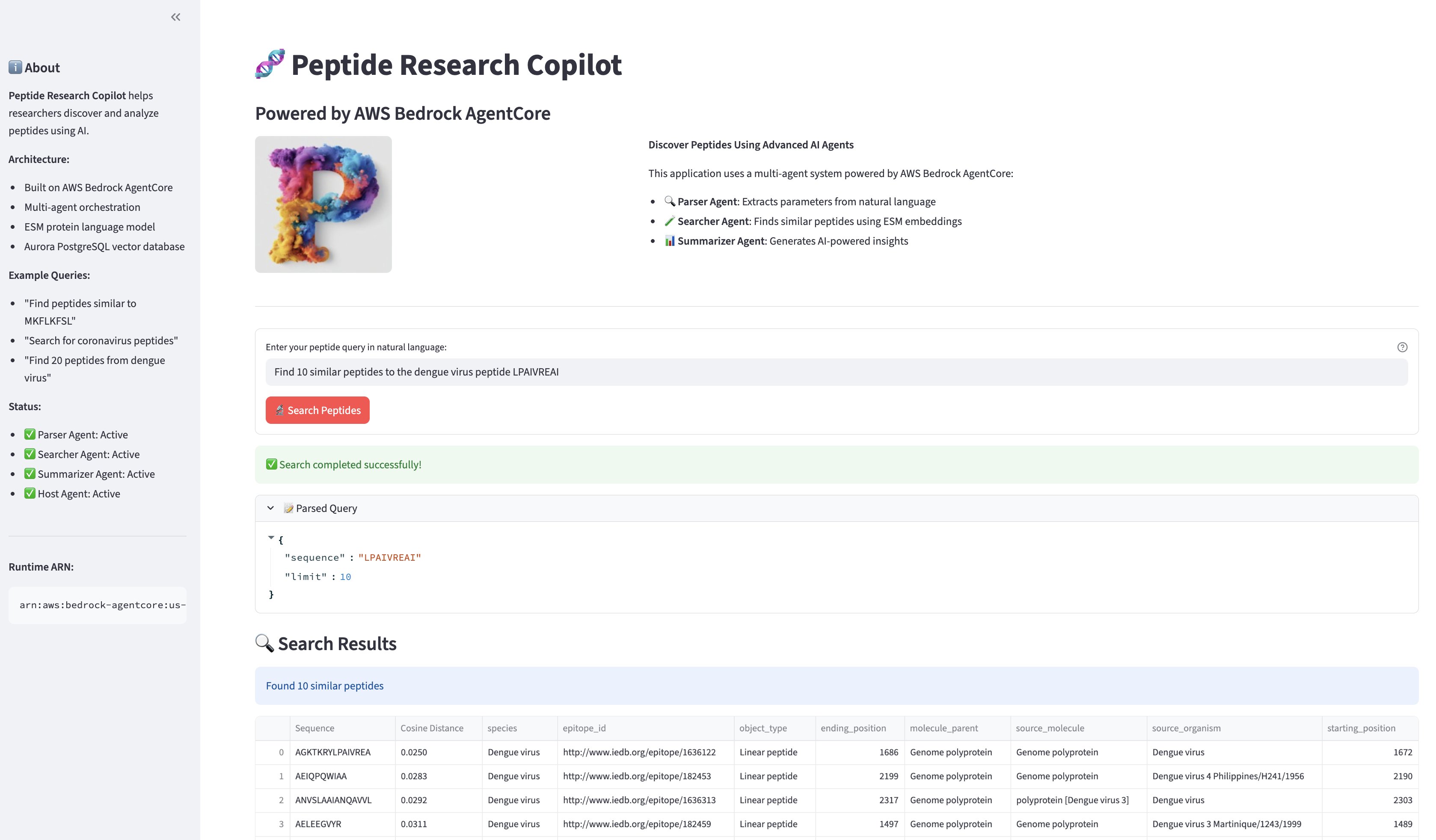
- Parse natural language user input like “Find 10 similar peptides to the dengue virus peptide LPAIVREAI”, into structured tool parameters using the Strands Agents SDK’s tool-use pattern.
- Deploy a custom ML model (ESM-C 300M) as Amazon SageMaker AI serverless endpoint with bundled weights for fast cold starts.
- Combine vector similarity search (pgvector on Amazon Aurora PostgreSQL) with metadata filtering in a single query.
- Orchestrate multiple specialized tools — including nested LLM agents — within a single Bedrock AgentCore runtime and generate scientific summaries of search results.
Prerequisites
To follow along with this post, you need:
- An AWS account with access to Amazon Bedrock foundation models (Anthropic Claude Sonnet 4.6).
- Python 3.12 or later.
- The AWS Command Line Interface (AWS CLI) configured with appropriate credentials.
- IAM permissions for Amazon Bedrock, Amazon SageMaker AI, Amazon Aurora, Amazon Elastic Container Service (Amazon ECS), and AWS CodeBuild.
bedrock-agentcore-starter-toolkitinstalled (pip install bedrock-agentcore-starter-toolkit).- The IEDB virus epitope dataset.
- Estimated deployment time: 30–45 minutes; review the AWS pricing pages for Bedrock, SageMaker AI, Aurora Serverless v2, and AWS Fargate for cost estimates.
Solution overview
The copilot follows a tool-use pattern where a single Strands agent orchestrates three specialized tools to handle the complete research workflow. When a researcher submits a natural language query, the agent parses it into structured parameters, searches for similar peptides using protein embeddings, and summarizes the results with scientific context.
The following diagram illustrates the architecture:
This architecture has five components:
- A Streamlit frontend running on AWS Fargate provides the conversational interface. It sends queries to the AgentCore runtime and displays results in a structured format with downloadable tables.
- A Strands agent running inside a single Amazon Bedrock AgentCore runtime orchestrates the workflow. The agent uses Anthropic Claude Sonnet 4.6 via the Bedrock Converse API and has access to three tools defined with the
@tooldecorator. - A parser tool that uses a dedicated Strands agent (LLM-as-parser pattern) to extract structured search parameters — sequence, species filter, result limit — from natural language queries.
- A searcher tool that generates protein embeddings via Amazon SageMaker AI serverless endpoint running ESM-C 300M, then performs cosine similarity search against Amazon Aurora PostgreSQL with pgvector.
- A summarizer tool that uses another dedicated Strands agent to analyze search results and produce concise scientific summaries with suggestions for further investigation.
This single-runtime, multi-tool design keeps the deployment simple while maintaining clear separation of concerns. Each tool encapsulates a distinct capability, and the orchestrator agent decides when and how to invoke them based on the user’s query.
Protein embeddings with ESM-C 300M
The core of the similarity search is ESM-C 300M, a protein language model from EvolutionaryScale (Built with ESM) that produces 960-dimensional embeddings capturing structural and functional properties of amino acid sequences. Two peptides with similar biological function produce embeddings that are close in vector space, enabling similarity search without requiring sequence alignment.
ESM-C 300M is deployed as an Amazon SageMaker AI serverless endpoint, which scales to zero when idle and incurs no cost between invocations. The model weights are bundled into the deployment artifact to avoid downloading from HuggingFace at inference time — critical for serverless endpoints where cold start latency matters.
The inference handler constructs the model architecture directly and loads pre-packaged weights:
The predict_fn handler takes a protein sequence, encodes it, and returns the mean-pooled embedding:
The endpoint is deployed as a serverless configuration with 6144 MB memory and a max concurrency of 5, using the PyTorch 2.6.0 CPU inference container. The model packaging script downloads weights once via from_pretrained, saves the state dict, and bundles it with the inference code into a model.tar.gz with the required code/ directory structure for SageMaker AI.
Vector search with Aurora PostgreSQL and pgvector
Peptide embeddings are stored in Amazon Aurora PostgreSQL-Compatible Edition Serverless v2 with the pgvector extension. The database schema is straightforward:
The properties JSONB column stores biological metadata — species, source organism, source molecule, epitope positions — enabling combined vector and metadata filtering. For example, a query like “Find peptides similar to LPAIVREAI from dengue virus” triggers both a cosine similarity search on the embedding column and a filter on properties->>'species'.
The data loading pipeline reads from the IEDB virus epitope dataset, generates embeddings for each peptide sequence via the SageMaker AI endpoint, and inserts them into the database using the Amazon RDS Data API. The initial load samples 1,000 linear peptides:
Database access goes through the Amazon Relational Database Service (Amazon RDS) Data API, which means the agent runtime does not need direct network connectivity to the database — it communicates over HTTPS, simplifying the networking requirements for AgentCore deployment.
Building the agent with Strands Agents SDK
The Strands Agents SDK provides a clean abstraction for building tool-using agents. Each tool is a Python function decorated with @tool, and the agent automatically generates tool descriptions for the LLM from the function’s docstring and type hints.
Tool definitions
The parser tool delegates to a dedicated Strands agent that acts as a structured output extractor:
The searcher tool combines SageMaker AI embedding generation with pgvector similarity search:
The summarizer tool uses another dedicated Strands agent for scientific analysis:
Orchestrator agent
The orchestrator ties everything together. It receives the user’s query and decides which tools to call and in what order:
This design uses the “agents-as-tools” pattern: the parser and summarizer are themselves Strands agents, but they are wrapped in @tool decorators and exposed to the orchestrator as callable tools. The orchestrator does not know or care that these tools internally use LLMs — it calls them as functions. This keeps the orchestration logic clean while allowing each tool to leverage LLM capabilities where needed.
Deploying to Amazon Bedrock AgentCore
Amazon Bedrock AgentCore provides a managed runtime for hosting AI agents. The agent code runs in a containerized environment built and deployed via AWS CodeBuild — no local Docker installation is required.
Agent entrypoint
The AgentCore runtime expects an entrypoint function that receives a payload and context:
The entrypoint captures tool outputs in a shared dictionary so that the response includes structured data (parsed query, search results table, summary text) instead of the agent’s final text output alone. This structured response is what the Streamlit frontend uses to render tables and expandable sections.
Infrastructure as code
The deployment uses AWS CloudFormation for all infrastructure. The VPC stack creates private subnets with NAT gateways and VPC endpoints for Amazon Bedrock, Amazon RDS Data API, and AWS Secrets Manager — helping to ensure the agent runtime can reach all required services without traversing the public internet.
Amazon Aurora PostgreSQL-Compatible Edition Serverless v2 database will be required with automatic scaling from 0.5 to 4 ACUs (1–8 GB RAM). An AWS Lambda-backed custom resource initializes the pgvector extension and creates the peptides table during stack creation:
Deploy the solution
The solution requires the following components, deployed in order:
Warning: Complete the deployment steps in order. Skipping steps may result in deployment failures.
- VPC and networking — Private subnets with NAT gateways and VPC endpoints for Amazon Bedrock, the Amazon RDS Data API, and AWS Secrets Manager, so the agent runtime can reach all required services without traversing the public internet.
- Aurora PostgreSQL database — An Amazon Aurora PostgreSQL-Compatible Edition Serverless v2 cluster with the pgvector extension enabled and the peptides table initialized via a Lambda-backed AWS CloudFormation custom resource.
- SageMaker AI endpoint — A serverless endpoint running ESM-C 300M with 6144 MB memory and a max concurrency of 5, using the PyTorch 2.6.0 CPU inference container.
- Peptide data — The IEDB virus epitope dataset is loaded into the database by generating embeddings for each sequence via the SageMaker AI endpoint and inserting them using the Amazon RDS Data API.
- AgentCore runtime and Streamlit UI — The Strands agent is deployed to an Amazon Bedrock AgentCore runtime via AWS CodeBuild (no local Docker required), and the Streamlit frontend is deployed to AWS Fargate.
Streamlit frontend
The frontend is a lightweight Streamlit application that communicates with the AgentCore runtime via the bedrock-agentcore boto3 client. It runs on AWS Fargate with a minimal container image that includes only streamlit, pandas, and boto3 — no ML libraries.
The UI displays results in three sections: the parsed query parameters (expandable), a sortable table of similar peptides with cosine distances and metadata, and the AI-generated scientific summary. Users can download results as CSV for further analysis.
The following screenshot shows the search query and the results.
Considerations
Before deploying this solution to production, keep the following design and operational trade-offs in mind:
Cold start latency. The SageMaker AI serverless endpoint takes 2–3 minutes on the first invocation after an idle period while the container initializes and loads model weights. Subsequent invocations within the keep-alive window complete in seconds. For latency-sensitive workloads, consider a provisioned endpoint or setting a higher provisioned concurrency on the serverless configuration.
Embedding model choice. We use ESM-C 300M for its balance of embedding quality and inference speed on CPU. For higher accuracy on structural similarity tasks, ESM-C 600M or ESM2 models offer larger embedding dimensions at the cost of increased memory and latency. The 960-dimensional embeddings from ESM-C 300M provide strong performance for peptide similarity search in testing.
Scaling the dataset. The initial load uses 1,000 sampled peptides from the IEDB dataset. For production use with larger datasets, consider batch-loading embeddings, increasing the IVFFlat index lists parameter proportionally, and scaling Aurora ACUs accordingly. The Amazon RDS Data API has a 1 MB response size limit, so queries returning large result sets may need pagination.
Cost. The serverless components (SageMaker AI serverless endpoint, Aurora Serverless v2, AgentCore runtime) scale to near-zero when idle, making this architecture cost-effective for research workloads with intermittent usage patterns. The primary ongoing costs during active use are Bedrock LLM inference (three calls per query: parser, orchestrator, summarizer) and SageMaker AI endpoint invocations.
Cleaning up
To avoid ongoing charges, delete the resources in the following order:
Warning: Delete resources in reverse order to avoid dependency errors.
- Streamlit UI — Delete the AWS Fargate stack via the AWS CloudFormation console or AWS CLI.
- SageMaker AI endpoint — Delete the endpoint, endpoint configuration, and model via the Amazon SageMaker AI console or AWS CLI.
- Database — Delete the IEDB dataset and then the Aurora PostgreSQL database stack, via the AWS CloudFormation console.
- VPC — Delete the VPC stack via the AWS CloudFormation console.
- AgentCore runtime — Delete the runtime via the Amazon Bedrock AgentCore console.
Conclusion
This post showed you how to build a protein research copilot that combines protein language model embeddings with LLM-powered analysis in a single conversational interface.
What traditionally requires a researcher to manually query sequence databases, run alignment tools, and interpret results across multiple applications — a process that can take hours per search — is reduced to a single natural language query that returns ranked, summarized results in under a minute (or 2–3 minutes on cold start). This consolidation of parsing, embedding-based search, and scientific summarization into one conversational workflow can significantly accelerate the early stages of peptide research and candidate screening.
The Strands Agents SDK’s tool-use pattern provides a clean way to compose specialized capabilities — parsing, searching, summarizing — into a coherent workflow, while Amazon Bedrock AgentCore handles the operational complexity of hosting and scaling the agent.
The same architecture generalizes beyond peptide research. Domains where researchers need to search over specialized embeddings, filter by structured metadata, and synthesize results — genomics, drug design, materials science — can benefit from this pattern of combining domain-specific embedding models with LLM orchestration. The key design decisions that make this practical are: bundling model weights to avoid cold-start downloads, using the Amazon RDS Data API to simplify networking, and automating the deployment with infrastructure as code.
As next steps, consider exploring larger ESM models for higher embedding accuracy, adding support for batch queries, or extending the metadata schema to include additional biological annotations from the IEDB dataset.
References
Vita R, Blazeska N, Marrama D; IEDB Curation Team Members; Duesing S, Bennett J, Greenbaum J, De Almeida Mendes M, Mahita J, Wheeler DK, Cantrell JR, Overton JA, Natale DA, Sette A, Peters B. The Immune Epitope Database (IEDB): 2024 update. Nucleic Acids Res. 2025 Jan 6;53(D1):D436-D443. doi: 10.1093/nar/gkae1092. PMID: 39558162; PMCID: PMC11701597.
ESM Team. “ESM Cambrian: Revealing the mysteries of proteins with unsupervised learning.” EvolutionaryScale, 2024.
About the authors


