

Google Research has open-sourced Harness² (or Harness2), a framework that lets AI agents improve themselves without retraining the underlying model. Instead of touching model weights, Harness² rewrites the harness around the model: its prompts, tools, memory, skills, and scripts. Then it carries what it learned into the next task.
The code ships under the Apache 2.0 license, alongside a research paper, Harness²: Recursive Agent Harnessing for an Open World, and a project site. The release is already being discussed on X.
This article explains how Harness² works and what its benchmark results show, then walks you through Google’s free demo and a real benchmark run on Vertex AI. If you’re looking for an open-source agent framework for self-improving AI agents, start here.
What Is Harness²?
A harness is everything around a model that lets it act as an agent: prompts, tools, memory, skills, and orchestration. Harnessing is the work of optimizing it. Today, most teams do it by hand: an engineer watches the agent fail, tweaks the prompt, adds a tool, and tries again. That works for tasks you planned for, but breaks down in what the paper calls an open world, where agents meet tasks nobody anticipated.
Harness² automates that tuning “while keeping model weights fixed” (README). There’s no fine-tuning and no new training data; only the model’s surroundings change. It can edit eight components:
| Component | What it does in the agent |
|---|---|
| System prompt | The standing instructions the model reads first |
| Guardrails | Rules about what the agent must or must not do |
| Memory | Long-term notes carried across steps |
| Skills | Reusable instructions for specific kinds of work |
| Tool guidance | How and when to use each tool |
| Scripts | Helper code the agent can run |
| Subagents | Delegated helpers for parts of a task |
| Plugins | Middleware that shapes behavior inside the tool loop |
From the README, the first four build the model’s context; tool guidance and scripts define its tool interface, subagents handle delegation, and plugins control middleware. Together they cover nearly everything about how an agent behaves except the model itself.
How Harness² Works: Two Levels of Recursion
The superscript “2” in the name refers to two loops. One improves the harness for the current task; the other improves how harnesses get improved across tasks.
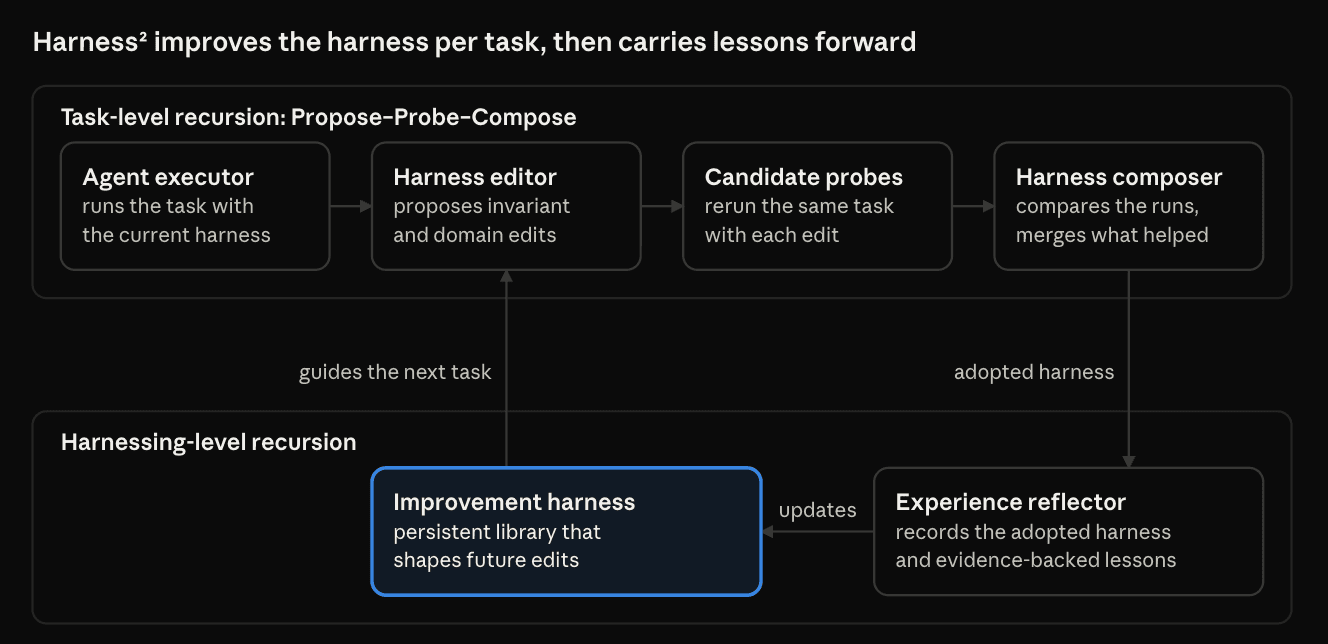
The top loop runs on every task. The highlighted improvement harness persists between tasks and shapes the next round of edits.
Loop 1: Task-Level Recursion (Propose—Probe—Compose)
- Propose: A harness editor suggests invariant (general) and domain (field-specific) edits
- Probe: The agent reruns the same task with each edited harness
- Compose: A composer compares the runs and merges the edits that helped
The key detail is that Harness² learns “from behavioral contrasts between executions, without ground-truth feedback.” It never needs the correct answer, only the difference between two runs of the same task. That matters because in the open world, nobody hands an agent an answer key.
Loop 2: Harnessing-Level Recursion
After each task, an experience reflector stores the adopted harness and “evidence-supported lessons” in a persistent improvement harness, which guides refinement on the next task. So the first loop makes the agent better at this task, and the second makes the framework better at improving agents on future tasks. You’ll see both loops leave files on disk in the demo below.
Parallel vs. Sequential Recursion
You can spend more compute on Loop 1 with a budget, k, and a mode (experiment guide):
- Parallel proposes k invariant and k domain candidates, then runs k independent compositions over the full pool. It explores wider.
- Sequential runs k Propose—Probe—Compose steps in a row, carrying the refined harness forward. It refines deeper.
The budget drives cost. Each task takes 4k executor rollouts and 3k improver sessions (run_sweep.py), so --k 3 means 12 rollouts and 9 improver sessions per task. LAB alone has 1,143 tasks (experiment guide), which is why every example here starts with one.
Benchmark Results
Google tested GLM-5 and Gemini 3.5 Flash across four model—harness configurations on three benchmarks. A single step (k = 1) improved both over their base harnesses:
| Benchmark | What it tests | Best reported gain |
|---|---|---|
| WorkBuddy-Bench | Office, web, and code tasks | Up to +11.5 points |
| LAB | Legal work, from Harvey’s harvey-labs | Up to +11.8 percentage points (partial pass rate) |
| JobBench | Professional work tasks | Up to +4.5 points |
These are best-case “up to” figures, not averages, and LAB’s is on its Partial score — the fraction of grading criteria passed. The README adds that a larger k “brings further gains,” and the paper has per-configuration numbers. These are Google’s own results, so independent reproductions will matter.
Why This Matters
The usual way to make a model better at a job is to train it further, which needs training data, GPUs, and access to its weights. Most teams using a model through an API have none of these. Harness² keeps every improvement in plain files instead: a rewritten prompt, a fixed script, a new guardrail. That has three practical upsides.
- You can read what changed. An improved harness is text and code, so you can review it and diff it against the original. Harness² even writes down why it adopted each change, as the demo shows.
- It works with models you can’t train. The executor and improver are just model IDs in a config file (setup guide). The release itself pairs GLM-5 and Gemini 3.5 Flash as agents with Vertex Gemini or Claude as the improver.
- It doesn’t need an answer key. Refinement comes from contrasts between runs, so it works on tasks nobody has labeled yet.
Running the Harness² Demo (No API Key Needed)
Google’s demo runs both recursion modes with “deterministic editors and real Python executions” and “requires no model credentials“, so it’s free.
Prerequisites
- Linux. On Windows, use WSL; on macOS, a Linux VM or container.
- Python 3.12. 3.13 is also supported, per pyproject.toml.
- uv, Astral’s Python package manager.
- git.
Step 1: Installing uv
curl -LsSf | shcurl downloads Astral’s installer script. The flags make it follow redirects (-L), stay quiet (-s) while still showing errors (-S), and fail cleanly on a bad response (-f). The | sh part pipes the script into your shell, which installs uv into your user directory. Open a new terminal and run uv --version to confirm. pip install uv also works.
Step 2: Cloning the Repository
git clone
cd harness2
git clone downloads the full repository from Google Research’s GitHub into a new harness2 folder, and cd moves you into it. Run every later command from this repository root.
Step 3: Creating and Activating a Virtual Environment
uv venv --python 3.12 .venv
source .venv/bin/activate
uv venv creates an isolated Python 3.12 environment in .venv, downloading Python if needed. source activates it, so python and installed commands now come from .venv. Your prompt usually shows (.venv) once it’s active. Rerun the source line in any new terminal.
Step 4: Installing Harness²
uv pip install -e '.[render]'-e installs in editable mode, using the source files in place. The [render] extra adds openpyxl and python-pptx for spreadsheet and slide outputs (pyproject.toml), and the quotes stop your shell from misreading the brackets. Installing registers the commands used below: harness2, harness2-demo, harness2-setup, harness2-check, harness2-judge, harness2-report, and harness2-bridge.
Step 5: Running the Demo
harness2-demo --output runs/demo --k 2The demo runs the real recursion and library workflow, with scripted editors in place of a model. --output sets the results folder and --k 2 sets the recursion budget. Without --mode, it runs both parallel and sequential modes. It finished in about two seconds for me:
 [accounting] 1/2 ok           ledger-1
  [accounting] 2/2 ok           ledger-2
Local demo: 2 tasks completed; 0 failed. /home/you/harness2/runs/demo/demo.json
There’s one domain, accounting, with two tasks. Both succeeded, and demo.json holds the summary.
Step 6: Seeing What Harness² Fixed
The starting harness ships with a bug, and Harness² has to find it on its own. Here’s the base harness’s helper script:
cat runs/demo/base/scripts/summarize.pyimport csv
import sys
from decimal import Decimal
with open(sys.argv[1]) as source:
amounts = [Decimal(row['amount']) for row in csv.DictReader(source)]
total = sum((amount for amount in amounts if amount > 0), Decimal(0))
print(f'Total: {total:.2f}')The script reads the amount column of a CSV as exact Decimal values and adds them up. The if amount > 0 filter is the bug: it silently drops negative entries.
Now run the original and the adopted script on the same ledger:
cat runs/demo/sources/ledger-1/ledger.csv
python runs/demo/base/scripts/summarize.py runs/demo/sources/ledger-1/ledger.csv
python runs/demo/library/k2/seq/accounting/harnesses/ledger-1/harness/scripts/summarize.py runs/demo/sources/ledger-1/ledger.csv
amount
100.25
-20.10
5.00
Total: 105.25
Total: 85.15The first command prints the ledger: three entries, one of them negative. The base script ignores it and reports 105.25; the adopted script reports the correct 85.15 (100.25 − 20.10 + 5.00). Harness² removed the filter without ever being told the right total.
Step 7: Reading the Lesson It Wrote Down
cat runs/demo/library/k2/seq/accounting/harnesses/ledger-1/EXPERIENCE.md# ledger-1
- adopted: `c1` (run `demo-oc-seq2/ledger-1/c1`)
- components: 1 scripts; 62 always-on chars
## Why this was chosen
The signed total matches the source ledger.
## What each edit did
component: scripts/summarize.py
candidates: inv1
change: dropped the positive-only filter from the amount sum
observed: the probe total included the credits the base run omitted
verdict: helped
## Transferable lesson
- **cue**: When a ledger includes credits and debits
- **lesson**: Include both signs when summing in scripts/summarize.py.
- **evidence**: The scripts/summarize.py row -- removing the positive-only filter changed the probe total to include the credits omitted by the base trajectory.
- **confidence**: high for this observed arithmetic contrastThis is the experience reflector’s note. adopted: c1 names the winning harness; sequential compositions are named c1 to ck and parallel ones agg1 to aggk (ledger.py). “What each edit did” records the probe evidence: the edit from invariant candidate inv1 “helped.” The “Transferable lesson” pairs a cue with a lesson, evidence, and confidence — and it’s what carries forward.
Next, check how the lesson reached the second task:
cat runs/demo/demo.json
{
  "domain": "accounting",
  "n_tasks": 2,
  "seed": null,
  "done": 2,
  "failed": 0,
  "tasks": [
    {
      "task": "ledger-1",
      "status": "ok",
      "library_entries_before": { "agg": 0, "seq": 0 }
    },
    {
      "task": "ledger-2",
      "status": "ok",
      "library_entries_before": { "agg": 1, "seq": 1 }
    }
  ],
  "execution_count": 28,
  "editor_calls": 32
}
library_entries_before counts stored lessons when each task started, with agg for parallel mode and seq for sequential (library code). The first task started with none; the second started with one per mode — the lesson from ledger-1. That’s the improvement harness growing between tasks.
Step 8: Exploring the Rest of the Output
The runs/demo folder has four parts worth knowing:
base/holds the starting harness:systemprompt.md,guardrails.md,LongTermMEMORY.md,tool_descriptions/tool_guidance.md, andscripts/summarize.py.runs/holds every candidate harness per task: invariant candidates (inv1, inv2), domain candidates (dom1, dom2), and the compositions.executions/holds the output of every probe run.library/holds the improvement harness: adopted harnesses,EXPERIENCE.mdnotes, and anINDEX.mdthat future tasks browse. Each index entry repeats its cue — such as “When a ledger includes credits and debits” — so a later task can tell at a glance whether a lesson applies.
Running a Real Benchmark (LAB on Vertex AI)
A real run uses models in every role: executor, improver, and judge. We’ll use LAB, the legal benchmark the README uses as its example. Model-backed runs cost money, so every command here is limited to one task. I verified each command up to the first paid model call; your model output will vary.
Extra Prerequisites
You’ll also need Node.js 20+ for the OpenCode executor, the Google Cloud CLI, a Google Cloud project with Vertex AI enabled, and Pandoc and Poppler for LAB’s documents. Docker is only needed for WorkBuddy-Bench.
sudo apt-get update
sudo apt-get install -y git curl unzip ca-certificates pandoc poppler-utils
apt-get update refreshes the package list, and the second line installs the tools, with -y skipping the prompt. pandoc converts documents and poppler-utils reads PDFs; setup uses the rest to download code and data.
Step 1: Creating Your .env File
The README says to copy .env.example, but that file isn’t in the repository at the time of writing (it returns a 404). Create .env in the repo root yourself, using the settings from the setup guide and config.py:
# Your Google Cloud project and Vertex AI region
GOOGLE_CLOUD_PROJECT=your-gcp-project-id
GOOGLE_CLOUD_LOCATION=global

# Executor (runs the task) and improver (edits the harness)
HARNESS2_SOLVER_MODEL=google-vertex/YOUR_GEMINI_MODEL_ID
HARNESS2_IMPROVER_MODEL=google-vertex/YOUR_GEMINI_MODEL_ID

# Judge (grades the output) - bare model ID, no prefix
HARNESS2_JUDGE_MODEL=YOUR_GEMINI_MODEL_ID
Harness² loads these KEY=VALUE lines at startup.
GOOGLE_CLOUD_PROJECTis your project ID; leaveGOOGLE_CLOUD_LOCATIONasglobal.HARNESS2_SOLVER_MODELis the executor. It must use OpenCode’s provider/model format, so Vertex Gemini IDs start withgoogle-vertex/.HARNESS2_IMPROVER_MODELedits the harness and defaults to the executor model. Vertex Claude also works here.HARNESS2_JUDGE_MODELgrades the results. It takes the bare model ID with no prefix, because Harness² adds the right prefix for each benchmark itself.
Replace each YOUR_GEMINI_MODEL_ID with the exact model ID from your Vertex AI console. Values set in your shell override .env, which is handy for quick experiments.
Step 2: Authenticating with Google Cloud
gcloud auth application-default loginThis signs you in through the browser and saves Application Default Credentials, which Harness² uses to call Vertex AI. On a headless server, add --no-browser.
Step 3: Installing the LAB Benchmark
harness2-setup labSetup downloads pinned versions of LAB (from Harvey’s harvey-labs) and the OpenCode executor, applies Google’s patches, installs Bun, builds LAB’s own Python environment, and fetches the tasks into dependencies/. Add --dry-run to preview the plan first. Keep your main .venv active; Harness² finds LAB’s interpreter itself.
Step 4: Checking Your Installation
harness2-check --bench labThis verifies dependencies, credentials, and settings without calling a model, and prints a FAIL: line for anything missing. For example, without a .env you’ll see FAIL: HARNESS2_SOLVER_MODEL is required for executor rollouts. It can’t confirm your account can use the models; that only shows on the first real call.
Step 5: Previewing with a Dry Run
harness2 --bench lab --k 1 --mode parallel
  --only-domains antitrust-competition --max-tasks 1 --dry-run
--dry-run prints the selected task and makes no model calls. --bench lab picks the benchmark, --k 1 --mode parallel sets one parallel step, --only-domains limits the run to one practice area, and --max-tasks 1 caps it at one task per domain.
Step 6: Running the Refinement
harness2 --bench lab --k 1 --mode parallel
  --only-domains antitrust-competition --max-tasks 1
Without --dry-run, this runs the full loop: 4 executor rollouts and 3 improver sessions at --k 1. It re-checks your configuration, including the judge, before spending anything. It then runs the base harness, proposes edits, probes them, composes a refined harness, and reflects on the result. If it stops partway, rerun the same command to resume.
Step 7: Judging and Reporting
harness2-judge --bench lab --k 1 --mode parallel
harness2-report --bench lab --k 1 --mode parallel
The judge grades the refined harness’s outputs against LAB’s rubric, and the report summarizes Partial and All-pass scores. Use the same benchmark, --k, --mode, and task selection as the run so both commands find its results.
To compare against the unimproved harness:
harness2-judge --bench lab --k 1 --mode parallel --bases--bases scores the original harness’s runs into base_judged.json, next to judged.json.
Results land in runs/lab/. Before changing models or task selection, point Harness² at a new folder with export HARNESS2_RUNS_DIR=runs/my-new-experiment. To run Steps 4 to 7 in one go:
bash scripts/run_lab.sh --only-domains antitrust-competition --max-tasks 1run_lab.sh chains the check, refinement, judging, and reporting, passing your flags to the refinement step. Put K=3 MODE=sequential in front of it to change the budget or mode.
Wrapping Up
Harness² hints at a future where agents improve by building up experience rather than by retraining: lesson libraries grown over weeks of real work, and harness changes that teams review like code. The open questions are how well lessons transfer across domains, how costs compare with fine-tuning, and how to keep self-editing agents safe. With the code open, the community can now find out.
To recap:
- Harness² is Google Research’s open-source framework for self-improving AI agents, and it keeps model weights fixed.
- Task-level recursion refines each task’s harness through Propose—Probe—Compose without ground-truth answers, and harnessing-level recursion carries lessons forward.
- Parallel mode explores wider, sequential mode refines deeper, and k costs 4k rollouts and 3k improver sessions per task.
- One step gained up to 11.5 points on WorkBuddy-Bench, 4.5 on JobBench, and 11.8 percentage points on LAB.
- The free demo shows Harness² fixing a buggy script and recording the lesson; real runs need Vertex AI and a hand-made
.env. - Lock down network access, watch costs, and treat it as research code.
For the full method, read the paper on arXiv. Then clone the repo and run the demo yourself.
Sources
Shittu Olumide is a software engineer and technical writer passionate about leveraging cutting-edge technologies to craft compelling narratives, with a keen eye for detail and a knack for simplifying complex concepts. You can also find Shittu on Twitter.


