

On August 12, 2026, Alibaba’s Qwen team released Qwen3.8-2.4T-A95B. This is the first time a Qwen-Max-class model has been made available as open weights. With 2.4 trillion total parameters (95 billion activated per token), a hybrid linear-plus-full-attention architecture, and native context up to 262K tokens (extensible to 1M), Qwen3.8 targets the most demanding agentic and reasoning workloads. These include multi-step coding, long-horizon planning, and autonomous tool use.
Open weights models give you full control. Data stays within your infrastructure, inference behavior can be customized, and there are no per-token API fees at scale. The trade-off is operational: hosting a 2.4T-parameter model requires purpose-built GPU infrastructure and an optimized serving stack.
In this post we show how to deploy Qwen3.8-2.4T-A95B on Amazon SageMaker HyperPod using vLLM on a ml.p6-b300 instance (8× NVIDIA B300 Blackwell Ultra GPUs). We cover the full path from cluster provisioning to an OpenAI-compatible endpoint, including vLLM configuration for NVFP4 quantization, built-in reasoning, tool calling, and native Multi-Token Prediction (MTP) speculative decoding.
This is the second post in our series on deploying open trillion-parameter models on Amazon SageMaker HyperPod. For the first post covering Kimi K3, see Deploying Kimi K3 on Amazon SageMaker HyperPod and Amazon EKS.
Qwen3.8-2.4T-A95B at a glance
Qwen3.8-2.4T-A95B (the open-weight release of Qwen3.8-Max) is the largest and most capable model in the Qwen family. The following is a summary of the key architectural details relevant to deployment.
Architecture
| Attribute | Value |
| Total parameters | 2.4 T |
| Activated parameters per token | 95 B |
| Architecture | Fine-grained Mixture of Experts (MoE) |
| Expert count | 512 routed + 1 shared (10 routed experts activated per token) |
| Layers | 92 |
| Layer layout | 3 × (Gated DeltaNet → MoE) → 1 × (Gated Attention → MoE), repeated |
| Context window | 262,144 tokens native. Extensible to 1,010,000 |
| Max output length | 128K tokens |
| Multi-Token Prediction | Native MTP draft heads (enables speculative decoding without a separate model) |
The hybrid attention design is key to efficient long-context inference. Gated DeltaNet layers (69 of 92) use linear attention with a bounded recurrent state, replacing the growing KV-cache with a fixed-size memory. Gated Attention layers (23 of 92) use full quadratic attention for high-fidelity token interactions. This 3:1 ratio keeps both compute and memory bounded as context scales toward 1M tokens. This is a critical property for agentic workloads that accumulate tool outputs, code, and reasoning traces across many turns.
The fine-grained MoE distributes capacity across 512 small experts rather than a few large ones, improving routing efficiency and specialization. Only approximately 95B parameters are active per forward pass, so serving costs track activated parameters, not the full 2.4T.
Capabilities and reasoning control
Qwen3.8 is designed for agentic execution: multi-step coding, autonomous tool use, long-horizon planning, and complex research workflows. It includes built-in reasoning controls through the reasoning_effort parameter (low, medium, high), so developers can trade compute for reasoning depth per request. Dial up for hard multi-step problems and dial down for high-throughput tasks.
Model weights and quantization
The open weights are published on Hugging Face in the standard Transformers format. Community quantizations include MXFP4 and NVFP4 (W4A4), which compress the model to approximately 1.2 TB, fitting on a single 8-GPU node with B300 Blackwell Ultra GPUs.
Benchmark highlights
According to the vendor’s benchmarking results, Qwen3.8-2.4T-A95 shows particular strength in research workflows (PaperBench 93.0), instruction following (IFBench 82.8), and terminal-based coding (86.6). It performs comparably with leading frontier models across most categories, with remaining headroom on harder repository-level tasks (SWE-bench Pro) and general tool use (Toolathlon). For organizations evaluating self-hosted alternatives to proprietary APIs, these results position Qwen3.8-2.4T-A95 as a credible frontier-class option, particularly for coding agents and research pipelines.
Why Amazon SageMaker HyperPod for large MoE inference
Deploying a 2.4T-parameter model is not only a GPU problem. It requires orchestration that handles model download, container scheduling, health monitoring, autoscaling, and node failures without manual intervention. Amazon SageMaker HyperPod is purpose-built for this class of workload.
Figure 1: High-level architecture of Amazon SageMaker HyperPod
EKS-orchestrated clusters. HyperPod clusters use Amazon Elastic Kubernetes Service (Amazon EKS) as the control plane. You get the full Kubernetes landscape (kubectl, Helm charts, custom resource definitions), while AWS manages the underlying infrastructure lifecycle: networking, storage, GPU driver installation, and the NVIDIA device plugin.
Inference Operator. The HyperPod Inference Operator (installed automatically or as an EKS Add-on) provides a single custom resource definition (CRD), InferenceEndpointConfig, that declaratively specifies your model, container image, GPU resource requests, and vLLM launch arguments. The operator handles:
- Model weight download (from Hugging Face Hub, Amazon Simple Storage Service (Amazon S3), or Amazon FSx).
- Container scheduling and GPU allocation.
- Health checks and readiness gates.
- Rolling updates and endpoint lifecycle management.
- Autoscaling through KEDA with Amazon CloudWatch or Prometheus metrics.
Reserved capacity with Flexible Training Plans. The ml.p6-b300.48xlarge instance type requires reserved capacity. Flexible Training Plans provide committed GPU reservations that can be allocated directly to your HyperPod cluster. There’s no contention with on-demand pools and no cold-start capacity risk.
Resilience. HyperPod continuously monitors node health and automatically replaces degraded nodes. For sustained inference workloads running 24/7, this alleviates the operational overhead of manually detecting and recovering from hardware failures.
Additional inference features (Inference Operator v3.x):
- Disaggregated Prefill and Decode (DPD) – separates prefill and decode onto distinct GPU pools for predictable per-token latency under concurrent load.
- Inference data capture – log inputs/outputs at the endpoint, load balancer, or pod level.
- Local NVMe model deployment – load weights from node-local storage to reduce cold-start latency.
- Amazon Route 53 DNS management – automatic custom domain records for your endpoints.
In short: You write a YAML manifest describing what to deploy. HyperPod handles how to run it reliably at scale.
Infrastructure sizing: Matching hardware to the model
The p6-b300 instance
The ml.p6-b300.48xlarge provides the compute density required for single-node serving of Qwen3.8:
| Resource | Specification |
| GPUs | 8× NVIDIA B300 (Blackwell Ultra) |
| GPU memory | 288 GB HBM3e per GPU (2.1 TB total) |
| GPU memory bandwidth | 8 TB/s per GPU |
| GPU interconnect | NVLink + NVSwitch, 14.4 TB/s bisection bandwidth |
| FP4 compute | ~15 PFLOPS per GPU (120 PFLOPS total) |
| vCPUs | 192 (Intel Xeon Emerald Rapids) |
| System memory | 4,096 GiB |
| Networking | 6,400 Gbps EFA |
| Local storage | 3.8 TB NVMe SSD |
Why NVFP4 quantization
At BF16 precision, Qwen3.8’s 2.4T parameters require approximately 4.8 TB of memory for weights alone, exceeding a single 8-GPU node. NVFP4 (W4A4) quantization compresses weights to approximately 4 bits per parameter, bringing the total weight footprint to approximately 1.2 TB. This fits comfortably within the 2.1 TB of aggregate GPU memory on a p6-b300 instance, leaving headroom for KV-cache and activations.
Memory budget
A rough breakdown for a single p6-b300 node:
| Component | Estimated Size | Notes |
| Model weights (NVFP4) | ~1.2 TB | 2.4T params × 4 bits |
| KV-cache (full attention layers) | Variable | 23 layers × KV heads × context length |
| Recurrent state (DeltaNet layers) | Fixed ~50–100 GB | 69 layers × bounded state (does not grow with context) |
| Activations + overhead | ~100–200 GB | Tensor-parallel buffers, framework overhead |
| Available headroom | ~500–700 GB | For batching and longer contexts |
The hybrid attention architecture is a key advantage here: the 69 DeltaNet layers maintain a fixed-size recurrent state regardless of context length, unlike traditional models where KV-cache grows linearly with every layer. Only the 23 full-attention layers contribute to context-dependent memory growth.
Throughput expectations
Reference numbers from NVIDIA’s Day-0 benchmarks on GB300 NVL72 (FP8, 72 GPUs): >4K tokens/sec/GPU, >350 tokens/sec/user. A single 8-GPU p6-b300 node with NVFP4 will deliver proportionally lower aggregate throughput but remains well-suited for production inference workloads with moderate concurrency.
Capacity procurement
The ml.p6-b300.48xlarge instance type isn’t available on-demand. You must procure capacity through a Flexible Training Plan, a committed reservation of GPU availability for your HyperPod cluster. Set the target Availability Zone to match your plan’s allocation when configuring the instance group.
vLLM configuration deep dive
This section details the vLLM serving parameters for Qwen3.8 on a single p6-b300 node. The configuration is informed by the vLLM recipe for Qwen3.8 on B300 (NVFP4).
Base serving command
The full vllm serve invocation:
Key flags explained:
--tensor-parallel-size 8– shards the model across all 8 B300 GPUs.--quantization nvfp4– activates NVIDIA FP4 (W4A4) quantization so the 2.4T model fits in 2.1 TB of GPU memory.--load-format fastsafetensors– uses accelerated weight deserialization for faster cold-start.--trust-remote-code– required for Qwen3.8’s custom modeling code on Hugging Face.--enable-prefix-caching– reuses computed KV-cache across requests that share prompt prefixes. Critical for multi-turn agentic conversations where the system prompt and conversation history repeat.--moe-backend auto– lets vLLM select the optimal MoE dispatch kernel for the hardware.
Reasoning (thinking mode)
The --reasoning-parser qwen3 flag extracts reasoning content from the model’s
- Qwen3.8 reasoning is enabled by default – no extra flag needed on the model side.
- The API response separates
reasoning_content(the thinking trace) fromcontent(the final answer). - To disable thinking per-request, pass
extra_body={"chat_template_kwargs": {"enable_thinking": False}}in the client call. - Structured output (
guided_json,guided_regex) works alongside reasoning – the structured output engine constrains only thecontentfield.
Tool calling (function calling)
The --enable-auto-tool-choice and --tool-call-parser qwen3 flags enable OpenAI-compatible function calling:
- Supports
tool_choicevalues:auto,required,none, and named functions. - Tool calls are parsed from the
contentfield only — thereasoning_contentis not parsed for function calls. This means the model can reason about which tool to call, then emit the structured call separately. - When
tool_choice="auto"andstrict: trueis set on a tool definition, vLLM enforces schema-constrained decoding for tool arguments, facilitating valid JSON output.
Speculative decoding (native MTP)
The --speculative-config '{"method":"mtp","num_speculative_tokens":1}' flag enables Multi-Token Prediction using Qwen3.8’s built-in draft heads:
- Qwen3.8 was trained with MTP – lightweight draft heads are bundled in the model weights. No separate draft model download or configuration is required.
- The draft head predicts the next N tokens in parallel, then verifies them in a single forward pass. Accepted tokens skip individual decode steps, increasing throughput.
num_speculative_tokens: 1is the safe starting point. Increase to 2–3 for throughput-sensitive workloads once you’ve validated that the acceptance rate remains high (monitor through vLLM’s/metricsendpoint).- MTP adds minimal latency overhead on the draft step because the heads reuse the model’s existing hidden states.
Deployment walkthrough on SageMaker HyperPod
The complete deployment manifests and scripts used in this post are available in our GitHub repository.
Prerequisites
Before deploying the model, you need a running HyperPod cluster with p6-b300 capacity:
- Create a HyperPod cluster with EKS orchestration. In the Amazon SageMaker AI console, navigate to HyperPod Clusters, then choose Create. Choose Orchestrated by Amazon EKS and either Quick Setup (default networking and IAM) or Custom Setup with an existing virtual private cloud (VPC) and subnets. Make sure Use default Helm charts and add-ons is selected so the Inference Operator is installed automatically.
- Provision a Flexible Training Plan. Under the instance group configuration, select Training plan as the capacity source. Create or attach a plan covering
ml.p6-b300.48xlargewith the instance count and duration you need. Set the Target Availability Zone to match the plan’s allocation. - Add a p6-b300 worker group. Add an instance group with
ml.p6-b300.48xlargeand at least 1 instance. Wait for the cluster to reach Active state with healthy GPU nodes. - Verify access. Confirm you can reach the cluster:
InferenceEndpointConfig manifest
Apply the following InferenceEndpointConfig to deploy Qwen3.8 with the vLLM configuration:
This manifest is also available in the GitHub repository.
Applying and monitoring
Apply the manifest:
Monitor the deployment progress:
The deployment proceeds through these stages: model download (approximately 1.2 TB from Hugging Face, time depends on network bandwidth) then weight loading (fastsafetensors deserialization to GPU memory) then health checks pass and endpoint ready. On a fresh deployment with no cached weights, expect 15–30 minutes for the full sequence. Subsequent restarts with local NVMe caching are significantly faster.
After the endpoint shows Ready, you can send requests to the service:
Inference in action: Calling the endpoint
After the endpoint is ready, it exposes an OpenAI-compatible API. You can use the standard OpenAI Python SDK, curl, or another HTTP client (note that in this deployment example the endpoint isn’t exposed to the public internet).
Basic chat completion (with reasoning)
To control reasoning depth per request, pass reasoning_effort:
For streaming responses, check for the reasoning_content attribute on each chunk’s delta:
Tool calling example
With strict: True set on the tool definition, vLLM makes sure the arguments conform to the JSON schema. No post-validation is needed.
Recommended sampling parameters
For most use cases with Qwen3.8:
temperature=0.6– balances creativity and coherence. Use0.0for deterministic outputs (for example, structured extraction).top_p=0.95– standard nucleus sampling.top_k=20– limits vocabulary at each step and reduces degenerate outputs on long generations.max_tokens– set generously when thinking is enabled, since thereasoning_contentcounts toward the token budget. For complex reasoning tasks, 32,768–65,536 is a reasonable ceiling.
A curl example for quick validation:
Performance tuning tips
With the endpoint running, the following tuning levers let you optimize for your specific workload pattern.
Benchmark results
We benchmarked Qwen3.8-2.4T-A95B on a single p6-b300 instance (8× B300 GPUs) using 512 requests with 1,024 input tokens and 1,024 output tokens at a concurrency of 32. We tested four configurations to isolate the impact of Expert Parallelism (EP) and Multi-Token Prediction (MTP) speculative decoding:
- TP – Tensor Parallelism only (TP=8), our baseline.
- TP+MTP – TP=8 with native MTP speculative decoding (
num_speculative_tokens: 1). - TP+EP – TP=8 with Expert Parallelism enabled.
- TP+EP+MTP – TP=8 with both EP and MTP enabled.
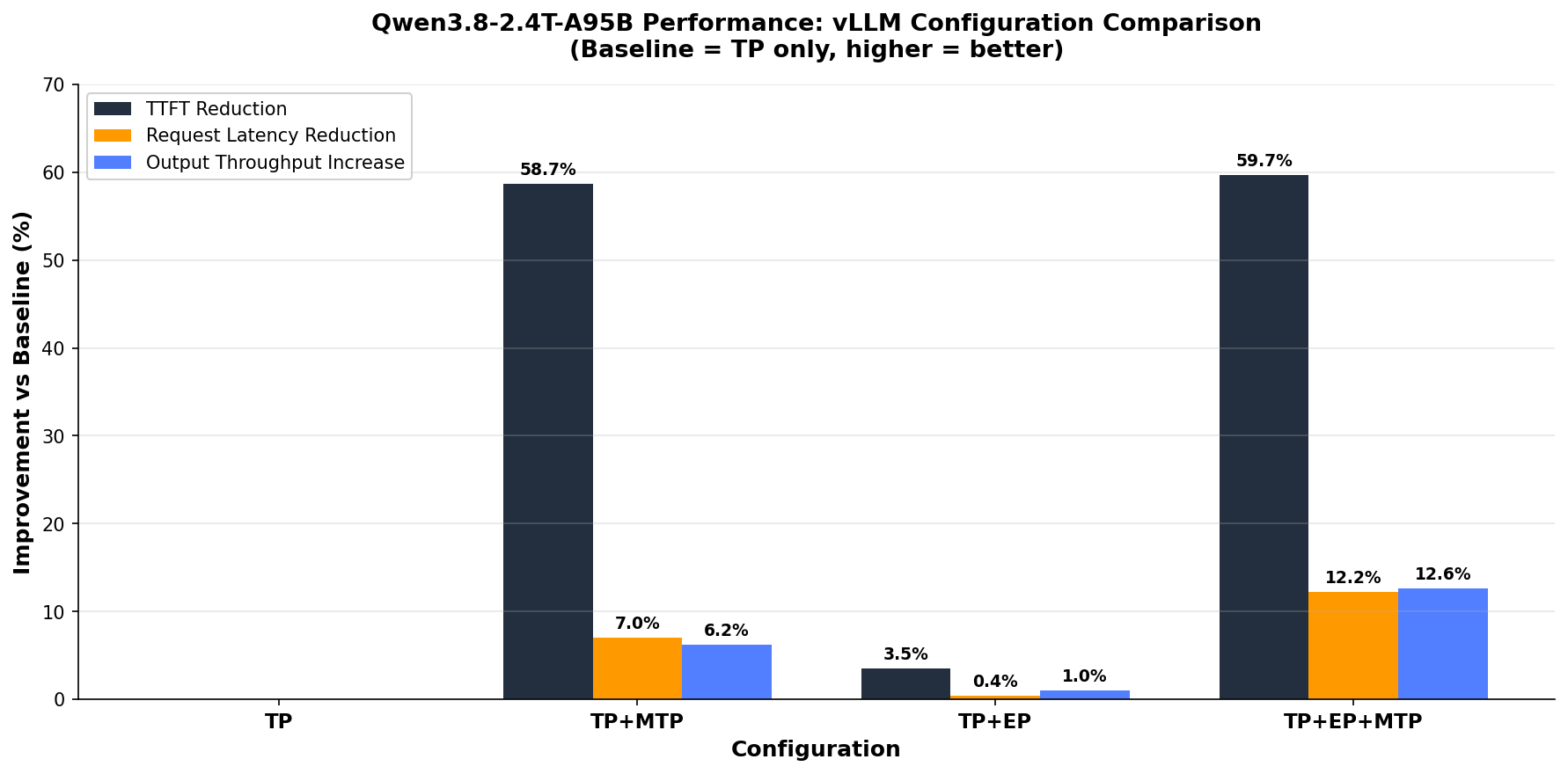
Figure 2: Benchmark comparison of TP, MTP, and EP configurations on a p6-b300 node
Key findings (percentage improvement compared to the TP baseline):
| Configuration | TTFT Reduction | Request Latency Reduction | Output Throughput Increase |
| TP+MTP | −58.7% | −7.0% | +6.2% |
| TP+EP | −3.5% | −0.4% | +1.0% |
| TP+EP+MTP | −59.7% | −12.2% | +12.6% |
Analysis:
- MTP is the dominant optimization for TTFT. Enabling speculative decoding (even with only 1 draft token) cuts time-to-first-token (TTFT) by nearly 59 percent, from 1,244 ms to 513 ms. This is because the MTP draft head predicts the first output tokens in parallel with the final prefill steps, overlapping compute.
- EP alone provides modest gains (approximately 3.5 percent TTFT, approximately 1 percent throughput). The benefit is more pronounced at higher concurrency levels where expert routing contention becomes a bottleneck.
- The combination of EP+MTP delivers the best overall result: 59.7 percent TTFT reduction, 12.2 percent latency reduction, and 12.6 percent higher output throughput. The two optimizations are complementary: EP reduces expert dispatch overhead while MTP reduces decode latency.
- Inter-token latency (not shown in chart) also improves: 17.97 ms (TP) to 17.33 ms (TP+MTP) to 16.36 ms (TP+EP+MTP), a 9 percent reduction with the full configuration.
Recommendation: For production deployments, enable both EP and MTP (--enable-expert-parallel + --speculative-config '{"method":"mtp","num_speculative_tokens":1}'). The combined configuration delivers the best latency and throughput profile with minimal additional complexity.
Prefix caching
Enabled with --enable-prefix-caching (already in our config). vLLM’s Automatic Prefix Caching (APC) reuses KV-cache blocks across requests that share the same prompt prefix. This is common in multi-turn agentic conversations where the system prompt and conversation history repeat. For workloads with high prefix overlap, this can reduce time-to-first-token (TTFT) by 50–80 percent on repeated turns. No downside for workloads without prefix sharing. Unused cached blocks are evicted automatically.
Speculative decoding (MTP) tuning
Our config starts with num_speculative_tokens: 1 (one extra token drafted per step). Tuning guidance:
- Increase to 2–3 for throughput-sensitive, low-concurrency workloads. Each additional speculative token increases the number of tokens that can be accepted per step, but also increases draft overhead and verification cost.
- Monitor acceptance rate through the vLLM
/metricsendpoint (spec_decode_acceptance_rate). If acceptance stays above 70–80 percent, increasingnum_speculative_tokensis profitable. Below 50 percent, reduce it or disable speculation. - High-concurrency caveat: at high queries per second (QPS), speculative decoding consumes additional GPU compute for drafting and verification. Under saturation, the overhead can reduce aggregate throughput. Consider disabling MTP under heavy batch load and enabling it only for latency-sensitive single-stream requests.
- MTP provides the best gains for memory-bound decode workloads (long outputs, low batch size) — exactly the pattern for agentic reasoning tasks with extended
Memory and context length
--gpu-memory-utilization (default: 0.9) controls how much GPU memory vLLM pre-allocates for KV-cache. For Qwen3.8 with NVFP4, the model weights occupy approximately 57 percent of GPU memory, leaving approximately 43 percent (roughly 900 GB) for cache and overhead. Tuning:
- Keep at 0.9 for maximum throughput (more KV-cache slots = more concurrent requests).
- Reduce to 0.85 if you observe out-of-memory (OOM) errors during long-context requests. This sacrifices batch capacity but helps prevent preemption cascades.
--max-model-len caps the maximum sequence length vLLM will accept. Setting this lower than the model’s full 262K context gives vLLM more KV-cache slots for shorter requests, improving concurrency. Set it to match your actual workload’s maximum context requirement. For example, 32,768 for typical coding agents or 131,072 for long-document analysis.
Batching and scheduling
--max-num-seqs (default: 256) limits concurrent sequences in a batch. For MoE models with large per-token compute, reducing this to 64–128 decreases scheduling overhead and makes sure each request gets sufficient GPU attention, improving per-request latency at the cost of aggregate throughput.
--max-num-batched-tokens controls the total token budget per scheduling step (prefill + decode combined). vLLM V1 uses chunked prefill by default. Large prefills are split into chunks and interleaved with decode steps:
- Lower values (for example, 8192) provide better inter-token latency (ITL), because decodes aren’t stalled by large prefills.
- Higher values (for example, 32768+) lead to better TTFT, since more prefill tokens are processed per batch.
- For agentic workloads with mixed short and long requests, start at 16384 and adjust based on observed P99 ITL.
MoE backend selection
--moe-backend auto lets vLLM choose the optimal kernel. On Blackwell GPUs, this typically selects fused MoE kernels that treat sparse expert dispatch as grouped-GEMM operations, minimizing per-expert scheduling overhead. If profiling (using nsys or vLLM’s built-in profiler) reveals MoE dispatch as a bottleneck, you can experiment with explicit backends, but auto is the recommended starting point.
Expert parallelism (advanced)
For deployments needing higher concurrency than a single TP=8 configuration allows, vLLM supports Expert Parallelism (EP) where MoE experts are distributed across GPUs independently of attention heads. On a single p6-b300 node, you could combine TP=4 + EP=2. This halves the number of experts per GPU, freeing memory for larger KV-cache at the cost of increased all-to-all communication during expert dispatch. Profile before adopting: on NVLink-connected GPUs the communication cost is low, but gains depend on your concurrency target.
Monitoring
vLLM exposes Prometheus metrics at /metrics. Key gauges to watch:
vllm:num_requests_running– current batch size. Spikes indicate queuing.vllm:gpu_cache_usage_perc– KV-cache utilization. Sustained >95 percent signals preemption risk.vllm:num_preemptions_total– if this climbs, increasegpu_memory_utilizationor reducemax_num_seqs.vllm:spec_decode_acceptance_rate– MTP acceptance rate. Tunenum_speculative_tokensaccordingly.vllm:e2e_request_latency_seconds– end-to-end latency distribution for service level agreement (SLA) tracking.
For HyperPod deployments, these metrics can be scraped by Amazon Managed Prometheus and visualized in Grafana, or fed into KEDA for autoscaling decisions.
Clean up
To avoid ongoing charges, remove the resources in reverse order:
If you no longer need GPU capacity, release or let your Flexible Training Plan expire. Cluster deletion stops compute charges. The training plan commitment remains until its term ends regardless of usage.
Conclusion and next steps
In this post we deployed Qwen3.8-2.4T-A95B, a 2.4-trillion-parameter open-weight model, on a single p6-b300 instance using Amazon SageMaker HyperPod and vLLM. The deployment exposes a production-ready OpenAI-compatible endpoint with built-in reasoning, tool calling, and native MTP speculative decoding, all managed through a single Kubernetes manifest.
From here you can:
- Benchmark with your workload – run
vllm bench serveor your own evaluation harness against the endpoint to establish baseline throughput and latency for your specific prompt distribution. - Integrate into agentic pipelines – connect the endpoint to your orchestration framework (LangChain, CrewAI, or custom) using the standard OpenAI SDK. The tool-calling and reasoning outputs are compatible without additional configuration.
- Fine-tune for your domain – use NVIDIA NeMo or Amazon SageMaker training jobs to produce domain-adapted checkpoints, then redeploy with the same manifest by swapping the model ID.
- Add guardrails – layer I/O filtering (for example, NVIDIA NeMo Guardrails or a custom proxy) in front of the vLLM endpoint for content safety and policy compliance.
References
About the authors


