Amazon Bedrock AgentCore harness is now generally available: Go from idea to production-grade agent in minutes


A year ago, Simon Willison wrote one of the cleanest definitions of an agent that has stuck around:
An LLM agent runs tools in a loop to achieve a goal.
That definition stuck because it describes what every production agent actually does. Kiro, Amazon Q Developer, Quick Agents, Codex, Claude Code: under the hood, they all run the same shape. The agent loop is the common denominator.
But the loop was never the hard part. The hard part was everything around it.
Pick a framework. Wire up tools. Provision sandboxed compute. Configure storage, secrets, networking. Decide where memory lives. Bolt on observability. Get the right dependencies into the right container. Also, local prototyping tends to be the easy part: a single developer can stand up an agent on their laptop in an afternoon. Getting it into production is where the work explodes, and the moment it has to serve more than one user, a whole new layer of work shows up: concurrency, isolation, identity, state, scaling.
Worse, that overhead multiplied with every new use case. Teams that wanted to experiment, try a different model, swap a tool, point the agent at a new domain, found themselves repeating the same plumbing. The bottleneck wasn’t intelligence. It was orchestration and infrastructure.
When we launched the AgentCore harness in preview in April, we made a bet: the AgentCore primitives (Runtime, Memory, Gateway, Browser, Identity, Observability) already give teams everything they need to run agents in production; what they shouldn’t have to do is wire them up by hand every time. The harness handles that wiring as a managed abstraction, so it becomes something you configure rather than something you build.
Today, Amazon Bedrock AgentCore harness is generally available. Two API calls (CreateHarness to define an agent, InvokeHarness to run it), a quick walkthrough in the AgentCore CLI (as shown in the below gif), or a few clicks in the console, and you have an agent running in minutes. It runs in its own isolated environment with a filesystem and shell, so it can read files, run commands, and write code safely. It remembers users and conversations across sessions, picks up skills you point it at (including the AWS-curated catalog), browses the web, calls your tools through gateway or MCP, and switches model providers mid-session without losing context. Every step streams back to you in real time and is automatically traced to CloudWatch. There’s no need to write orchestration code or build a container, except if you want to.
What the harness offers you
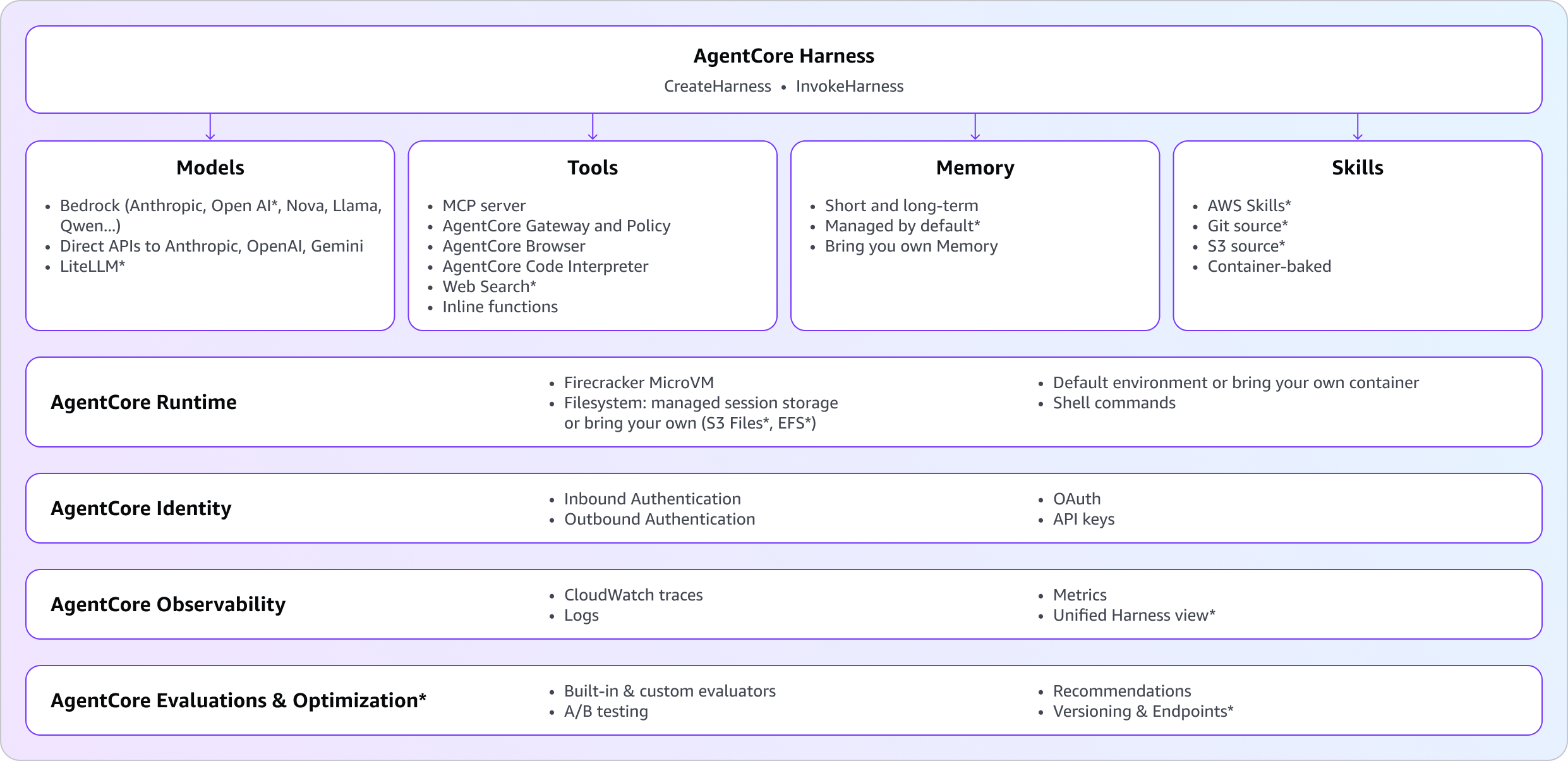
A harness is everything an agent needs to run in production, wrapped behind two API calls. You point to the model, tools, skills, and instructions you want. AgentCore handles the sandboxed environment, the memory, the storage, the identity, and the observability that ties it all together. Capabilities new at GA are marked with * in the diagram below.
Any model: Use the right model for the job, switch when you need to
Different tasks need different models. Customers told us they want to plan with one model and execute with another, swap a provider for a price-performance test, or move off a model that just shipped a regression, all without losing the conversation. Pick a default model on CreateHarness, then override it on any single InvokeHarness call when you need to. The default stays in place for every other invocation. Set the matching field on model for the provider you want:
bedrockfor any model served on Amazon Bedrock, including Anthropic Claude, Amazon Nova, Meta Llama, DeepSeek, Qwen, Kimi, MiniMax, Cohere, Mistral and as of recently OpenAI GPT-5.5 and GPT-5.4 on BedrockopenAifor direct access to OpenAI’s API (api.openai.com)geminifor Google GeminiliteLlmfor any third-party provider supported by LiteLLM, including Anthropic direct, Cohere, Mistral, Vertex, Azure OpenAI, and others
And the part that customers told us mattered most: switch providers at any point, even mid-session, and keep context. For example, you can use Claude Opus to plan, switch to GPT-5.5 to write code, switch to Gemini to summarize. The conversation continues. The harness handles the transition seamlessly.
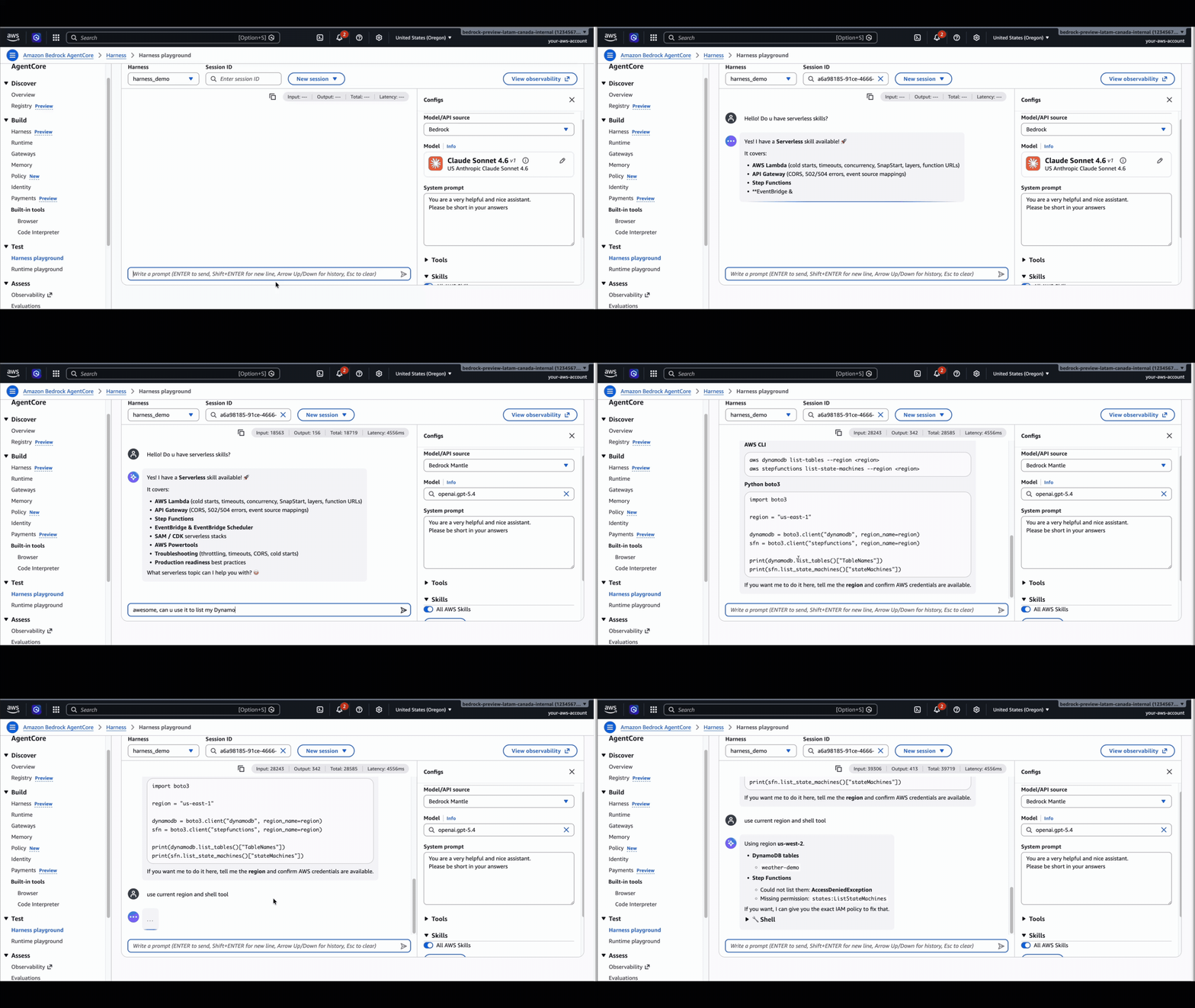
If you’re using API keys to access any of the underlying model providers, they’re stored securely in AgentCore Identity’s token vault. The agent never sees raw credentials.
Tools as config: Connect your agent to the world without writing glue code
Tools are how the agent affects anything outside its own reasoning, and wiring them is the part most teams quietly hate. Customers told us they don’t want to write per-API adapter code, manage MCP server lifecycles, or build their own browser sandbox. They want to declare what the agent can use and let the harness handle the connection, the auth, and the execution.
tools on CreateHarness are a list. Each entry has a type and a config block, and the harness wires them in:
agentcore_gateway: you can reference an AgentCore Gateway by ARN. Every target the gateway exposes (OpenAPI, Smithy, Lambda, MCP) shows up as a tool, with IAM/JWT auth, per-tool authorization, and outbound credential brokering handled for you.remote_mcp: you can connect directly to any MCP server by URL. Good when the server is already secured and you don’t need Gateway’s governance layer in front of it.agentcore_browser: a full browser sandbox as a one-line reference. Click, type, navigate, screenshot.agentcore_code_interpreter: sandboxed Python and Node execution, same one-line pattern.inline_function: a tool schema the harness emits as a tool-use event in the stream and waits for you to respond on. Use it for human-in-the-loop approvals or for tools that have to run on your side.
Every session also gets built-in shell (run commands inside the microVM) and file_operations (read and write on the agent’s filesystem) without you listing them. They’re what make the stateful filesystem and shell story usable from the model.
You have the same options on InvokeHarness for per-call edits, where you can pass new tools to change tools for a single call, or strip the list down to a focused set for that invocation via the allowed_tools parameter. Defaults are set at create time, but you can easily override at invoke time.
Built-in memory: Your harness remembers users and conversations
Customers want their agent to recognize a returning user, pick up where the last conversation left off, and remember preferences without anyone replaying message history. In preview, you had to provision an AgentCore Memory resource separately and pass its ARN, which worked but was a second API call and an easy thing to forget on the way to production.
At GA, omitting memory on CreateHarness provisions a managed memory automatically, with sensible defaults: SEMANTIC + SUMMARIZATION strategies, 30-day event expiry, AWS-owned encryption, and multi-tenant isolation by default through namespace templates that key on actorId. It’s a real, customer-owned Memory resource, provisioned for you. Memory isn’t mandatory. If your agent is stateless, set memory: { disabled: {} } and the harness skips memory entirely. If you’d rather attach an AgentCore Memory resource you already own, pass agentCoreMemoryConfiguration with its ARN. Those three paths look like the following:
Switching to your own memory is one UpdateHarness call. Pass agentCoreMemoryConfiguration with your memory ARN and the previously managed memory disassociates immediately. It’s still a regular AgentCore Memory resource in your account, so you can keep using it anywhere, attach it to another harness, query it directly, or delete it on your own terms. When you delete the harness, the managed memory is cascade-deleted by default (deleteManagedMemory: true). Pass deleteManagedMemory: false if you want to keep it.
The managed memory is automatic but not opaque. It’s a real, addressable AWS resource you can query, attach to a different agent, audit, or hand to an analytics pipeline.
Skills: Give your agent the right expertise on the right task
Customers want their agent to know how to handle a specific task before it tries it. For example, how to format an Excel report, how to file a JIRA ticket the way their team files them, or how to follow AWS-recommended procedures for accessing their data on AWS. Skills are how you give the agent that knowledge on demand. They’re bundles of files, scripts, and instructions. The harness loads skill metadata and pulls full content into context only when the task actually calls for it.
At GA, HarnessSkill is a union with four sources, so you can attach skills declaratively without baking them into a container or shelling in:
awsSkills– turn on the AWS-curated skill bundle.git– clone a public or private repo over HTTPS, pinned to a commit or a branch.s3– pull a skill bundle from your own Amazon Simple Storage Service (Amazon S3) bucket.path– reference a path that already exists in the container you brought in.
The same shape works on InvokeHarness for per-call layering. The harness materializes each skill onto the session filesystem on session start, or during a new invocation if the Skills configuration changes.
The big unlock for AWS builders: the AWS skills repository ships curated skills covering the AWS surface area, from core skills (SDK usage, infrastructure as code (IaC), AWS Identity and Access Management (IAM), Amazon CloudWatch, and Amazon Bedrock) to service-specific deep workflows for analytics, databases, Amazon Elastic Compute Cloud (Amazon EC2), networking, security, serverless, and storage.
To make this even simpler, GA introduces a first-class awsSkills toggle: turn on the AWS skill bundle with zero plumbing, no URL, no network fetch (the skills are brought in the harness’s underlying runtime, whenever you need them).
Environment and filesystem: Run your agent in the environment it needs
Most agents run fine on the harness’s default environment, which includes Python and bash. When you need more (a private dependency, a runtime version, a CLI tool, or persistence across sessions), two knobs let you shape the agent’s runtime to match your stack: the container image and the filesystem.
Container image. If Python and bash aren’t enough, you can package your source code, dependencies, runtimes, and tools into a custom container, push it to Amazon Elastic Container Registry (Amazon ECR), and reference it in CreateHarness. The agent then uses that exact environment. You can also pair it with InvokeAgentRuntimeCommand, an API that runs a shell command directly inside the agent’s microVM session, for session-specific setup that varies per invocation (clone a particular branch, seed test data, or pull credentials). It’s deterministic, doesn’t go through the model, and doesn’t burn tokens.
Filesystem. Agents often need files to outlive a single response: a shared knowledge base, a working directory across sessions, or a place to drop produced documents back into your bucket. The harness gives you three filesystem options, each with different reach and persistence characteristics.
| Type | Managed | Virtual private cloud (VPC) required | Persistence |
| Managed session storage | Yes | No | Across stop/resume cycles of the same runtimeSessionId. |
| Amazon Elastic File System (Amazon EFS) access point | BYO | Yes | Across all sessions, sharable across harnesses. |
| Amazon Simple Storage Service (Amazon S3) Files access point | BYO | Yes | Across all sessions and harnesses, with full Amazon S3 durability, versioning, and history. |
Reach for managed session storage for working files that need to survive microVM restarts within a session. Reach for EFS when multiple harnesses or sessions need to share reference data, prompts, or skill bundles. Reach for S3 Files when you want the agent to read and write through standard file operations while changes are automatically synchronized with the backing S3 bucket (the agent writes a report, the report appears in your S3 bucket as it goes).
Unified observability: See what your agent did, in one place
When something goes wrong, customers want to know in one place what the agent ran, what it called, where it slowed down, and where it failed. A typical harness invocation crosses runtime + memory + gateway + a built-in tool or two, and stitching that picture together used to mean opening five tabs.
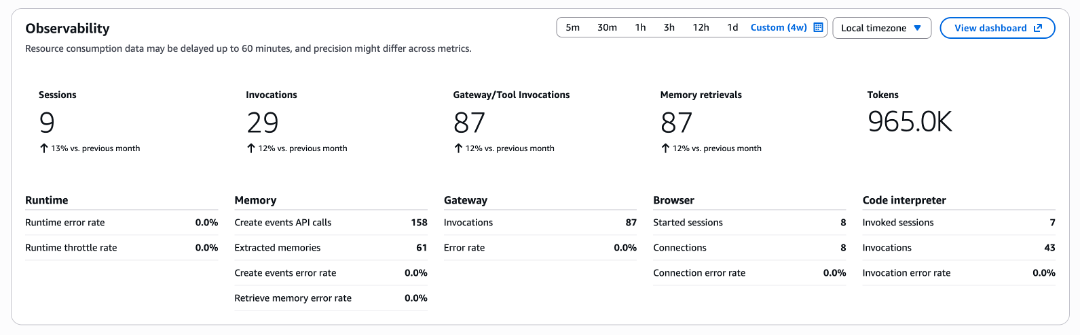
At GA, every harness page in the AgentCore console shows a single observability widget: an aggregate row that summarizes the harness across every primitive it touched, plus per-primitive sections that appear only for the primitives the harness is configured with or has used.
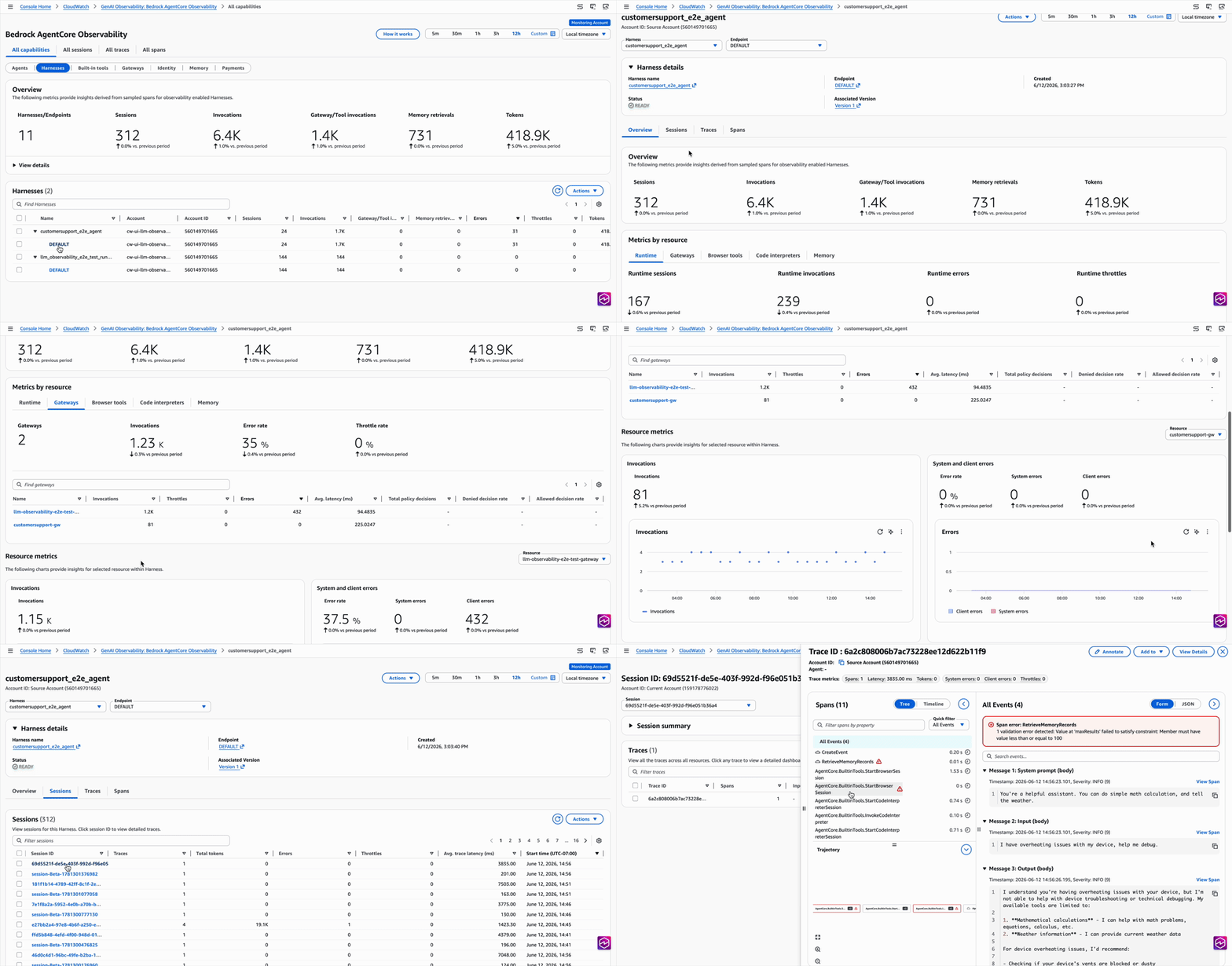
For deeper analysis, CloudWatch GenAI Observability has a new Harnesses tab alongside Runtime and other primitives. Drill from a harness, into a session, into a single trace, and see exactly what the agent did, in what order, how long each step took, and where it failed. Logs from every primitive (memory, gateway, browser, code interpreter) surface inline at the right span, so you stop hopping between log groups to piece together what happened.
Evaluate and optimize: Keep improving your agent in production
Once your agent is in production, the question shifts from “does it work?” to “is it improving?” Customers want a way to score how their agent is actually doing on real traffic, get suggestions on what to change, and validate those changes before rolling them out. GA brings two pieces that close that loop:
- AgentCore Evaluations score harness traces with built-in large language model (LLM)-as-a-judge evaluators (helpfulness, faithfulness, safety), or with custom evaluators you author. Run them online (scoring every session as it happens), on-demand for a single trace, in batch over historical traces, against a fixed test dataset, or as a simulation with synthetic users to stress-test before going live.
- AgentCore optimization reads those evaluator scores and generates prompt and tool-description recommendations, then validates them by routing live traffic between two variants through AgentCore Gateway with online evaluation scoring per session and statistical significance reporting. Variants can be different versions of an optional configuration bundle on the same runtime, or different version pointing at different endpoints, so you can A/B-test prompt and tool-description changes without redeploying code by pointing just at a different endpoint.
Run your harness, capture traces, get scores, get recommendations, A/B-test the recommended configuration against the current one, then ship the winner.
Version and roll back: Roll out changes safely, roll back instantly
Customers want to update prompts, swap a tool, or try a new model on a subset of traffic without putting the whole agent at risk. Versioning and endpoints on the harness mirror what AgentCore Runtime already offers: every UpdateHarness creates an immutable version capturing the full configuration (model, system prompt, tools, memory config, skills, environment, truncation, execution limits), and rollback is “point the endpoint at an earlier version.”
The DEFAULT endpoint auto-advances on every update. Named endpoints (PROD, STAGING) stay pinned until you explicitly promote.
Export to code: Graduate when configuration isn’t enough
When a use case outgrows configuration (custom orchestration, multi-agent coordination, deep instrumentation), customers want to take the agent further without rebuilding it from scratch. One CLI command exports the harness as Strands-based code that can host on AgentCore Runtime or anywhere else:
The exported project preserves your model, prompt, tools, memory wiring, skills, and container environment. Same compute path, same observability, same identity primitives. The graduation is a config-to-code translation, not an architecture switch.
Strands is the first export target; Claude Agent SDK is coming soon, so customers who prefer that framework can graduate the same way.
This is the part of the harness story we care about most. When configuration stops being enough, you graduate to the same compute and the same primitives, with code you can read and modify, instead of starting over from scratch.
Other notable additions
We also added the following:
Step Functions integration. A harness invocation is now a first-class state in AWS Step Functions. In Workflow Studio, search for AgentCore InvokeHarness and drag it into your workflow. Use Quick Create Harness to scaffold a new harness and execution role from inside Step Functions, or point at an existing harness and override per call. The same InvokeHarness semantics apply, with defaults at the harness and overrides at the Task state.
Web Search on AgentCore. The new Web Search on AgentCore (also launched at NY Summit) is available to harness agents through AgentCore Gateway: expose Web Search as a Gateway target, reference the Gateway from the harness, and the agent has search. A first-party agentcore_web_search tool type is coming soon, matching the one-line pattern of agentcore_browser and agentcore_code_interpreter.
What you can do with all of this
There are countless use cases the harness can support, across industries and agent types. To give you a sense of the diversity, here are three concrete examples, each something teams told us they were piecing together by hand before.
A research and writing agent. The agent could search the web, browse sources, draft a document, and hand you back a real xlsx or pptx file, with memory carrying across sessions so the next question doesn’t replay everything. The minimum to stand it up is one CreateHarness call:
tools:agentcore_browser, plus a Gateway target that exposes Web Search on AgentCore.skills: agitsource pointing atanthropics/skillsfor the document-skills bundle.
Memory is on by default, so you don’t configure it explicitly. That’s it.
An AWS data and analytics agent for your team. The agent could pull data from your AWS account (Amazon Athena, AWS Glue, Amazon S3, Amazon Redshift, Amazon CloudWatch), run an analysis, and hand back a summary, a chart, or a finding, while following AWS-recommended procedures for accessing each service step by step instead of improvising. The minimum to stand it up is one CreateHarness call:
skills:[{"awsSkills": {}}]to flip on the curated AWS catalog (analytics, database, Amazon EC2, networking, security, serverless, and storage).executionRoleArn: an IAM role scoped to whatever AWS APIs you want the agent to read from.
Add agentcore_code_interpreter if you want the agent to also run Python in a sandbox to slice and visualize the data it pulls.
A coding agent. The agent could read your code base, plan a change, write it, run the tests, and open a pull request (PR), with the ability to switch to a different model mid-session for design and implementation without losing context. The minimum to stand it up is two steps:
- Push a custom container with your repo and toolchain to Amazon ECR.
- Call
CreateHarnesswithenvironmentArtifactpointing at that image, plus a Gateway target wired to GitHub (or your internal GitLab or Bitbucket equivalent) so the agent can interact with branches, PRs, and reviews.
For deterministic git operations like clone, commit, push, and open a PR (without paying the model to think through them), call InvokeAgentRuntimeCommand directly.
Those are three different agents, with the exact same harness. The API configuration is the only thing that changes.
Pay only for what you use
There is no additional harness fee. You pay for the underlying capabilities based on actual consumption.
- Runtime compute (where the harness session runs): active-consumption pricing per second, $0.0895 per vCPU-hour, $0.00945 per GB-hour. Agentic workloads spend significant time waiting on model and tool I/O. Runtime bills only when CPU is actually consumed.
- Browser and Code Interpreter: same active-consumption model.
- Gateway: per-1,000 invocations and per-1,000 search queries.
- Memory: per-1,000 short-term events, per-1,000 long-term records per month, per-1,000 retrievals.
- Observability: standard Amazon CloudWatch pricing for spans, logs, and metrics.
- Model inference: charged by Amazon Bedrock or the third-party provider at their standard rates.
Each is independent. Use one, use all. An agent that runs for 60 seconds and calls two tools costs accordingly. An agent that runs for an hour with heavy compute costs accordingly. You pay proportionally to what your agent actually computes.
For full pricing details, see the AgentCore pricing page.
What some of our customers are excited about with harness
Omar Paul, VP of Product at Twilio stated that “Twilio’s customers are building AI agents that work across voice, messaging, and digital channels — with real-time intelligence and persistent memory that make every interaction feel like a conversation. By combining AgentCore harness with Twilio Conversations, developers can go from idea to live agent without rewiring infrastructure. The best customer experiences happen when great AI and great communications infrastructure are built together.”
Dr. Lukas Schack, Principal Machine Learning Engineer at TUI GROUP told us that “Amazon Bedrock AgentCore has become a core building block at TUI: we use Runtime to host agents across frameworks and Memory to share context between them, in production and in workshops with over 500 employees, sometimes with more than 130 people building at the same time. With AgentCore harness what used to take weeks from idea to working product now takes minutes, and customer-facing use cases are next.”
Rodrigo Moreira, VP of Engineering, VTEX said “We’re building AI agents that will revolutionize ecommerce. Previously, prototyping each new agent required days of orchestration code and infrastructure setup before we could validate an idea. AgentCore harness has changed that: swapping a model, adding a tool, replacing a skill, or refining an agent’s instructions is now a configuration change, not a rebuild. We can now validate agent ideas in minutes instead of days, and we’re looking forward to accelerating agent development further with these new capabilities”.
Kazumi Matsuda, Senior Manager, AI Promotion Department at FUJISOFT noted that “At Fujisoft, we’re building AI agents to accelerate software development and operations across our teams. Our framework, Character Capsule, packages agent roles, skills, and execution procedures as reusable capsules that scale to multi-agent orchestration on AgentCore. With AgentCore harness, we deploy new agents in minutes and version each change. Once in production, evaluations scores how our agents perform using execution logs, and AgentCore’s optimization capabilities generate prompt and tool suggestions based on those scores. We A/B test those recommendations on live traffic before rolling out, so improvement is continuous, not guesswork. Together, these capabilities let us stand up new agents quickly and keep improving them with confidence, catching quality regressions before they reach production and rolling out only the changes we’ve validated across our multi-agent patterns.”
Get started
Amazon Bedrock AgentCore harness is available today in all AWS Regions where AgentCore is generally available.
The faster a team can get from idea to working agent, the more ideas they can afford to test. The harness collapses that loop from days to minutes. We’re excited to see what you build.
Additional resources
For more information, see the following:
About the authors


