

Amazon Bedrock powers generative AI for more than 100,000 organizations worldwide—from startups to global enterprises across every industry. It provides the proven infrastructure and comprehensive capabilities to confidently build applications and agents that work in production with the flexibility, enterprise security, and proven scalability you need to innovate boldly and deliver AI that drives real business impact. As organizations scale their generative AI applications powered by Amazon Bedrock across multiple foundation models and production workloads, proactive operational management becomes key to sustaining innovation velocity.
As generative AI adoption grows across teams, organizations can benefit from a purpose-built operational monitoring solution that delivers: 1) proactive, multi-layer monitoring that anticipates quota increase needs as adoption grows by tracking usage patterns and accelerates operational issue triage for generative AI workloads powered by Amazon Bedrock; 2) context-aware support case automation that accelerates mean time to resolution by equipping AWS support engineers with the information they need; 3) duplicate case prevention that suppresses new case creation when an unresolved case of the same alarm category already exists, avoiding distraction from active investigations; 4) contextualized notifications that empower AI SRE teams to act quickly; and 5) continued focus on innovation by reducing manual operational overhead.
In this post, we introduce Amazon Bedrock Ops Alert, a three-layer automated monitoring solution that proactively detects operational issues, dynamically adjusts alarm thresholds, classifies alarms by category, automatically creates context-aware support cases, helps prevent duplicate cases when an unresolved case of the same alarm category is already active, and delivers contextualized notifications to AI SRE teams. We walk through the solution architecture and how you can deploy it in your own environment.
Scaling operational maturity for generative AI workloads
Amazon Bedrock provides service quotas for requests per minute (RPM) and tokens per minute (TPM) to help manage resource allocation across customers. These quotas can be increased through AWS Support cases as workloads grow. A common initial approach uses third-party dashboarding solutions backed by Amazon CloudWatch metrics, combined with manual processes to monitor quota consumption and request increases when needed. This approach serves teams well during early adoption.
As adoption grows, organizations often discover that workload optimization addresses capacity needs more effectively than quota increases. Cross-region inference helps organizations manage unplanned traffic bursts by using compute across different AWS Regions. When using an inference profile tied to a specific geography, Amazon Bedrock automatically selects the optimal commercial AWS Region within that geography to process the inference request. Global cross-region inference extends this beyond geographic boundaries by routing inference requests to support commercial AWS Regions worldwide, optimizing available resources and providing higher model throughput. With global inference profiles, workloads are no longer constrained by individual Regional capacity, providing access to a much larger pool of resources and approximately 10% cost savings compared to geographic cross-region inference. In the post Unlock global AI inference scalability using new global cross-Region inference on Amazon Bedrock with Anthropic’s Claude Sonnet 4.5, we detail how global inference profiles dynamically route requests across the AWS global infrastructure to absorb demand that would otherwise require quota increases.
Prompt caching is an optional feature that reduces inference response latency and input token costs. By adding portions of the context to a cache, the model skips recomputation of inputs, allowing Amazon Bedrock to share in the compute savings and lower response latencies. Prompt caching helps when workloads have long and repeated contexts that are frequently reused for multiple queries, reducing costs by up to 90% and latency by up to 85%, which directly lowers tokens-per-minute consumption. In the post Effectively use prompt caching on Amazon Bedrock, we walk through how to structure prompts to maximize cache hits across multiple API calls. Additional techniques such as batch inference and Intelligent Prompt Routing further reduce per-request overhead by dynamically selecting the most cost-effective model for each call.
As organizations adopt these optimization strategies and expand across multiple foundation models and production workloads, AI SRE teams look to complement them with automated operational monitoring to sustain innovation velocity and reduce mean time to resolution. Specifically, teams commonly identify four areas for improvement:
- Reactive operations: AI SRE teams often learn of operational issues only when business users report impact. This forces the team to operate reactively, with limited time to investigate and respond before the impact escalates.
- Opportunity for case context enrichment: When quota issues arise, support cases can benefit from richer context, distinguishing straightforward quota increases from issues requiring deeper investigation, to help support engineers resolve cases faster.
- Multiplying operational effort: As organizations adopt new foundation models for different use cases, each new model requires its own monitoring setup and quota increase requests. This undifferentiated heavy lifting grows linearly with the model portfolio.
- Moving target for alarm thresholds: Each approved quota increase requires the AI SRE team to manually recalculate and update CloudWatch alarm thresholds, creating operational overhead and the risk of configuration drift.
Solution overview
Amazon Bedrock Ops Alert is an AWS CloudFormation-based solution that implements comprehensive generative AI observability through three complementary detection layers. Each layer provides different visibility into generative AI workloads, from immediate operational issue detection to predictive anomaly identification.
The solution uses Amazon CloudWatch alarms, AWS Lambda functions, Amazon Simple Notification Service (Amazon SNS), the Service Quotas API, and AWS Support API.
The following diagram illustrates the solution architecture.
The workflow steps are as follows:
- During deployment, a Lambda function (Quota Calculator) queries the Service Quotas API for current RPM and TPM quota values and calculates alarm thresholds by applying configured percentages.
- The calculated thresholds are stored in AWS Systems Manager Parameter Store, and AI SRE team email contacts are stored in AWS Secrets Manager.
- Amazon Bedrock publishes runtime metrics (invocations, token counts, errors, throttles, and latency) to CloudWatch. Three independent monitoring layers evaluate these metrics:
- Layer 1 (Critical Error Detection) monitors throttles, client errors, and server errors for immediate alerting.
- Layer 2 (Usage Rate Monitoring) compares RPM, TPM, and latency against the dynamically calculated thresholds.
- Layer 3 (Anomaly Detection) uses CloudWatch machine learning to identify unusual patterns across metrics.
- When a child alarm triggers, a composite alarm aggregates the state.
- The composite alarm publishes to an SNS topic (Raw Alarm Topic).
- The SNS topic invokes a Lambda notification processor function, which polls the composite alarm to identify which child alarms triggered and determines alarm severity (critical or warning).
- The notification processor queries the Service Quotas API for current RPM and TPM quota values.
- The notification processor queries CloudWatch for current usage metrics, including steady-state and peak RPM/TPM over the past 14 days and average tokens per request. It also reads stored alarm thresholds from Parameter Store and compares peak usage against thresholds to determine the support case scenario.
- If automated support case creation is enabled, the function classifies the alarm as quota-related or non-quota, checks for existing unresolved cases using category-aware duplicate detection (configurable lookback window, default 60 days), and either appends a communication to the existing case or creates a new AWS Support case. For quota-related alarms, the case includes pre-filled quota data with usage-validated content. For non-quota alarm (such as persistent errors or latency anomalies), providing context to assist with root cause analysis.
- After support case processing completes, the function sends formatted email notifications to stakeholders through a second SNS topic (Formatted Notification Topic), filtered by notification preference (all, critical, or warning). If a support case was created, the email includes the case ID and a direct link to the AWS Support console.
- The formatted notification is delivered as email to subscribed stakeholders.
- On a configurable schedule, an Amazon EventBridge rule triggers a Lambda function (Alarm Updater).
- The Alarm Updater queries the Service Quotas API for current RPM and TPM quota values.
- The Alarm Updater recalculates alarm thresholds by applying configured percentages, and updates CloudWatch alarms with new thresholds.
- The updated thresholds are stored in Parameter Store with timestamps for tracking history.
Three-layer monitoring architecture
The solution implements three monitoring layers using CloudWatch alarms that work independently to detect operational issues at different stages.
Layer 1: Critical error detection
The first layer monitors error metrics that indicate operational issues:
- ClientErrors alarm: Monitors the InvocationClientErrors metric to identify requests rejected due to client-side issues such as exceeded quota limits, validation errors, or invalid parameters.
- ServerErrors alarm: Monitors the InvocationServerErrors metric to identify service-side errors that may require investigation.
- Throttles alarm: Monitors the InvocationThrottles metric to identify requests explicitly throttled when the rate limit is reached.
These alarms use configurable thresholds and evaluation periods. Setting the error threshold to 0 with a single evaluation period triggers immediate alerts when an error occurs, while higher values provide tolerance for transient issues.
Layer 2: Usage rate monitoring
The second layer monitors usage metrics against dynamically calculated thresholds, providing proactive alerts before reaching your quota limit:
- HighInvocationRate alarm: Monitors the Invocations metric and triggers when the API request rate breaches the configured RPM threshold percentage of your quota.
- HighTPMQuotaUsage alarm: Monitors the EstimatedTPMQuotaUsage metric and triggers when estimated tokens per minute quota consumption breaches the configured TPM threshold percentage of your quota (includes cache write tokens and output burndown multipliers).
- HighLatency alarm: Monitors the InvocationLatency metric and triggers when response time breaches the configured latency threshold.
The solution automatically calculates alarm thresholds by querying the Service Quotas API and applying configurable percentages. For example, with an 80% threshold and a 100 RPM quota, the RPM alarm triggers at 80 requests per minute. For TPM, the same 80% threshold on a 1,000,000 TPM quota gives an 800,000 effective tokens threshold. The TPM alarm uses the EstimatedTPMQuotaUsage metric that tracks estimated TPM quota consumption, including cache write tokens and output burndown multipliers.
Layer 3: Anomaly detection
The third layer uses CloudWatch anomaly detection as the threshold type to identify unusual patterns across metrics:
- InvocationAnomaly alarm: Monitors the Invocations metric using anomaly detection to identify unusual request volume changes.
- InputTokenAnomaly alarm: Monitors the InputTokenCount metric using anomaly detection to identify abnormal input token usage.
- OutputTokenAnomaly alarm: Monitors the OutputTokenCount metric using anomaly detection to identify abnormal output token usage.
- LatencyAnomaly alarm: Monitors the InvocationLatency metric using anomaly detection to identify performance degradation trends.
CloudWatch machine learning analyzes historical data to establish normal behavior baselines, then alerts when current metrics exceed the upper threshold of the expected range. The solution monitors only upward deviations: usage drops are positive signals that don’t require intervention. This approach detects issues that static thresholds miss, such as gradual quota consumption increases or unexpected usage surges.
Automated threshold management
The solution dynamically adapts to quota changes through automated threshold recalculation:
- Initial calculation: During deployment, a Lambda function queries the Service Quotas API and calculates alarm thresholds based on current quotas and configured percentages.
- Scheduled updates: An EventBridge rule triggers threshold recalculation on a configurable schedule (default: every 1 day).
- Automatic alarm updates: When approved quota increases change the quota values, the solution updates CloudWatch alarms with new thresholds.
- Threshold history: Calculated thresholds are stored in Parameter Store, a capability of AWS Systems Manager, with timestamps.
This automation alleviates manual threshold maintenance when further quota increase requests are approved. AI SRE teams no longer need to track quota changes and manually update alarm configurations: the system self-corrects.
The following table describes how alarm thresholds are derived from Service Quotas values.
| Threshold | Formula | Example |
| RPM threshold | RPM quota × (RequestsPerMinuteThresholdPercent / 100) | 10,000 RPM quota × 80% = 8,000 |
| TPM threshold | TPM quota × (TokensPerMinuteThresholdPercent / 100) | 6,250,000 TPM quota × 80% = 5,000,000 |
The TPM threshold percentage is applied directly to the TPM quota. The usage validation compares 14-day peak TPM against this threshold when determining the support case scenario.
Automated support case creation
The solution optionally automates AWS Support case creation when operational issues are detected. This feature requires an AWS Business or Enterprise Support plan for Support API access.
The workflow operates as follows:
- The composite alarm triggers when a child alarm enters ALARM state.
- A Lambda function polls the composite alarm status, checking for eligible child alarms.
- The function reads stored alarm thresholds from Parameter Store and compares 14-day peak usage against thresholds to determine the support case scenario.
- The function classifies the alarm as quota-related or non-quota and checks the Support API for existing unresolved cases using category-aware duplicate detection (configurable lookback window, default 60 days).
- If an unresolved case of the same category exists, the system appends a communication to the existing case with full alarm details, updated metrics, and urgency context. If no duplicate exists, the system creates a new support case with scenario-appropriate content, either a quota increase request with usage-validated details, or a service investigation request without quota details.
The system classifies alarms into two categories and determines the appropriate response.
Quota-related alarms trigger a “Quota Request” support case with usage-validated content:
- RPM-specific alarms (HighInvocationRate, InvocationAnomaly) request an RPM quota increase only.
- TPM-specific alarms (HighTPMQuotaUsage, InputTokenAnomaly, OutputTokenAnomaly) request a TPM quota increase only.
- Undetermined quota alarms (Throttles, ClientErrors) request both RPM and TPM quota increases, providing context to help identify which limit was reached.
Non-quota alarms (ServerErrors, HighLatency, LatencyAnomaly) trigger an “Investigation Request” support case providing alarm context and usage data to assist with root cause analysis, without quota increase details.
The following table summarizes the alarm classification and quota routing.
| Classification | Alarms | Case Type | Quota Requested |
| RPM-specific alarms | HighInvocationRate, InvocationAnomaly | Quota Request | RPM quota increase only |
| TPM-specific alarms | HighTPMQuotaUsage, InputTokenAnomaly, OutputTokenAnomaly | Quota Request | TPM quota increase only |
| Undetermined quota alarms | Throttles, ClientErrors | Quota Request | Both RPM and TPM quota increases |
| Non-quota alarms | ServerErrors, HighLatency, LatencyAnomaly | Investigation Request | No quota increase requested |
Usage-validated scenario decision tree
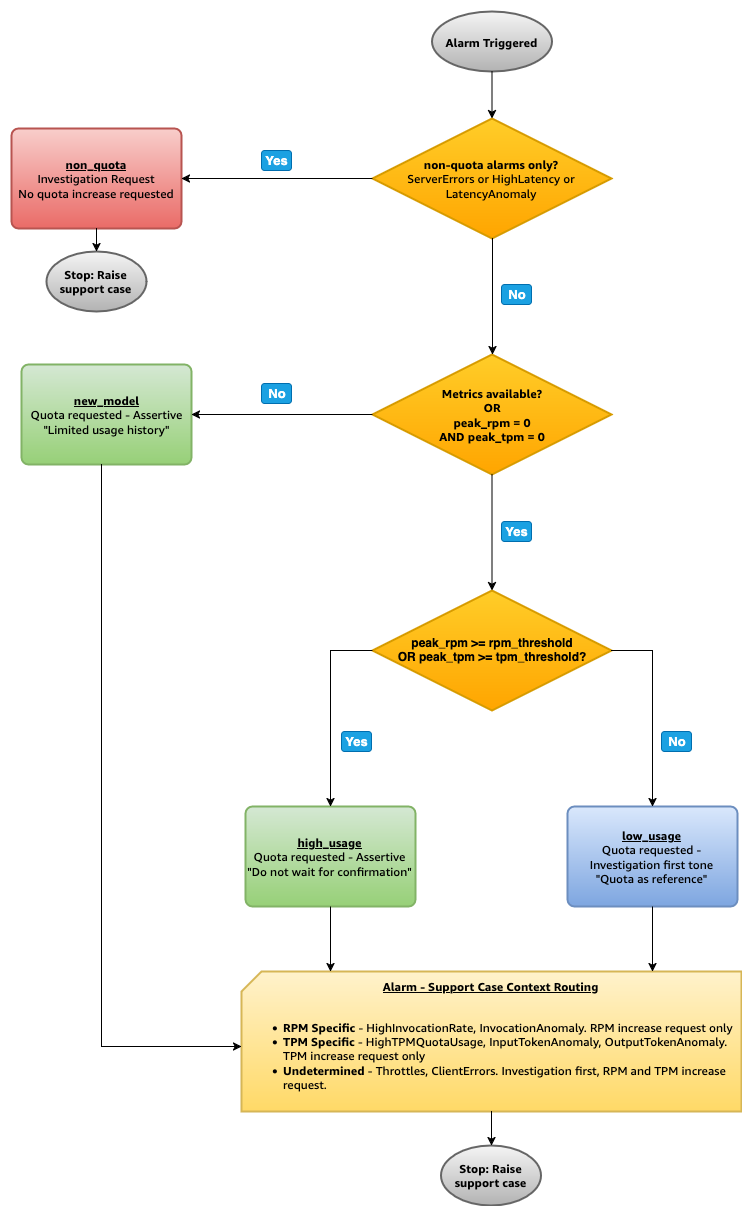
Before creating a quota-related support case, the solution compares 14-day peak usage metrics against stored alarm thresholds to determine the appropriate response. This usage validation makes sure that support cases include the right context and tone for the support engineer.
The following diagram illustrates the scenario decision tree.
Usage-validated scenario details
The following sections describe each scenario in detail, including the trigger conditions, support case content, and examples.
Non-quota: ServerErrors, HighLatency, or LatencyAnomaly triggered, and no other alarm types. No quota increase details included. The case provides the support engineer with alarm context, usage metrics, and triggering conditions to assist with root cause analysis.
| Field | Detail |
| Case type | Investigation Request |
| Alarms | ServerErrors-Critical (InvocationServerErrors), HighLatency-Warning (InvocationLatency), LatencyAnomaly-Warning (InvocationLatency) |
| Quota requested | No quota increase requested |
| Rationale | These alarms indicate server error such as 5xx errors or latency degradation, not quota limits |
Examples
ServerErrors alarm triggered:
| Field | Value |
| Alarm | {CustomerName}-Bedrock-ServerErrors-Critical-{ModelName} |
| Metric | InvocationServerErrors (Sum per minute) |
| Severity | CRITICAL |
| Decision | Triggered alarms are non-quota → non_quota (usage metrics not evaluated) |
| Result | Investigation Request with no quota increase details |
New model: A quota-related alarm triggered, but the model has zero usage history (peak RPM = 0, peak TPM = 0) or metrics and thresholds could not be retrieved. The support case bypasses the usage guard and includes quota increase details, noting the model is newly deployed with limited usage history. The case notes that the model is newly deployed with limited usage history and includes quota increase details for the support engineer’s review.
| Field | Detail |
| Case type | Quota Request |
| Alarms | Any of: ClientErrors-Critical, Throttles-Critical, HighInvocationRate-Warning, HighTPMQuotaUsage-Warning, InvocationAnomaly-Warning, InputTokenAnomaly-Warning, OutputTokenAnomaly-Warning |
| Quota requested | RPM-specific alarms → RPM only. TPM-specific alarms → TPM only. Undetermined quota alarms (Throttles, ClientErrors) → Both RPM and TPM |
| Rationale | The support case bypasses the usage guard because the model has no usage history to validate against |
Example
InputTokenAnomaly alarm triggered on a freshly deployed model:
| Field | Value |
| Alarm | {CustomerName}-Bedrock-InputTokenAnomaly-Warning-{ModelName} |
| Metric | InputTokenCount (Sum per minute) |
| Classification | TPM-specific alarm → TPM quota increase only |
| RPM quota | 200 |
| Peak RPM | 0 (no usage history) |
| TPM quota | 500,000 |
| Peak TPM | 0 (no usage history) |
| Decision | peak_rpm = 0 AND peak_tpm = 0 → new_model |
| Result | Quota Request. TPM increase details included |
High usage (peak meets or exceeds threshold): A quota-related alarm triggered AND 14-day peak RPM meets or exceeds the RPM threshold OR 14-day peak TPM meets or exceeds the TPM threshold. The support case includes quota increase details with usage data confirming sustained consumption trends. For CRITICAL severity, the case includes a note indicating that usage is approaching rate limits.
| Field | Detail |
| Case type | Quota Request |
| Alarms | Any of: ClientErrors-Critical, Throttles-Critical, HighInvocationRate-Warning, HighTPMQuotaUsage-Warning, InvocationAnomaly-Warning, InputTokenAnomaly-Warning, OutputTokenAnomaly-Warning |
| Quota requested | RPM-specific alarms → RPM only. TPM-specific alarms → TPM only. Undetermined quota alarms (Throttles, ClientErrors) → Both RPM and TPM |
| Rationale | Peak usage meets or exceeds the alarm threshold, confirming sustained quota usage trends |
Examples
Throttles alarm triggered:
| Field | Value |
| Alarm | {CustomerName}-Bedrock-Throttles-Critical-{ModelName} |
| Metric | InvocationThrottles (Sum per minute) |
| Classification | Undetermined quota alarm → Both RPM and TPM quota increases |
| Severity | CRITICAL |
| RPM quota | 10,000 |
| RPM threshold | 8,000 (80% of quota) |
| Peak RPM | 9,500 |
| TPM quota | 6,250,000 |
| TPM threshold | 5,000,000 (80% of quota) |
| Peak TPM | 3,000,000 |
| Decision | peak_rpm (9,500) >= rpm_threshold (8,000) → high_usage |
| Result | Quota Request. Both RPM and TPM increase details included. “Expedited processing” |
HighTPMQuotaUsage alarm triggered:
| Field | Value |
| Alarm | {CustomerName}-Bedrock-HighTPMQuotaUsage-Warning-{ModelName} |
| Metric | EstimatedTPMQuotaUsage (Sum per minute) |
| Classification | TPM-specific alarm → TPM quota increase only |
| RPM quota | 200 |
| RPM threshold | 160 (80% of quota) |
| Peak RPM | 150 |
| TPM quota | 200,000 |
| TPM threshold | 160,000 (80% of quota) |
| Peak TPM | 210,000 |
| Decision | peak_tpm (210,000) >= tpm_threshold (160,000) → high_usage |
| Result | Quota Request. TPM increase details included |
Low usage (peak below threshold): A quota-related alarm triggered but 14-day peak RPM is below the RPM threshold AND 14-day peak TPM is below the TPM threshold. Since usage metrics suggest a transient event rather than sustained quota consumption trends, the solution sends an email notification to the AI SRE team to investigate root cause first and collaborate with the support engineer, if needed. The support case includes quota increase details as reference only, in case the investigation confirms the need.
| Field | Detail |
| Case type | Quota Request |
| Alarms | Any of: ClientErrors-Critical, Throttles-Critical, HighInvocationRate-Warning, HighTPMQuotaUsage-Warning, InvocationAnomaly-Warning, InputTokenAnomaly-Warning, OutputTokenAnomaly-Warning |
| Quota requested | RPM-specific alarms → RPM only (as reference). TPM-specific alarms → TPM only (as reference). Undetermined quota alarms (Throttles, ClientErrors) → Both RPM and TPM (as reference) |
| Rationale | Usage metrics suggest a transient event rather than sustained usage trends. Quota details are provided as reference in case the investigation confirms the need |
Examples
InvocationAnomaly alarm triggered:
| Field | Value |
| Alarm | {CustomerName}-Bedrock-InvocationAnomaly-Warning-{ModelName} |
| Metric | Invocations (Sum per minute) |
| Classification | RPM-specific alarm → RPM quota increase only |
| RPM quota | 10,001 |
| RPM threshold | 8,000 (80% of quota) |
| Peak RPM | 5,578 |
| TPM quota | 6,250,000 |
| TPM threshold | 5,000,000 (80% of quota) |
| Peak TPM | 3,404,691 |
| Decision | peak_rpm (5,578) < rpm_threshold (8,000) AND peak_tpm (3,404,691) < tpm_threshold (5,000,000) → low_usage |
| Result | Quota Request with investigate-first tone. RPM increase details included as reference |
ClientErrors alarm triggered:
| Field | Value |
| Alarm | {CustomerName}-Bedrock-ClientErrors-Critical-{ModelName} |
| Classification | Undetermined quota alarm → Both RPM and TPM quota increases |
| Severity | CRITICAL |
| RPM quota | 200 |
| RPM threshold | 160 (80% of quota) |
| Peak RPM | 50 |
| TPM quota | 200,000 |
| TPM threshold | 160,000 (80% of quota) |
| Peak TPM | 80,000 |
| Decision | peak_rpm (50) < rpm_threshold (160) AND peak_tpm (80,000) < tpm_threshold (160,000) → low_usage |
| Result | Quota Request with investigate-first tone. Both RPM and TPM increase details included as reference |
This validation confirms that quota increase requests reflect actual usage patterns, while still providing quota details as reference for the support engineer’s investigation.
Support case management and email notifications
The solution uses category-aware duplicate detection to help prevent redundant cases. When a new alarm triggers and an unresolved case of the same category (Quota Request or Investigation Request) already exists, the system appends a communication to the existing case instead of creating a duplicate. The appended communication includes full alarm details, updated usage metrics, and quota increase requests (if applicable), prefixed with urgency context signaling that the situation is escalating. This makes sure the support engineer is informed of new signals without creating conflicting cases. A quota request case for one alarm type does not block an investigation request case for a different alarm type, and the opposite is also true.
Support case parameters are stored in Parameter Store and can be updated without redeploying the CloudFormation stack. You can enable or disable automated case creation, adjust quota increase percentages (0–100%), and configure email notification filtering (all alerts, critical only, or warning only).
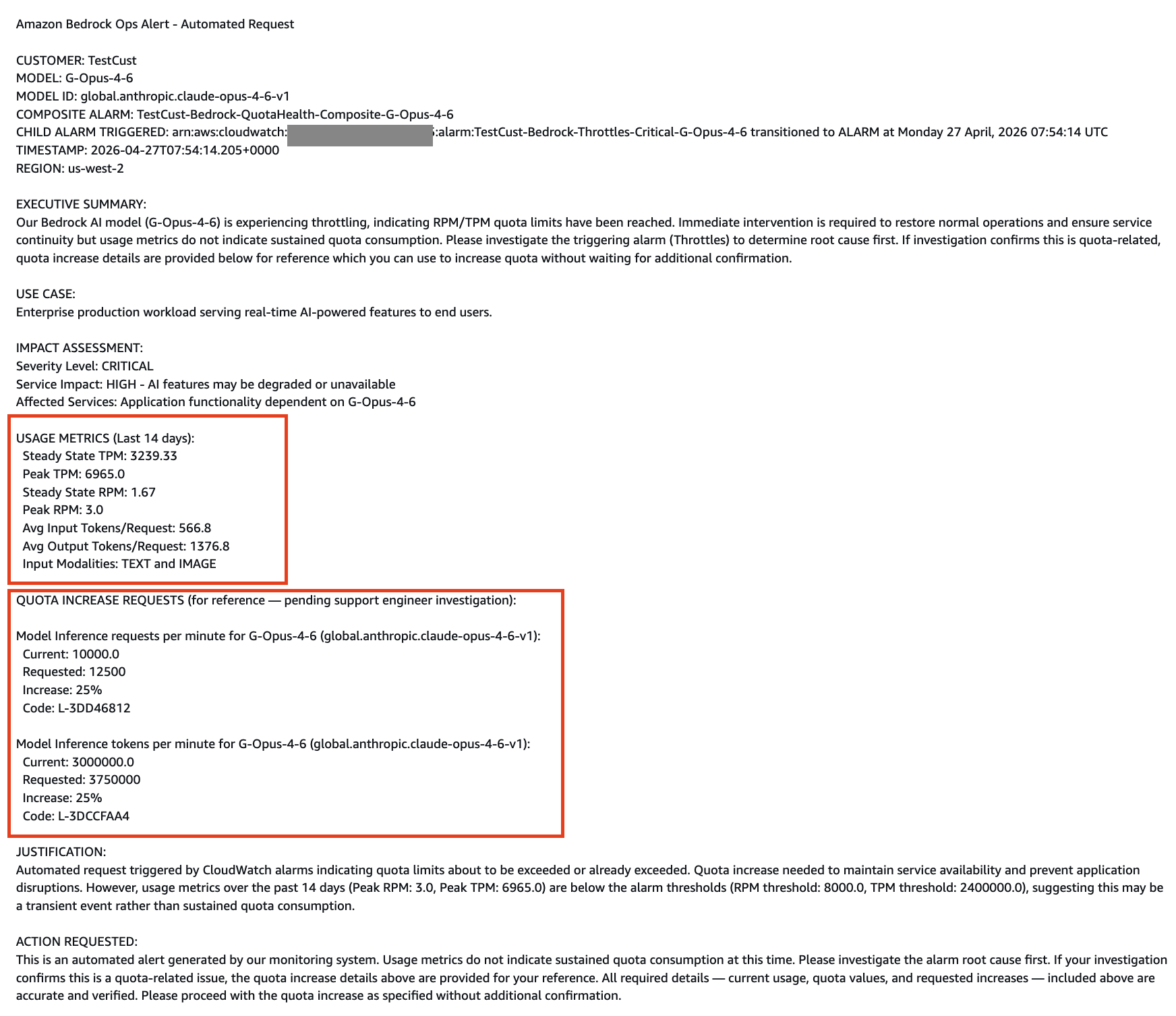
The following screenshot shows an automated “Quota Request” support case created for a quota-related alarm, pre-filled with usage-validated quota data and increase request details. This pre-filled context helps the support engineer resolve the case faster by providing the information needed upfront. This screenshot demonstrates the support case format generated by the solution.
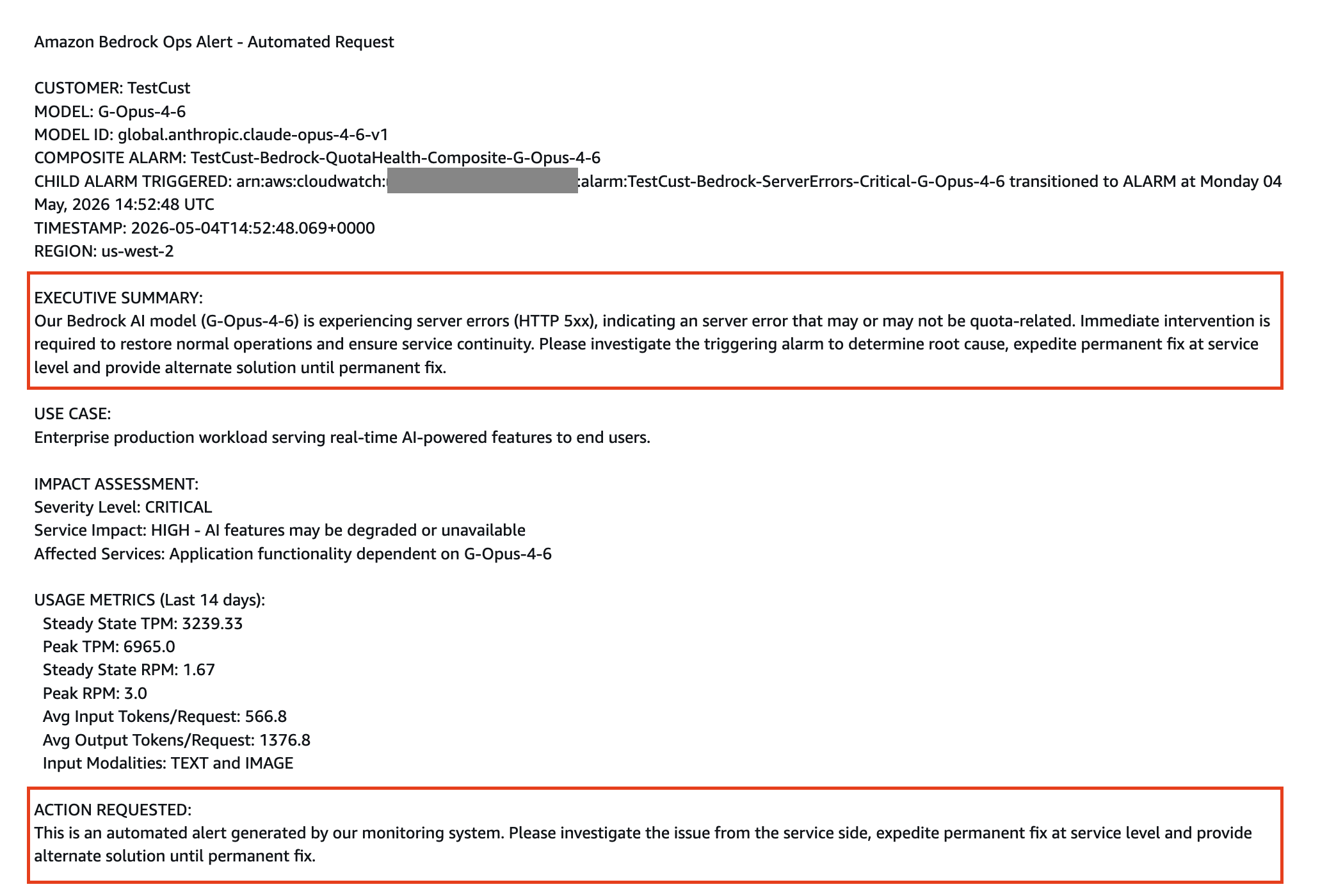
The following screenshot shows an automated “Investigation Request” support case created for a non-quota alarm (such as server errors or latency issues), providing relevant alarm context and metrics to enable efficient root cause investigation. This screenshot demonstrates the support case format generated by the solution.
Email notifications are sent after support case processing completes. If a support case was created, the email includes the case ID and a direct link to the AWS Support console, giving the AI SRE team immediate visibility into the automated case and supporting coordinated follow-up. Email content is tailored for the AI SRE team perspective, while support case content is tailored for the support engineer.
Results
Amazon Bedrock Ops Alert delivers the following outcomes:
- Improved operational efficiency: The AI SRE team shift from manual monitoring to higher-value work.
- Intelligent alarm classification: Non-quota alarms (server errors, latency anomalies) are routed to investigation cases instead of quota increase requests, providing support engineers with targeted case context and accelerating root cause resolution.
- Usage-validated support cases: The solution compares peak usage against thresholds before creating support cases, validating that quota increase requests reflect actual usage patterns and include appropriate context for the support engineer.
- Reduced mean time to resolution: Automated case creation reduces manual effort for each incident from hours to minutes.
- Proactive quota management: Quota increase requests are initiated before usage reaches rate limits in production applications.
- No manual threshold maintenance: Alarms stay accurate as approved quota increases change the target, with no engineer intervention required.
- Scalable foundation: Additional Bedrock models can be monitored by deploying additional stack instances, supporting an expanding generative AI portfolio.
Deploy the solution
For step-by-step deployment instructions, including prerequisites, packaging, CloudFormation stack deployment, parameter reference, testing, and cleanup, see the Deployment Guide in the GitHub repository.
Conclusion
Generative AI monitoring is unlike traditional infrastructure monitoring. As generative AI adoption blurs the boundaries between business and technology teams, with non-engineering teams now using custom-built generative AI applications powered by Amazon Bedrock-hosted foundation models, organizations need to rethink their operational monitoring strategy to match this new reality.
In this post, we introduced Amazon Bedrock Ops Alert, a multi-layer operational monitoring solution composed of AWS native services, to address the operational needs of running generative AI workloads at scale. The three-layer monitoring architecture, consisting of critical error detection, usage rate monitoring, and anomaly pattern recognition, provides comprehensive visibility into generative AI workloads across operational issues, usage trends, and unusual behavior. The solution’s intelligent alarm classification routes client-side issues, latency concerns, and quota-related signals to the appropriate support case type, each enriched with the context a support engineer needs to act quickly. Before creating a support case, the usage validation guard compares recent peak usage against stored thresholds to confirm the case is warranted, and duplicate case prevention suppresses new cases when an unresolved case of the same alarm category is already active, keeping investigations focused. Contextualized email notifications keep the AI SRE team informed and aligned with the automated case throughout. By automating CloudWatch alarm threshold recalculation, the solution also removes the manual effort of investigating the new quota value, calculating the appropriate alarm threshold, and updating alarms after each approved quota increase, keeping alarms accurate and alleviating the risk of stale thresholds.
Together, these capabilities shift operations from reactive monitoring to proactive operational monitoring, reducing mean time to resolution, anticipating further quota increase needs as adoption grows, and freeing AI SRE teams to focus on building generative AI applications rather than monitoring infrastructure.
You can extend this solution by integrating with incident management systems, monitoring multiple Bedrock models with separate stack deployments, customizing alarm patterns for specific use cases, and implementing predictive scaling based on historical usage patterns.
To get started, visit the Amazon Bedrock Ops Alert repository on GitHub. To learn more about Amazon Bedrock quotas, see Amazon Bedrock endpoints and quotas. To explore Amazon Bedrock, visit the Amazon Bedrock detail page.
Disclaimer: This solution is provided as-is for educational purposes. You are responsible for evaluating, testing, and validating all solutions in non-production environments before deploying to production systems. Conduct comprehensive testing including performance validation, security assessments, and compliance verification to make sure solutions meet your specific requirements and regulatory obligations.
About the authors


