Testing SQL Like a Software Engineer: Unit Testing, CI/CD, and Data Quality Automation


# Introduction
Everyone focuses on writing SQL that “works,” but very few test whether it keeps working tomorrow. A single new row, a changed assumption, or a refactor can break a query silently. This article walks through a complete workflow, showing how to treat SQL like software: versioned, tested, and automated. We’ll use a real Amazon interview question about identifying customers with the highest daily spending. Then we will convert the SQL into a testable component, define expected outputs, and automate testing with continuous integration and continuous deployment (CI/CD).
# Step 1: Solving an Interview-Style SQL Question
// Understanding the Problem

In this interview question from Amazon, you are asked to find the customers with the highest daily total order cost between a certain date range.
// Understanding the Dataset
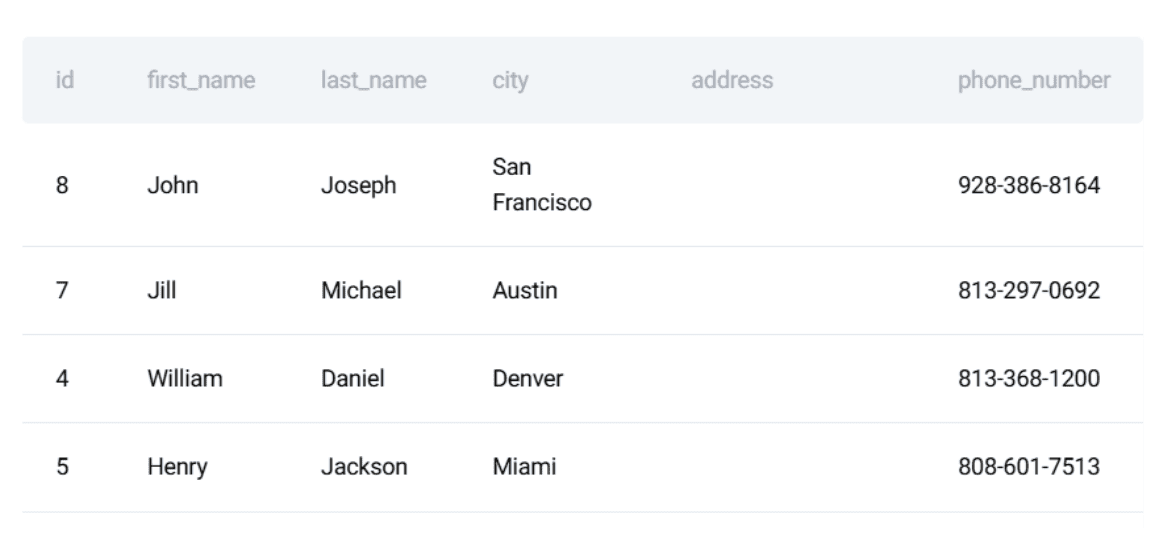
There are two data tables in this project: customers and orders.
The customers table:
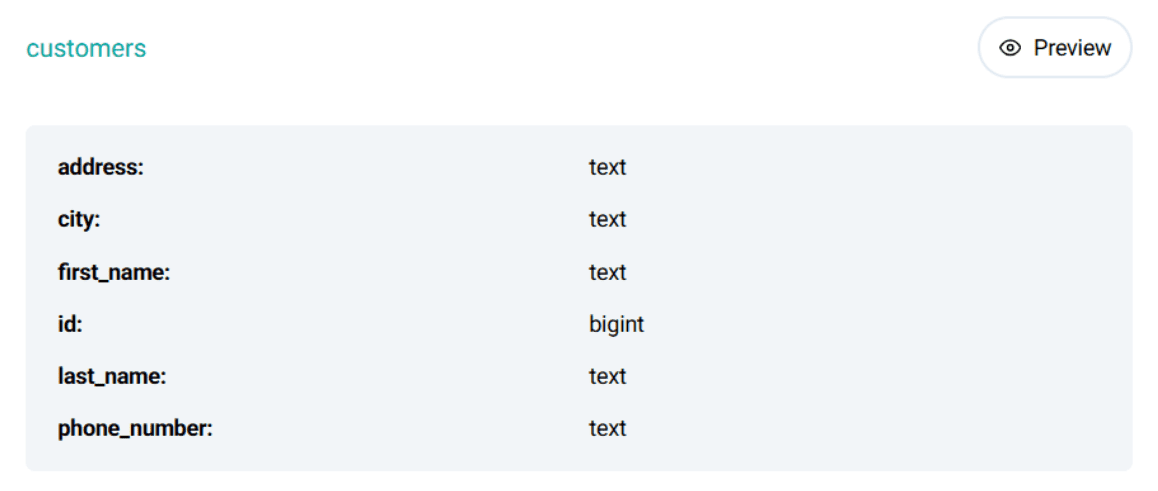
Here is a preview of the dataset:
The orders table:
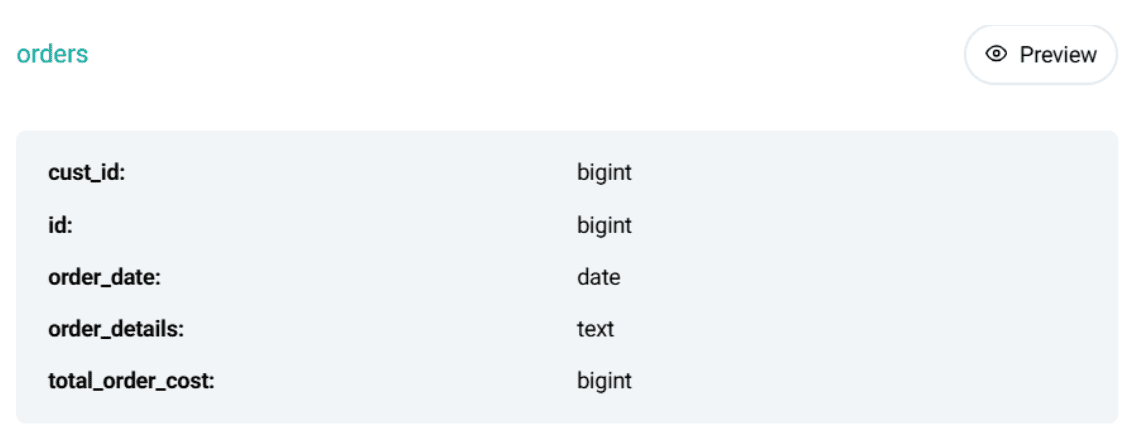
Here is a preview of the dataset:
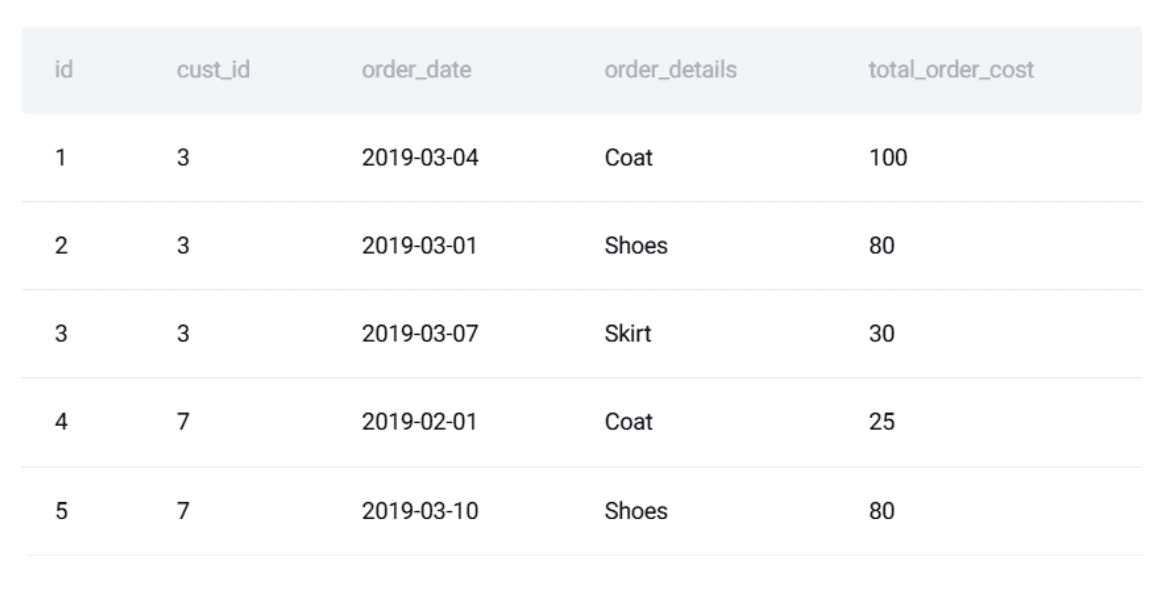
This problem is perfect for illustrating how SQL can be treated like software: the query must be correct, stable, and resistant to regressions.
// Writing the SQL Solution
The logic breaks down into three parts:
- Aggregate each customer’s total spending per day
- Rank customers by total spending for each date
- Return only the daily top spenders
Here is the final PostgreSQL solution:
WITH customer_daily_totals AS (
  SELECT
    o.cust_id,
    o.order_date,
    SUM(o.total_order_cost) AS total_daily_cost
  FROM orders o
  WHERE o.order_date BETWEEN '2019-02-01' AND '2019-05-01'
  GROUP BY o.cust_id, o.order_date
),
ranked_daily_totals AS (
  SELECT
    cust_id,
    order_date,
    total_daily_cost,
    RANK() OVER (
      PARTITION BY order_date
      ORDER BY total_daily_cost DESC
    ) AS rnk
  FROM customer_daily_totals
)
SELECT
  c.first_name,
  rdt.order_date,
  rdt.total_daily_cost AS max_cost
FROM ranked_daily_totals rdt
JOIN customers c ON rdt.cust_id = c.id
WHERE rdt.rnk = 1
ORDER BY rdt.order_date;
// Defining the Expected Output
Here is the expected output:
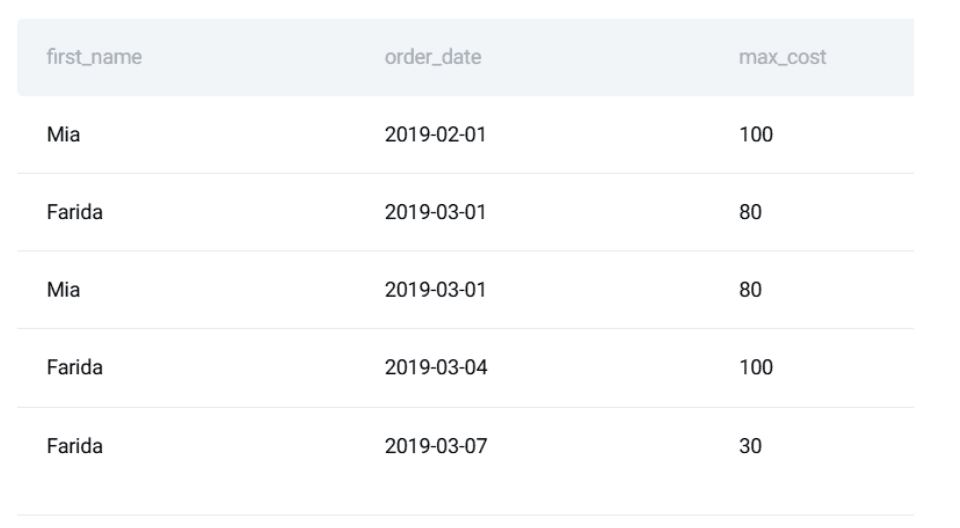
At this stage, most people stop.
# Step 2: Making the SQL Logic Reliable with Unit Tests
SQL breaks more easily than most think. A changed default, a renamed column, or a new data source can introduce silent errors. Testing protects you from these issues. There are three testing steps we will cover: converting the logic into a function, defining expected output, and writing a unit test suite.
// Turning the Query into a Reusable Component
To test the SQL code, we begin by wrapping it in a Python function using a lightweight testing framework like unittest. First, we define the query that we want to test:
    query = """
        WITH customer_daily_totals AS (
          SELECT
            o.cust_id,
            o.order_date,
            SUM(o.total_order_cost) AS total_daily_cost
          FROM orders o
          WHERE o.order_date BETWEEN '2019-02-01' AND '2019-05-01'
          GROUP BY o.cust_id, o.order_date
        ),
        ranked_daily_totals AS (
          SELECT
            cust_id,
            order_date,
            total_daily_cost,
            RANK() OVER (
              PARTITION BY order_date
              ORDER BY total_daily_cost DESC
            ) AS rnk
          FROM customer_daily_totals
        )
        SELECT
          c.first_name,
          rdt.order_date,
          rdt.total_daily_cost AS max_cost
        FROM ranked_daily_totals rdt
        JOIN customers c ON rdt.cust_id = c.id
        WHERE rdt.rnk = 1
        ORDER BY rdt.order_date;
    """
// Defining Test Input and Expected Output
Next, we must create a controlled sample dataset to test against.
test_customers = [
    (15, "Mia"),
    (7, "Jill"),
    (3, "Farida")
]

test_orders = [
    (1, 3, "2019-03-04", 100),
    (2, 3, "2019-03-01", 80),
    (4, 7, "2019-02-01", 25),
    (6, 15, "2019-02-01", 100)
]
We also create the expected output:
expected = [
    ("Mia", "2019-02-01", 100),
    ("Farida", "2019-03-01", 80),
    ("Farida", "2019-03-04", 100)
]
Why? Because defining expected outputs creates a benchmark.
// Writing SQL Unit Tests
Now we have the query defined, the test inputs, and the expected outputs. We can write an actual unit test. The idea is simple:
- Create an isolated, in-memory database
- Load controlled test data
- Execute the SQL query
- Assert that the result obtained matches the expected output

Python’s built-in unittest framework is highly effective because it allows us to keep dependencies minimal while providing structure and repeatability. We start by creating an in-memory SQLite database:
conn = sqlite3.connect(":memory:")
cursor = conn.cursor()
Using :memory: ensures that:
- the test database is fully isolated
- no external state can affect the result
- the database is discarded automatically once the test finishes
Next, we recreate only the tables required by the query:
CREATE TABLE customers (...)
CREATE TABLE orders (...)
Even though the query only uses a subset of columns, the schema mirrors a realistic production table. This reduces the risk of false confidence caused by oversimplified schemas. We then insert the controlled test data defined earlier:
cursor.executemany("INSERT INTO customers VALUES (?, ?, ?, ?, ?, ?)", test_customers)
cursor.executemany("INSERT INTO orders VALUES (?, ?, ?, ?, ?)", test_orders)
conn.commit()
At this point, the database contains a known, deterministic state, which is essential for meaningful tests. Before executing the query, we load and print the test tables using Pandas:
customers_df = pd.read_sql("SELECT id, first_name, last_name, city FROM customers", conn)
orders_df = pd.read_sql("SELECT * FROM orders", conn)
While this step is not strictly required for automation, it is highly useful during development and debugging. When a test fails, being able to immediately inspect the input data saves significantly more time than checking the SQL logic, because it allows you to understand step-by-step what the code is computing. Now we run the query under test:
result = pd.read_sql(query, conn)
The result is loaded into a DataFrame, which provides:
- structured access to rows and columns
- easy comparison with expected outputs
- readable printing for debugging
Next, we must verify the results row by row. The verification logic makes a manual assertion between the query output and the expected result:
all_correct = True

if len(result) != len(expected):
    all_correct = False
The first check confirms whether the number of rows returned by the query matches what we expect. A mismatch here immediately indicates missing or extra records. Next, we iterate through the expected output and compare it to the actual query result row by row:
for i, (fname, lname, date, cost) in enumerate(expected):
    if i < len(result):
        actual = result.iloc[i]
        if not (
            actual["first_name"] == fname
            and actual["last_name"] == lname
            and actual["order_date"] == date
            and actual["max_cost"] == cost
        ):
            all_correct = False
Each row is checked on all relevant dimensions:
- customer name
- order date
- aggregated daily cost
If any value differs from the expected, the test is marked as failed. Finally, the test result is summarized in a clear pass/fail message:
if all_correct and len(result) == len(expected):
    print("ALL TESTS PASSED")
else:
    print("SOME TESTS FAILED")
The database connection is then closed:
If the tests pass, the expected output is:
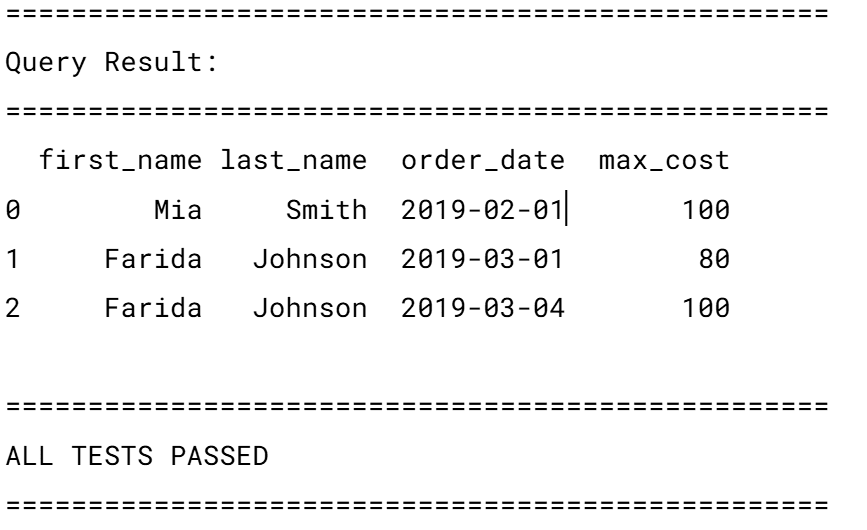
This test carries some assumptions worth noting:
- a stable row order (
ORDER BY order_date) - exact matches on all values
- no tolerance for ties or duplicate winners per day
The full script, ready to be used, can be seen here.
# Step 3: Automating SQL Tests with Continuous Integration and Continuous Deployment
A test suite is only useful if it runs consistently whenever needed. We utilize CI/CD to automate testing whenever a code change is made.
// Organizing the Project
A minimal repository structure can look like this:
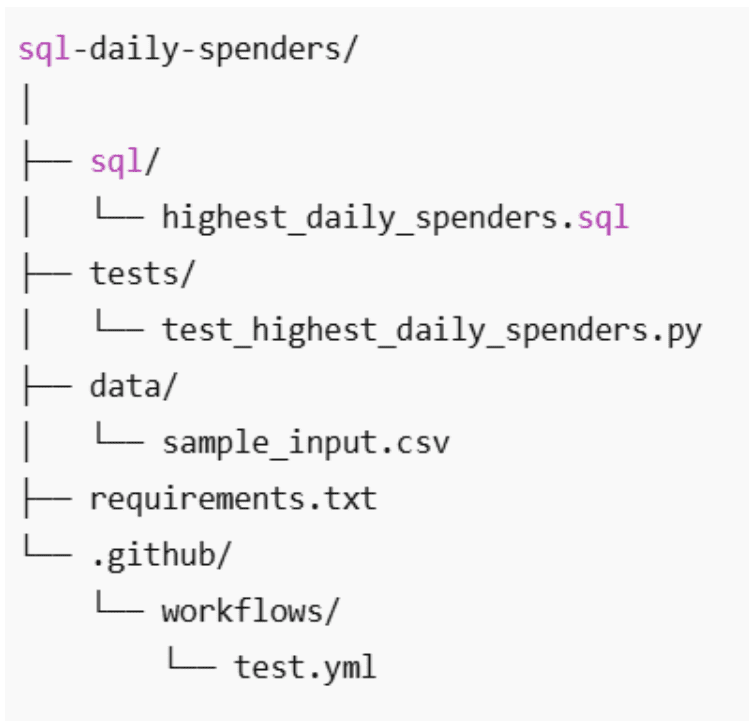
// Creating the GitHub Actions Workflow
The next step is to ensure these tests run automatically whenever the code changes. For this, we use GitHub Actions. This tool allows us to define a CI workflow that runs the SQL tests every time code is pushed or a pull request is opened.
Create the workflow file: In your repository, create the following folder structure if it doesn’t already exist: .github/workflows/. Inside this folder, create a new file called test_sql.yml. The name is not special; GitHub only cares that the file lives inside the .github/workflows/ directory. You can name it anything, but test_sql.yml keeps things clear and simple.
Define when the workflow should run: Here is the full workflow file:
name: Run SQL Tests

on:
  push:
    branches: [ "main" ]
  pull_request:
    branches: [ "main" ]
This section defines when the workflow runs:
- on every push to the main branch
- on every pull request targeting main
In practice, this means:
- pushing directly to main will trigger the tests
- opening or updating a pull request will also trigger the tests
This helps catch SQL regressions before they get merged.
Define the test job: Next, we define a job called test:
jobs:
  test:
    runs-on: ubuntu-latest
This tells GitHub to:
- create a fresh Linux machine
- run all test steps inside it
Each workflow run starts from a clean environment, which prevents “it works on my machine” problems.
// Adding the Workflow Steps
Now we define the steps the machine should execute:
- name: Checkout repository
  uses: actions/checkout@v4
This step downloads your repository’s code into the runner so it can access your SQL files and tests.
- name: Set up Python
  uses: actions/setup-python@v5
  with:
    python-version: "3.10"
This installs Python 3.10, ensuring a consistent runtime across all runs.
- name: Install dependencies
  run: |
    python -m pip install --upgrade pip
    pip install -r requirements.txt
This installs all required Python libraries (such as Pandas) defined in requirements.txt.
- name: Run unit tests
  run: python -m unittest discover
Finally, this command:
- automatically discovers test files
- runs all SQL tests defined in the
tests/folder - fails the workflow if any test fails
The full workflow can be found here.
Running the workflow: You don’t need to run this file manually. Once committed:
- pushing to main will trigger the workflow
- opening a pull request will trigger the workflow
You can view the results directly in GitHub by navigating to your repository’s Actions tab.

Each run will show whether your SQL tests passed or failed.
# Step 4: Automating Data Quality
Unit tests confirm whether the logic still returns the expected output, and CI ensures these tests run automatically. But in real data environments, the input data itself can cause failures: late-arriving rows, malformed dates, missing keys, and unexpected duplicates can break queries long before the SQL logic does. This is where data quality automation comes in. Testing and versioning form a safety net for code changes; data quality automation extends that safety net to the data itself, preventing downstream issues before they impact results.
// Understanding Why Data Quality Checks Matter for SQL Workflows
In our interview problem, the following issues could make the query return incorrect results:
- A customer’s first name is no longer unique.
- An order arrives with a negative cost.
- Dates fall outside the expected range.
- Daily aggregates contain duplicate rows for the same customer and date.
- A customer exists in orders but not in customers.

Without automated checks, these issues may silently distort results. Because SQL doesn’t raise obvious exceptions in many of these scenarios, errors spread unnoticed. Automated data quality checks detect these issues early and prevent the pipeline from running with corrupted or incomplete data.
// Turning Data Assumptions into Automated Rules
Every SQL query relies on assumptions about the data. The problem is that these assumptions are rarely written down and almost never enforced. In our daily spenders query, correctness depends not only on SQL logic, but also on the shape and validity of the input data. Instead of trusting those assumptions implicitly, we can turn them into automated data quality rules. The idea is simple:
- express each assumption as a SQL check
- run those checks automatically
- fail fast if any assumption is violated
First names must be unique: Our query joins customers by ID, but returns first_name as an identifier. If first names are no longer unique, the output becomes ambiguous.
SELECT first_name, COUNT(*)
FROM customers
GROUP BY first_name
HAVING COUNT(*) > 1;
If this query returns any rows, the assumption is broken.
Order costs must be non-negative: Negative order values usually indicate ingestion or upstream transformation issues.
SELECT *
FROM orders
WHERE total_order_cost < 0;
Even a single row here invalidates financial aggregates.
Order dates must be valid and within expectations: Dates that are missing or wildly out of range often reveal synchronization or parsing errors.
SELECT *
FROM orders
WHERE order_date IS NULL
   OR order_date < '2010-01-01'
   OR order_date > CURRENT_DATE;
This protects the query from silently including bad temporal data.
Every order must reference a valid customer: If an order refers to a non-existent customer, joins will silently drop rows.
SELECT o.*
FROM orders o
LEFT JOIN customers c ON c.id = o.cust_id
WHERE c.id IS NULL;
This rule ensures referential integrity before analytics logic runs.
// Converting Rules into an Automated Check
Instead of running these checks manually, we can wrap them into a single Python function that fails immediately if any rule is violated.
import pandas as pd

def run_data_quality_checks(conn):
    checks = {
        "Duplicate first names": """
            SELECT first_name
            FROM customers
            GROUP BY first_name
            HAVING COUNT(*) > 1;
        """,
        "Negative order costs": """
            SELECT *
            FROM orders
            WHERE total_order_cost < 0;
        """,
        "Invalid order dates": """
            SELECT *
            FROM orders
            WHERE order_date IS NULL
               OR order_date < '2010-01-01'
               OR order_date > CURRENT_DATE;
        """,
        "Orders without customers": """
            SELECT o.*
            FROM orders o
            LEFT JOIN customers c ON c.id = o.cust_id
            WHERE c.id IS NULL;
        """
    }

    for rule_name, query in checks.items():
        result = pd.read_sql(query, conn)
        if not result.empty:
            raise ValueError(f"Data quality check failed: {rule_name}")

    print("All data quality checks passed.")
This function:
- executes each rule
- checks whether any rows are returned
- raises an error immediately if a violation is found
At this point, data quality rules behave just like unit tests: pass or fail. If tests pass, you will see something like:
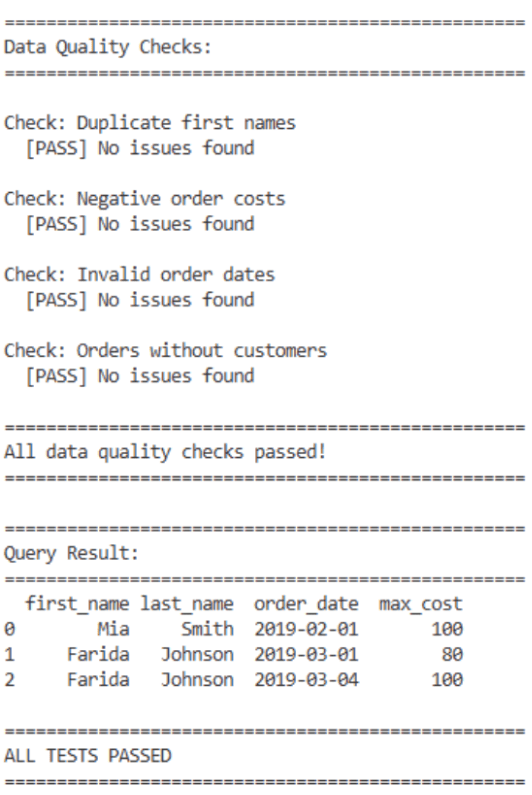
Because the data quality checks run inside Python, they are automatically picked up by the existing GitHub Actions workflow:
- name: Run unit tests
  run: python -m unittest discover
The CI pipeline will stop immediately as long as:
- the function is imported or executed by your test file
- a failure raises an exception
# Concluding Remarks
Most people stop once the SQL query produces a correct answer. But real data environments reward those who make their queries stable, testable, and version-controlled.
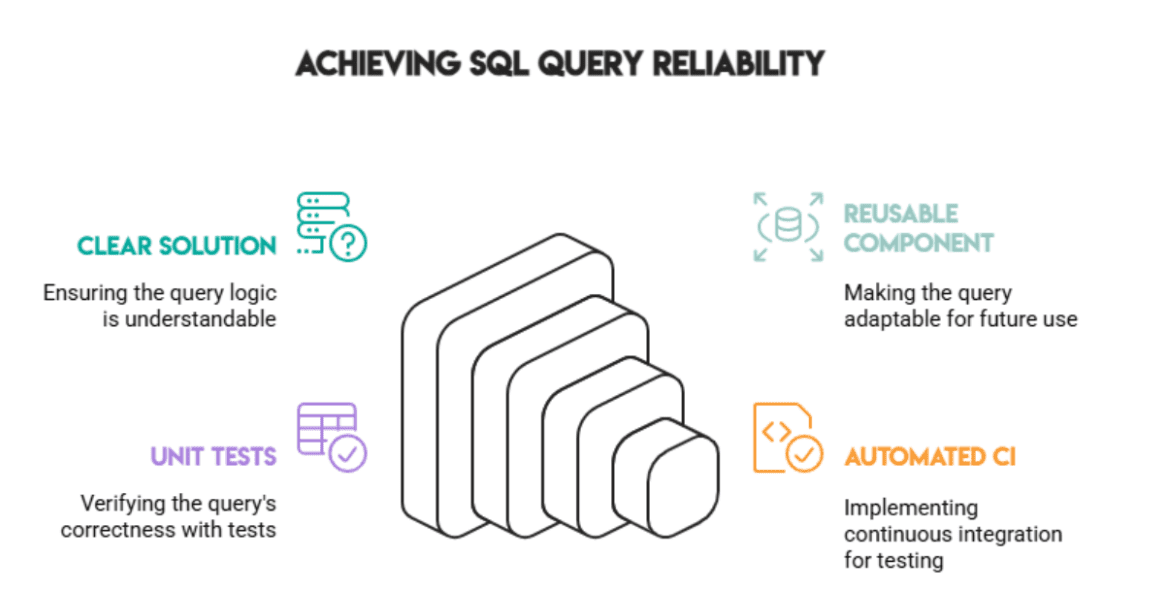
Combining the following practices ensures the query continues to deliver reliable results, even as data changes over time:
- a clear solution
- a reusable component
- unit tests
- automated CI
Correctness is good, but reliability is essential.
Nate Rosidi is a data scientist and in product strategy. He’s also an adjunct professor teaching analytics, and is the founder of StrataScratch, a platform helping data scientists prepare for their interviews with real interview questions from top companies. Nate writes on the latest trends in the career market, gives interview advice, shares data science projects, and covers everything SQL.


