

A quarter of organizations say poor data quality costs them more than $5 million a year, and 7% put that number above $25 million, a Forrester finding IBM cites in its own data quality research. Most of that damage never shows up on a dashboard.
Standard cleaning catches nulls, duplicate rows, and type mismatches. Those checks run fast and catch real problems, then stop looking the moment every column passes.
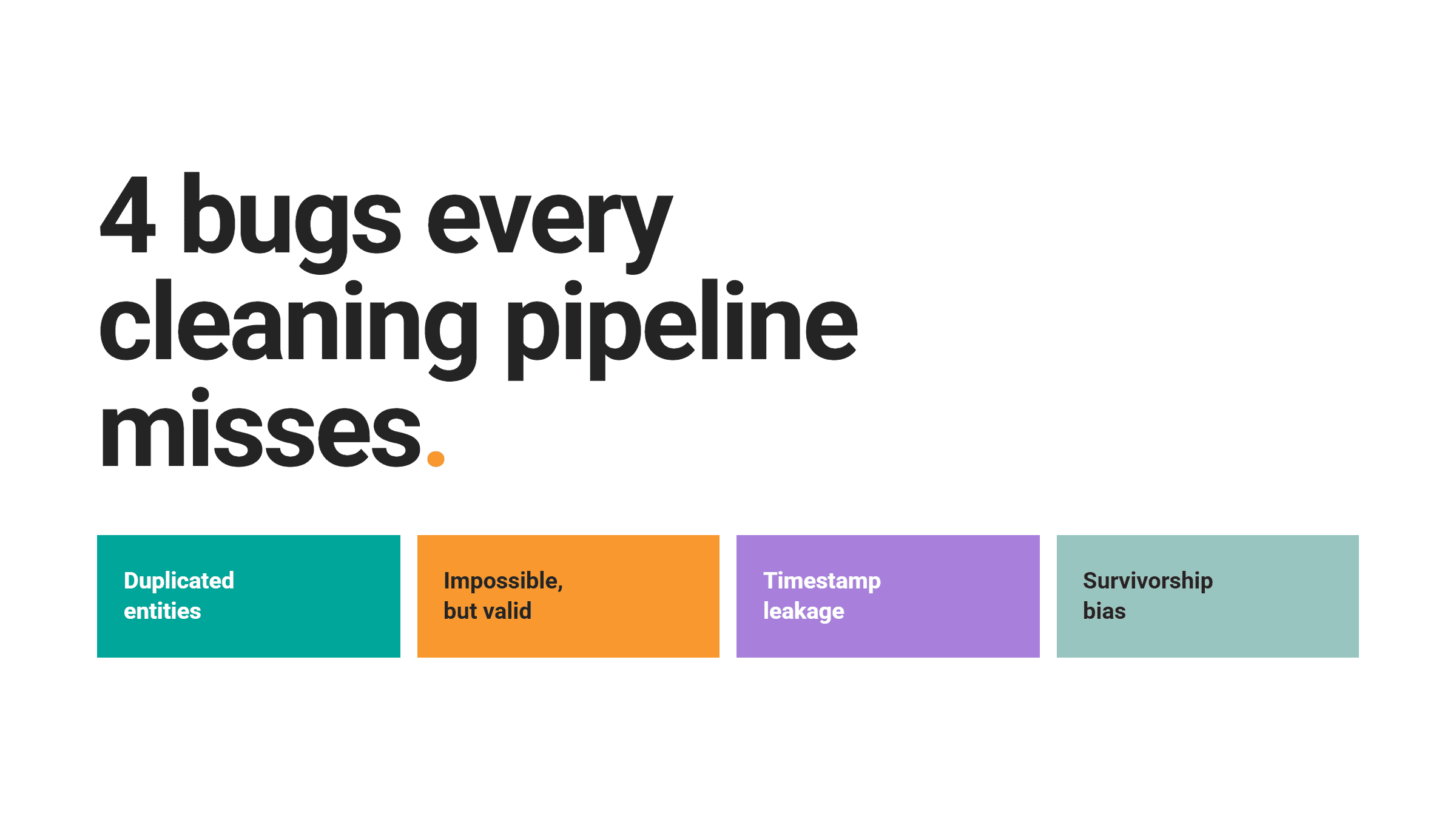
Four bugs clear those checks anyway and still break the model, the dashboard, or the finance report downstream: entities duplicated without ever looking identical, values that sit inside range but make no sense in context, timestamps that leak information from the future, and denominators that drop the people who would have changed the answer.
Each one shows up in a real interview question on StrataScratch. Here’s what we’d miss on a naive read of each question, and what to check for instead.
The Syntax, Semantics, and Pragmatics Gap
We can split data quality tests into three layers, borrowed from linguistics.
Syntax asks whether a value is well-formed: is the zip code 5 digits, does the date parse, is the column non-null.
Semantics asks whether the value makes sense for what it represents: is a 214-year-old customer possible, is a 3 am login from a store that closes at 10 pm believable.
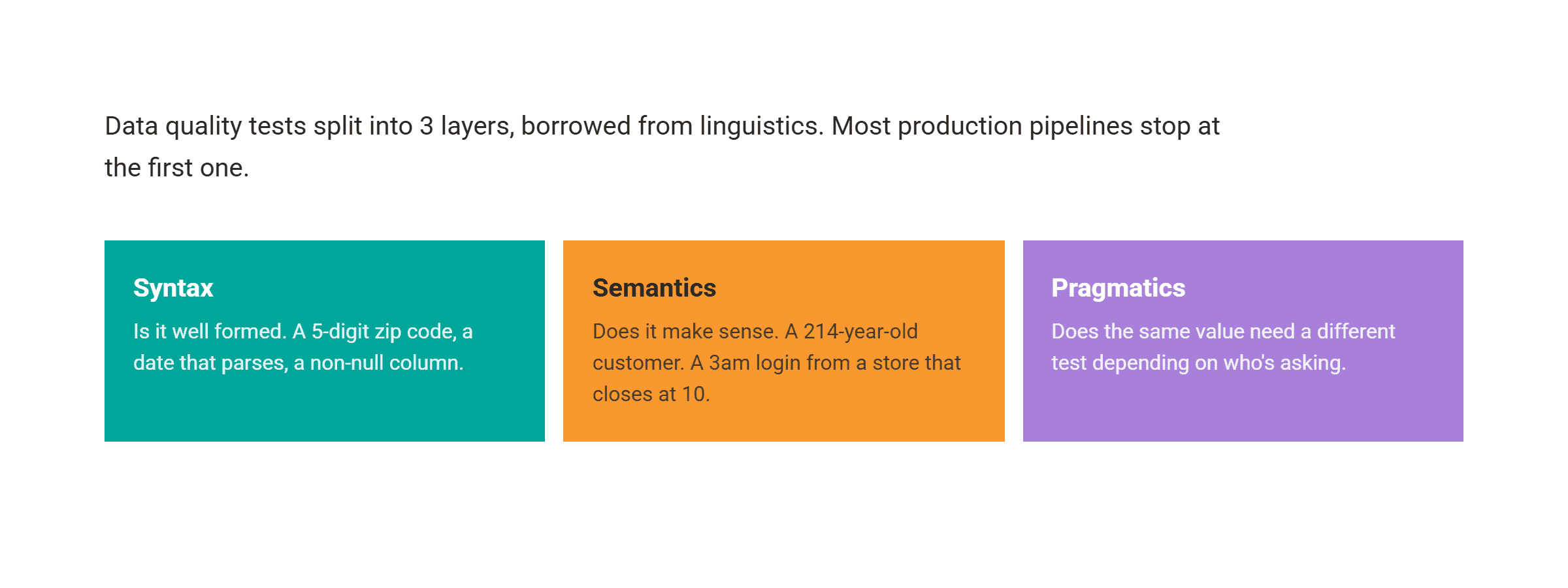
Pragmatics asks whether the same kind of value needs a different test depending on who’s using it: for example, a pharma company where a drug discovery team and a manufacturing team look at the same kind of record and don’t agree on what counts as valid.
We see most production pipelines stop at syntax.
Pandera and dbt tests (SQL queries that check data quality) default to type, null, and range checks, the ones a generic library can write without knowing the business. Semantic checks need someone who understands what the data means. That gap is where the 4 bugs below live.
Silent Data Error #1: Duplicated Entities
A duplicate check tests whether 2 rows are byte-for-byte identical.
drop_duplicates() catches “John Smith, 123 Main St” twice, but not “John Smith, 123 Main St” and “J. Smith, 123 Main Street”: 2 differently written rows for the same customer that a lifetime-value model still counts as 2 different people.
The check passes because the row isn’t duplicated. The entity is.
This Amazon interview question asks you to do the opposite on purpose: given a worker table, output every HR employee’s first name and department twice.
Data: the worker table has 13 employees across HR, Admin, and Account.

Code:
SELECT first_name, department
FROM worker
WHERE department LIKE 'HR'

UNION ALL

SELECT first_name, department
FROM worker
WHERE department LIKE 'HR';
Output:
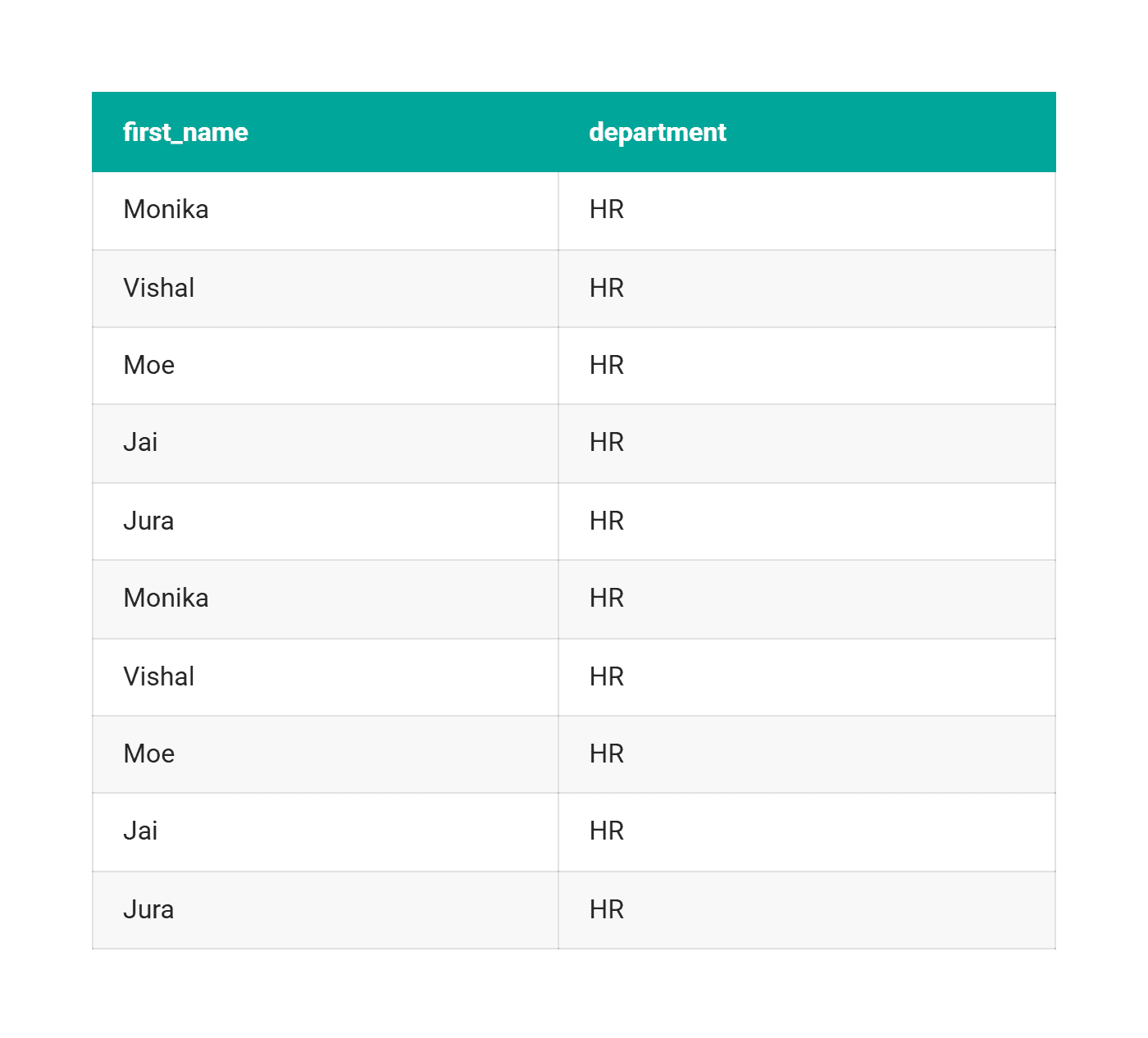
The official answer is a UNION ALL.
That’s also what happens, unintentionally, when 2 source systems ship the same table into a warehouse with no dedup step before the join. Every SUM or COUNT downstream doubles, and no null check flags it.
The same failure shows up 2 more ways on the platform, and between them the 3 examples in this section cover how duplication enters downstream metrics: duplicate rows, an entity double-counted under a coarser grain, and rows over-matched by a loose join.
A Microsoft, Apple, and Dell question needs COUNT(DISTINCT user_id) for monthly active users: swap in COUNT(*) over the same table and the number changes, because 1 user firing 10 events looks like 10.
The Fix to This Error
The fix runs in both directions: canonicalize the string (lowercase it, strip punctuation, normalize the address), score similarity instead of testing equality, and route anything in between to a review queue.
Silent Data Error #2: Impossible but Valid Values
A value can sit inside its column’s type, inside its declared range, and still be wrong for the row it’s in.
A 214-year-old customer passes an integer check; a negative delivered quantity passes a numeric check. Catching either takes a rule that knows what the number means, not its type.
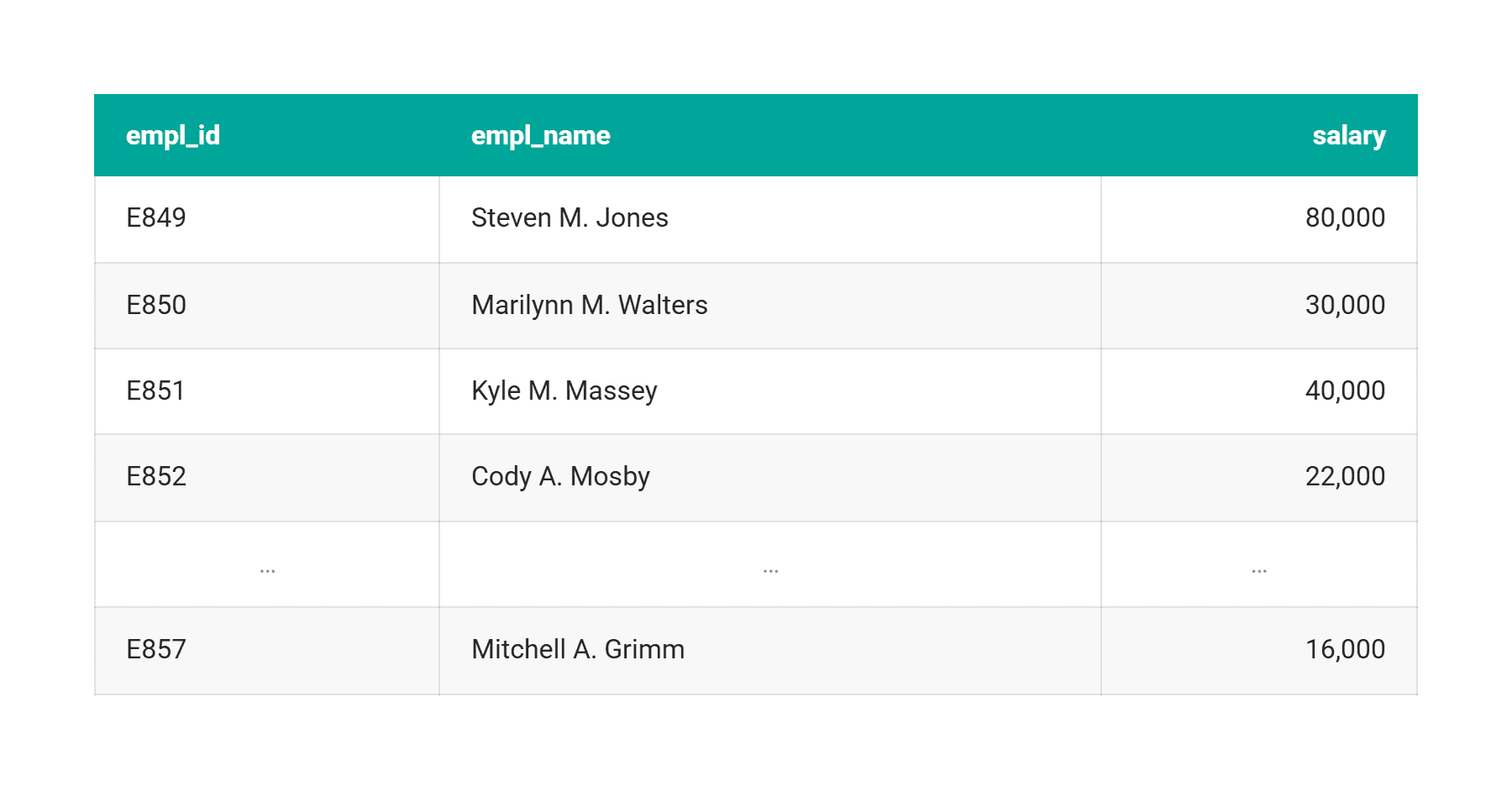
This Amazon, Walmart, and Best Buy question asks for every manager whose salary is less than twice the average salary of the employees reporting to them, and shows how that error hides inside a normal aggregation.
Data: dim_employee holds 9 employees, and map_employee_hierarchy pairs each manager_empl_id with the empl_id of a direct report. Here, we are only using some of the data from dim_employee:
Code:
SELECT
    h.manager_empl_id,
    managers.salary AS manager_salary,
    AVG(employees.salary) AS avg_employee_salary
FROM map_employee_hierarchy h
JOIN dim_employee managers
    ON h.manager_empl_id = managers.empl_id
JOIN dim_employee employees
    ON h.empl_id = employees.empl_id
GROUP BY 1, 2
HAVING managers.salary < 2 * AVG(employees.salary);
Output:
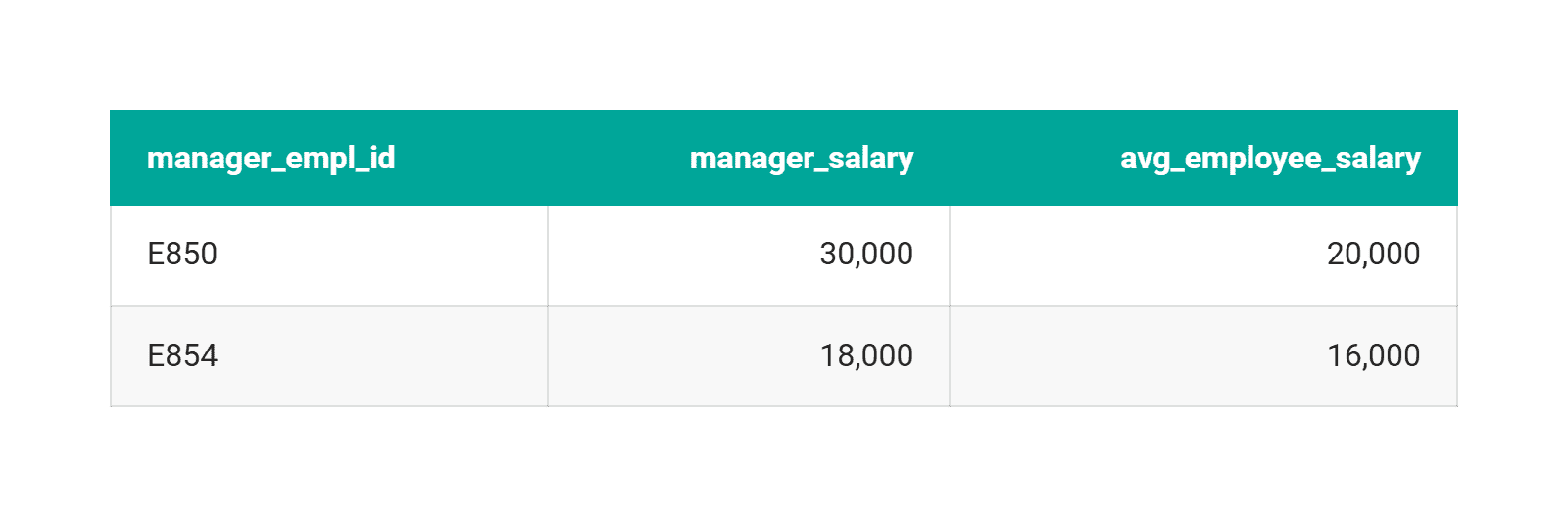
Nothing about this query is wrong.
A single bad salary in dim_employee — zero, negative, or typed in cents instead of dollars — shifts the average and silently drops managers from the result or adds them to it. The query passed every syntax check on the way in. The bug sits in a single cell.
The Fix to This Error
The fix is business-aware constraints and peer-group plausibility checks, applied at ingestion.
Age between 0 and 120 and order quantity greater than 0 are business constraints: they encode what’s possible for the business, not just what fits the data type.
Salary compared against the distribution for the same level and location, not just against 0, is the stronger check: it catches a value that’s plausible on its own but wrong for the row it’s in.
Silent Data Error #3: Timestamp Leakage
Leakage happens when a feature carries information from after the moment it’s supposed to describe.
Wikipedia‘s definition is the cleanest one: information that would not actually be available at prediction time ends up in the training row anyway.
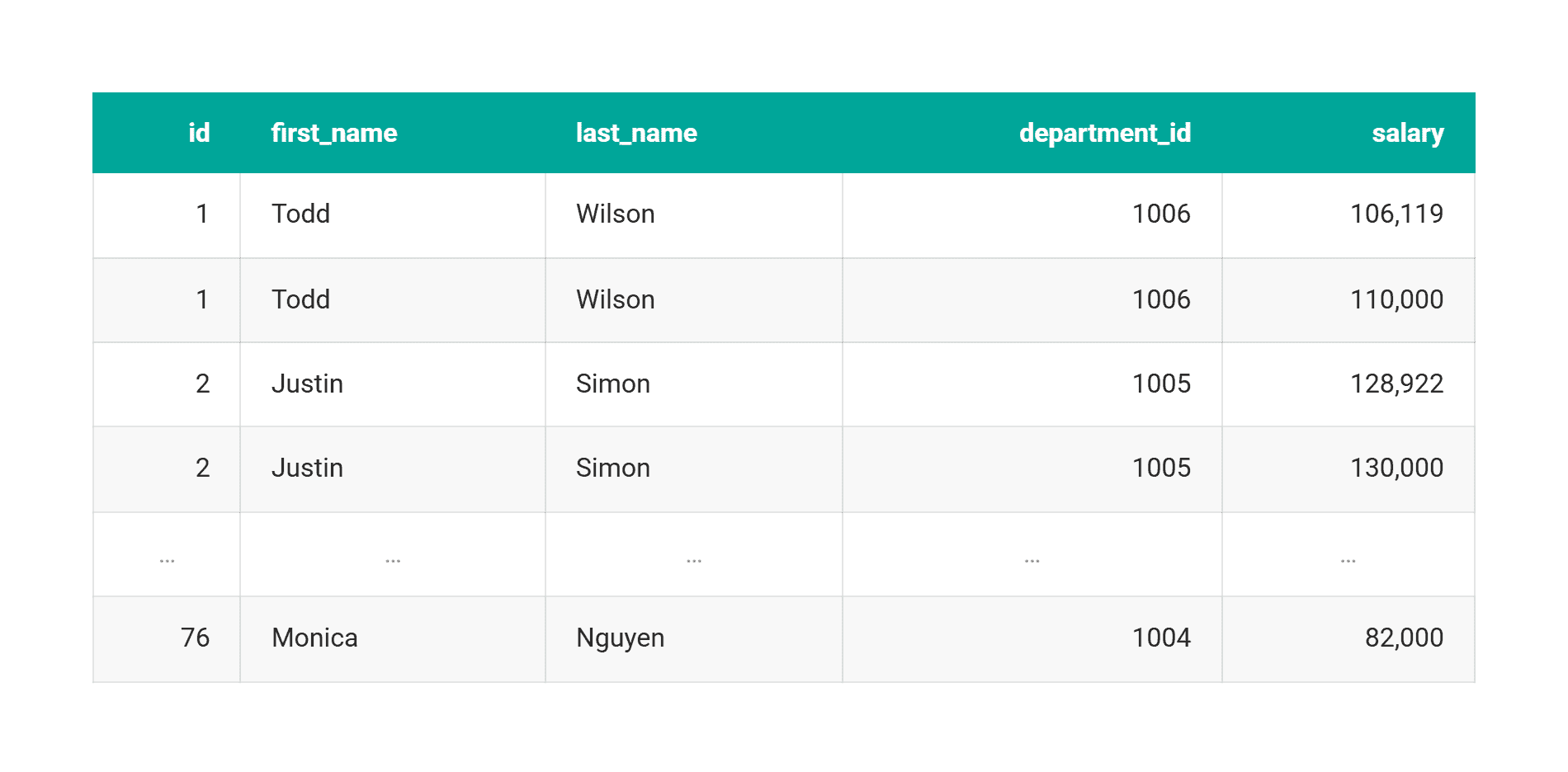
This Microsoft question asks you to find each employee’s current salary from a table with no timestamp at all, only repeated salary rows per employee, so “current salary” has to be inferred by assuming salary only goes up: the purest version of the problem.
Data: ms_employee_salary has 98 rows for 76 employees, several with more than one salary on file and nothing to say which came first.
Code:
SELECT
    id,
    first_name,
    last_name,
    department_id,
    salary
FROM (
    SELECT
        *,
        ROW_NUMBER() OVER (
            PARTITION BY id
            ORDER BY salary DESC, department_id DESC
        ) AS rn
    FROM ms_employee_salary
) s
WHERE rn = 1
ORDER BY id ASC;
Output:
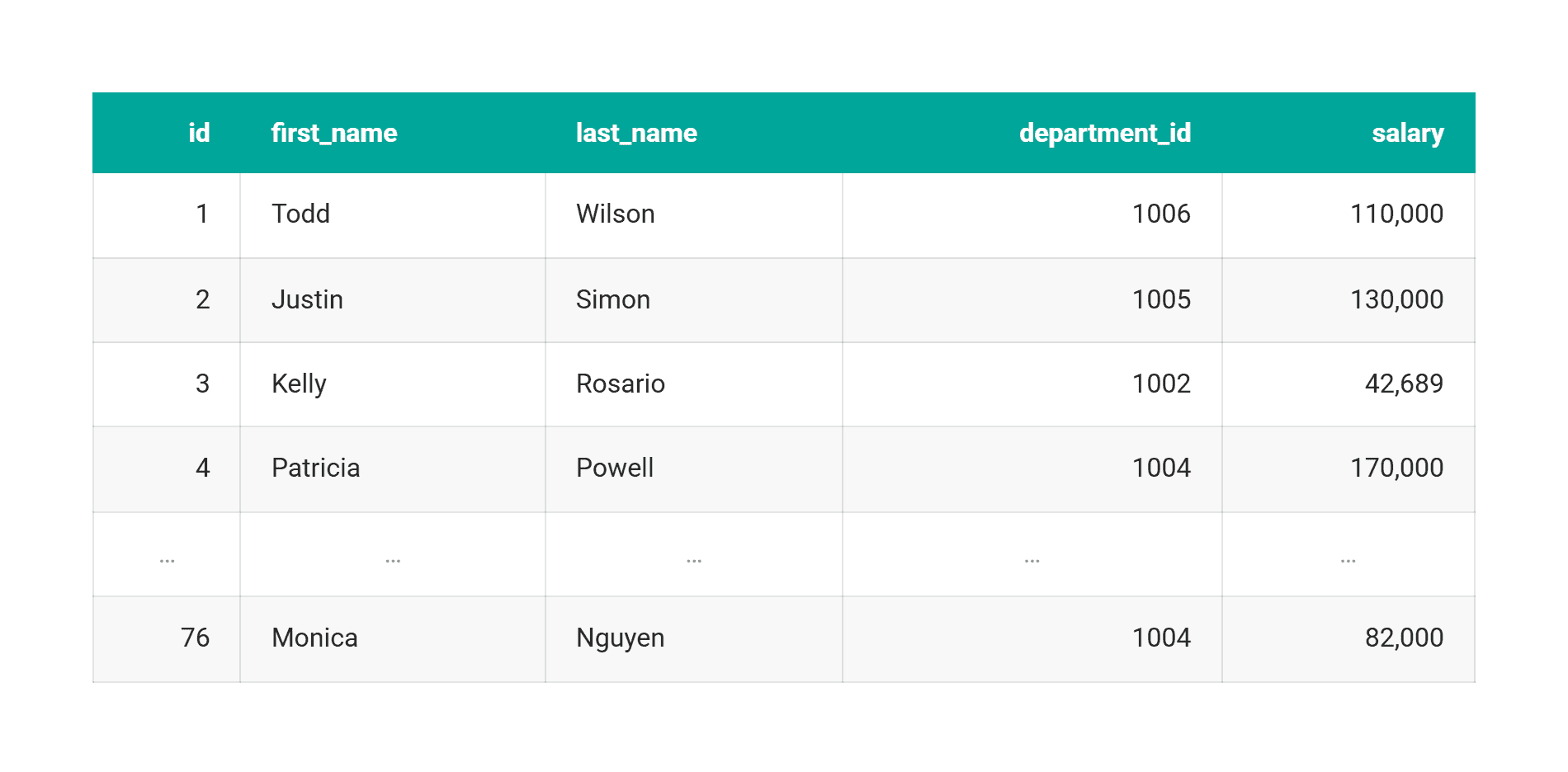
That ROW_NUMBER() trick is the right answer here.
It’s also what a warehouse does when ingesting a slowly changing dimension with no effective-dated column: “most recent” becomes a guess, and any feature joined on employee_id downstream inherits it. Use that inferred “current” salary to recreate a prediction made 6 months earlier, and the historical row gets information from its own future. That’s the leak.
A related Amazon question is a time-window bug, not a leakage bug: users with a second purchase 1 to 7 days after their first, ignoring same-day purchases.
Swap that strict BETWEEN 1 AND 7 for a loose <= 7, and same-day, multi-item baskets start counting as returning users, a retention number inflated by rows that were never a second visit. The query sets its own definition of “return visit” here; no future information reaches the model.
The Fix to This Error
The fix is structural: store both when an event happened and when the row was written, and join features with a strict event_time <= feature_time inequality, never a bare MAX().
Silent Data Error #4: Survivorship Bias
Survivorship bias is a denominator problem: the rows that would tell you the truth were removed before your query ran. The classic case is hedge fund index returns calculated only over funds still trading, dropping every fund that closed. The same shape shows up whenever someone reports on “customers who purchased in 2024” without noticing that this already excludes everyone who churned in Q1.
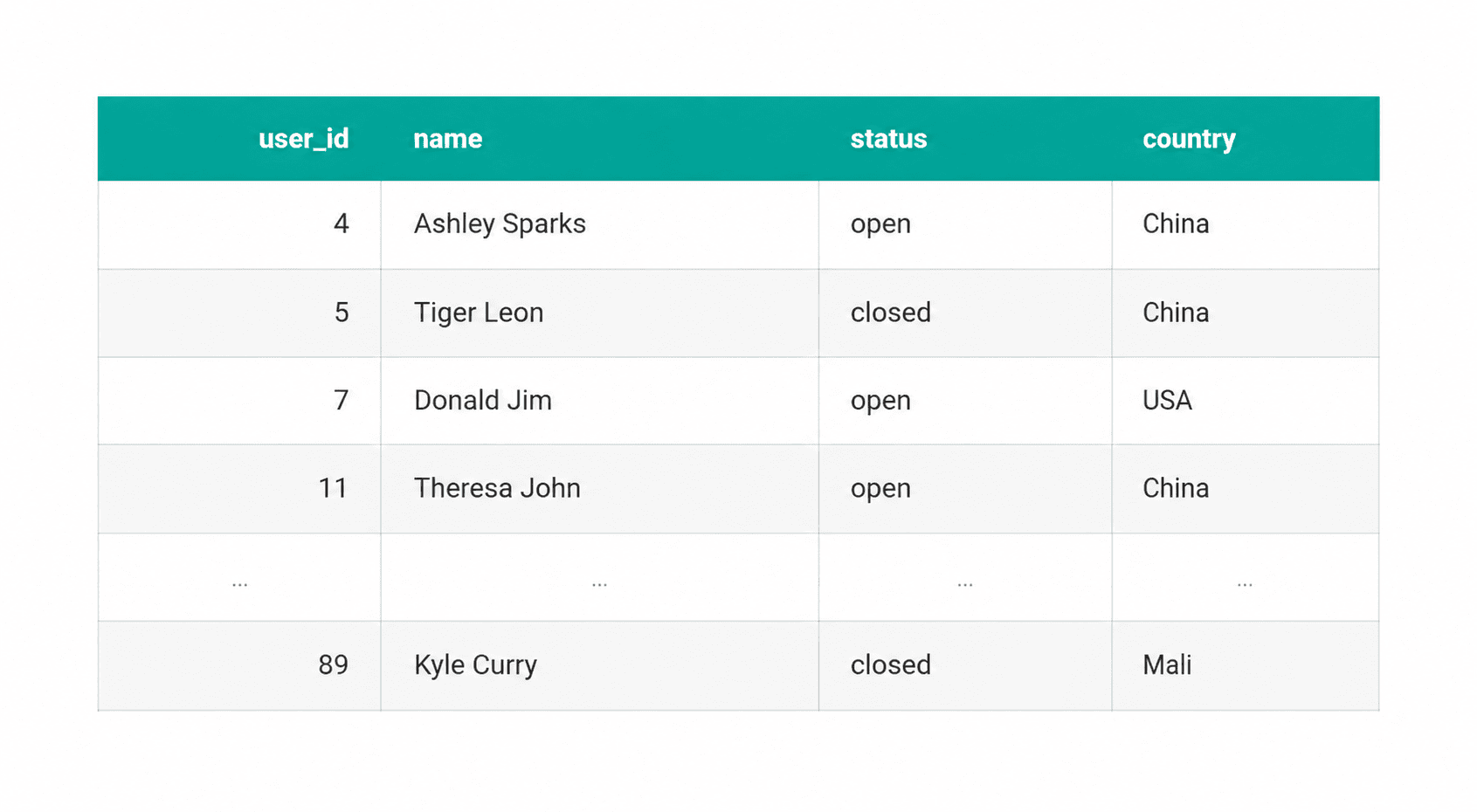
This Meta question asks for the percentage of users who are both from the US and have an “open” status, using a table called fb_active_users.
Data: 23 rows, with a status column marking each user “open” or “closed.”
Code:
SELECT
    SUM(
        CASE
            WHEN country = 'USA' AND status="open" THEN 1
            ELSE 0
        END
    ) * 100.0 / COUNT(*) AS us_active_share
FROM fb_active_users;
Output:

The dangerous assumption here is treating fb_active_users as the complete user population.
This table’s status column has both “open” and “closed” rows, so nothing here has been pruned. The table name is still the kind of signal that gets trusted without a check.
If a table like this excludes deleted or deactivated accounts entirely instead of flagging them, COUNT(*) becomes a denominator made of survivors only, and no null check catches it: the missing rows were gone before the pipeline saw the data.
The Fix to This Error
A cheap way to catch this early: for every cohort filter in a query, plot the row count at each step, and flag any step that drops a large share of the cohort before trusting the number that comes out the other end.
Building a Validation Layer
For duplicated entities: a uniqueness check on the canonicalized identity, plus a join-cardinality assertion that fails when a join outputs more rows than either input table.
For impossible-but-valid values: a business-aware range or peer-group check instead of a data type check; for example, salary against the distribution for the same level and location instead of just against 0.
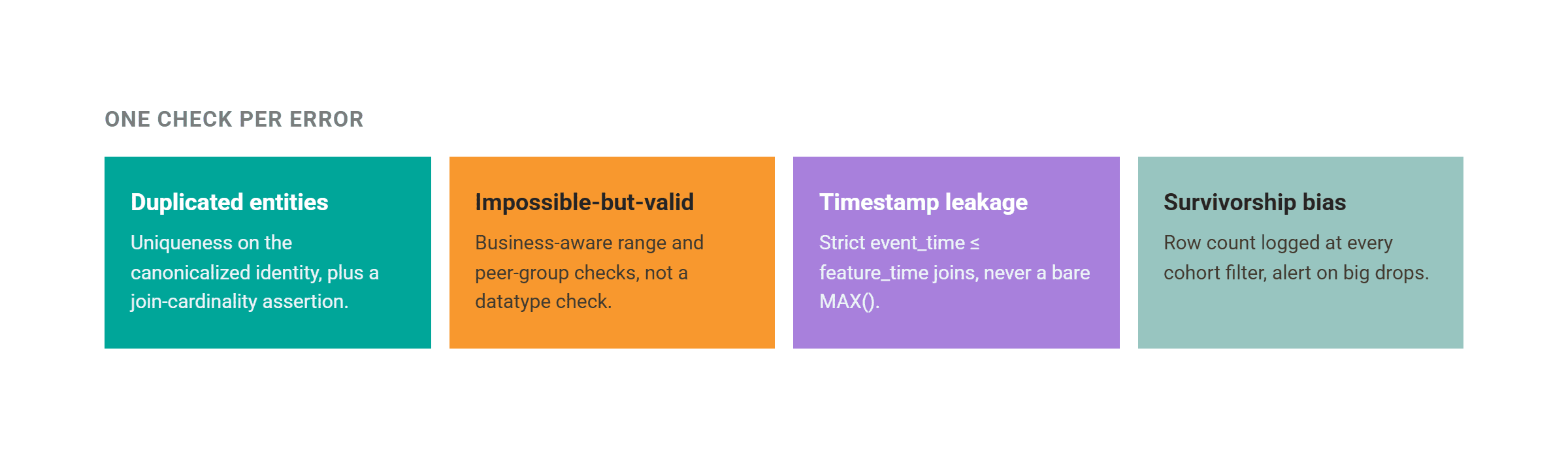
For timestamp leakage: a strict event_time <= feature_time join instead of a bare MAX(), so a feature can never be built from data that didn’t exist yet.
For survivorship bias: a row count logged at every cohort filter, with an alert when one step drops an unusually large share of the population.
Conclusion
We still run null, duplicate, and schema checks on every pipeline. They’re the cheap half of data quality, and they check whether a value is well-formed. Whether it’s true is a separate question.
The 4 patterns here — duplicated entities, impossible-but-valid values, timestamp leakage, and survivorship bias — all pass that first layer of checks and still corrupt whatever gets built on top of them. Catching them takes a rule that knows what the data means, not just its shape, written by someone who understands the business. No generic library ships with it.
Nate Rosidi is a data scientist and in product strategy. He’s also an adjunct professor teaching analytics, and is the founder of StrataScratch, a platform helping data scientists prepare for their interviews with real interview questions from top companies. Nate writes on the latest trends in the career market, gives interview advice, shares data science projects, and covers everything SQL.


