

I in my previous article, “From Code to Insights: Software Engineering Best Practices for Data Analysts”, that engineering skills and best practices can be incredibly useful for analysts and other data professionals.
This is even more true now in the AI era, when we have far more opportunities to build our own analytical tools: from fancy data viewers that display charts or showcase different scenarios, to simulators that can predict outcomes based on input parameters. Personally, I use web applications all the time in my day-to-day work.
There has been a lot of hype around vibe coding, but it seems that professional engineers are already moving beyond it and leaning more toward spec-driven development. Even Andrej Karpathy, who coined the term “vibe coding” in February 2025, admitted just a year later that this era is ending and that we are entering the age of agentic engineering — orchestrating agents against detailed specifications with human oversight.
Today (1 year later), programming via LLM agents is increasingly becoming a default workflow for professionals, except with more oversight and scrutiny. The goal is to claim the leverage from the use of agents but without any compromise on the quality of the software. Many people have tried to come up with a better name for this to differentiate it from vibe coding, personally my current favorite “agentic engineering”:
– “agentic” because the new default is that you are not writing the code directly 99% of the time, you are orchestrating agents who do and acting as oversight.
– “engineering” to emphasize that there is an art & science and expertise to it. It’s something you can learn and become better at, with its own depth of a different kind.
In this article, I’d like to put spec-driven development into practice on a greenfield project, following the best practices from JetBrains’ course on DeepLearning.AI, “Spec-Driven Development with Coding Agents”.
The project is a bit more personal, but still data-related. As I’m preparing for my half marathon in September, I’m trying to balance running and strength training. There are so many tools out there, each focused on a different part of the journey, that finding one solution that truly works for me has been surprisingly difficult. So, I decided to feed two birds with one scone: build my own web app while hopefully learning something new along the way.
Ready for action? Me too. But before we jump into implementation, let me first spend a few minutes on the theory behind spec-driven development.
Vibe coding vs Spec-driven development
Many of us have already experienced vibe coding: you write a short prompt (for example, “Please add a DAU chart to my web application”), wait for the agent to generate the change, run it locally, and check whether the result matches your expectations.
Usually, it doesn’t. So you go back to the same chat, ask the agent to adjust the chart, and keep iterating until the result is good enough.
This approach works reasonably well for simple projects, but it doesn’t scale well, especially when multiple developers are working on the same codebase.
The main drawbacks are the lack of best practices and shared conventions. For example, without a structured approach, teams can easily end up with five different ways to run ML model training inside the same DBT pipeline.
Another common issue is that we usually don’t persist the results or reasoning from our conversations with AI agents. As a result, it becomes easy to lose track of why certain decisions were made. For example, an agent might forget why you cleaned up data in a particular way, and the next update could silently introduce a different result.
Context decay is also an especially common problem. AI agents are stateless, and when working on larger projects, we often have to start new chats because of context window limitations, effectively starting our communication from scratch.
Spec-driven development (SDD) is much closer to traditional engineering practices. Instead of jumping straight into implementation, we start by doing the hard thinking ourselves: making architectural decisions, defining requirements, and documenting them in a structured markdown specification stored in the repository and updated alongside the project. This creates an important shift: we decouple the specification (what we are building and why) from the implementation (the actual code).
SDD addresses many of the core issues of vibe coding by preserving context across sessions (and even across different AI agents) while aligning both humans and agents around the project’s main non-negotiables.
SDD workflow
A typical spec-driven development workflow usually consists of the following stages.
The first step is defining the constitution — an agreement on the key decisions for the project. It usually includes several core documents:
- Mission explains the why: why are we building this project, and what are its key goals and features?
- Tech Stack documents technical decisions, as well as deployment and update processes.
- Roadmap outlines project phases, planned features, and is continuously updated as the project evolves.
Specifications can be created for both new and existing projects, which makes this approach quite versatile.
Once the project-level documentation is in place, we can move on to the feature development phase, which typically includes:
- Understanding what we want to build and writing a detailed specification.
- Implementing the changes.
- Validating that the implementation works as expected.
After successfully implementing your first feature, you might immediately feel the urge to move on to the next one. But this is actually the right moment to pause and rethink.
This is where replanning comes in. It’s a dedicated phase for revisiting the constitution and reviewing previous feature decisions and plans to make sure they still align with the project goals.
Now that we’ve covered the theory, let’s put it into practice.
Building
Enough theory, it’s time to build. To better understand how spec-driven development works in practice, I decided to apply it to a real greenfield project.
I started by creating a new repository for this project (and, of course, spending half an hour choosing the name and logo): repository. I also documented my initial product vision in the README.md file.
One of the nice things about the SDD approach is that it is largely agnostic to the choice of LLM, agent, or IDE, so you can work with whatever setup you prefer. For this project, I’ll be using Visual Studio Code with the Claude Code plugin, as it allows me to use Claude as an agent while also reviewing all code changes directly in the editor.
Creating a constitution
As we discussed, the first step is to write the constitution. Of course, we don’t need to do it manually, we can use LLMs to put it together based on the initial product vision, as well as additional context gathered through follow-up questions.
We are building Trainlytics, a personal fitness tracking web app built
for people who want more control, flexibility, and insights than standard
fitness apps provide. Find the full requirements in README.md.

Let's create a "constitution" in a specs directory that consists of
the following parts:
- mission.md - what and why we are building; the main mission of the product
- tech-stack.md - core technical decisions
- roadmap.md - project phases broken down in implementation order

IMPORTANT: You must use your AskUserQuestion tool to get my feedback.
The agent then asks a series of clarifying questions that help define the project constitution and create an initial implementation plan.
In the end, the agent created the three files we asked for.
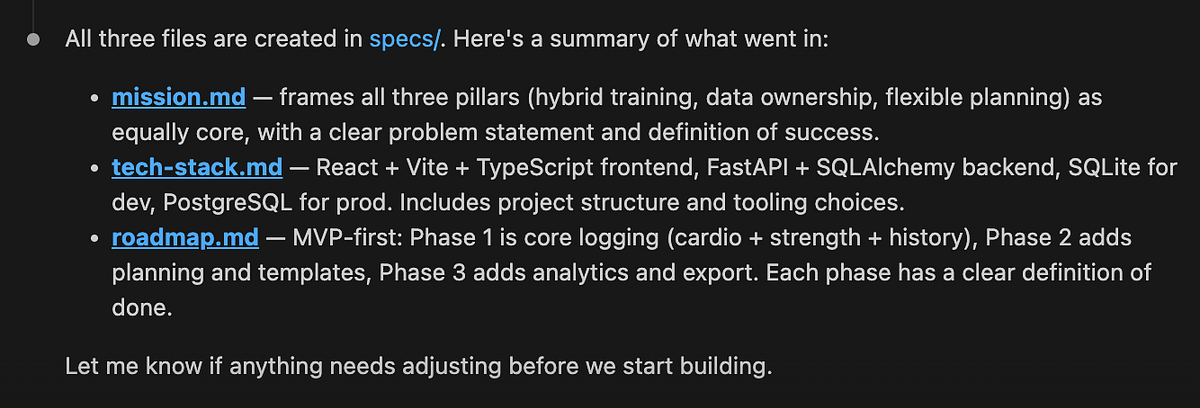
At this point, you might feel the urge to immediately ask the agent to start building the project, but that can be too soon.
Before moving forward, we first need to validate and refine the constitution. It’s worth spending time now aligning on the plan, because this specification will later translate into thousands of lines of code. It’s much better to resolve ambiguities and mistakes early.
I usually do this by reading the documents myself and iterating with the agent, asking clarifying questions and refining the plan step by step. A good practice is to make all changes through the agent rather than patching documents yourself to maintain consistency across the project. For example, I told the agent that we need authentication in the app, since my use case is to log workouts from both desktop and mobile devices. This led to updates in both the tech stack document and the roadmap.
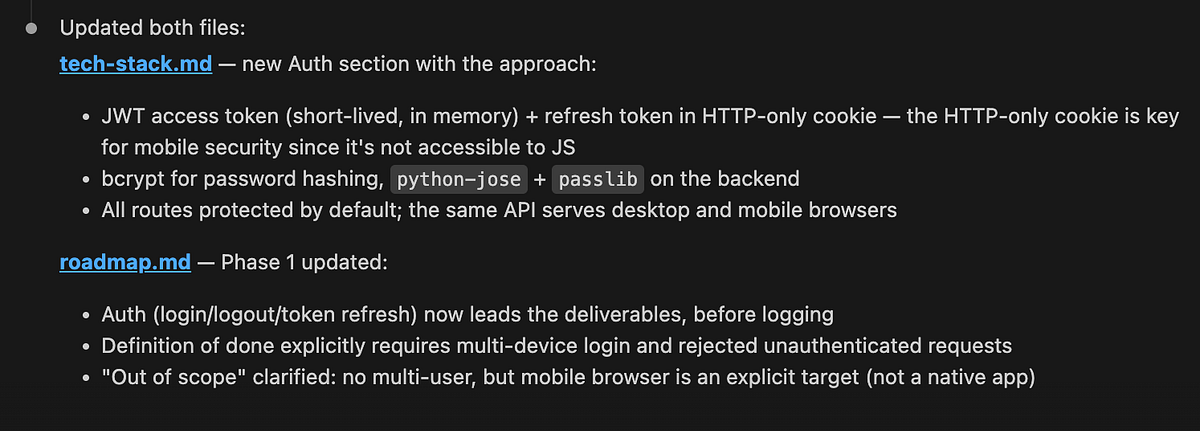
Once you’re happy with the review, you can also ask a second agent — with fresh context — to critique the plan. There are lots of evidence that reflection improves output quality.
When all checks are complete, it’s time to commit the constitution to the repository.
First feature phase
Now, it’s time to move on the first feature phase.
According to our roadmap, we’ll start with the MVP: Core Activity Logging. At the end of this phase, a user should be able to log in on both desktop and mobile, record a run and a gym session, and view both in their history with full details.
As discussed, each feature phase follows a simple cycle: plan → implement → validate. So let’s start by defining the specification and building the plan.
Find the next phase in specs/roadmap.md and create a new branch,
ask me about any steps in the specs that are not fully clear.

Then create a new directory in the format YYYY-MM-DD-feature-name under specs/
for this feature, with the following files:
- plan.md - a structured list of numbered task groups
- requirements.md - scope, key decisions, and context
- validation.md - how we define success and confirm the implementation can
be merged

Use specs/mission.md and specs/tech-stack.md as guidance.Tip: it’s worth starting a new session with clear context in your LLM agent.
The agent put together specifications pretty quickly.

At this point, it’s again time to review the specs and ensure everything is aligned with the original vision. As you can see, with agentic engineering, the role of the developer shifts toward steering, reviewing, and making architectural decisions, rather than directly writing specifications or code.
Once you’re happy with the plan, it’s time to move on to implementation. I prefer to implement each group of tasks separately rather than one-shotting the entire feature phase, but this depends on the size of the feature. For this project, I used the following prompt.
Take the next task group from 2026-05-04-phase-1-mvp/plan.md and implement it.
Use requirements.md and validation.md for guidance.
Once done, update the status in both the plan and validation documents.
When the code is ready, it’s time for review. This is one of the most important steps, so it’s worth investing some time here.
In data-related applications, I usually focus my review on the core business logic and check that the numbers match my expectations.
I must confess that I have close to zero knowledge of frontend technologies, so I rarely review frontend code in detail. Instead, I simply test the interface locally and check whether everything works as expected. For this case, I decided to run the app and see how it works.
After a few iterations with the agent, we managed to run the app locally, and it worked. We can already add different exercises and activity types, and log both cardio and strength sessions.
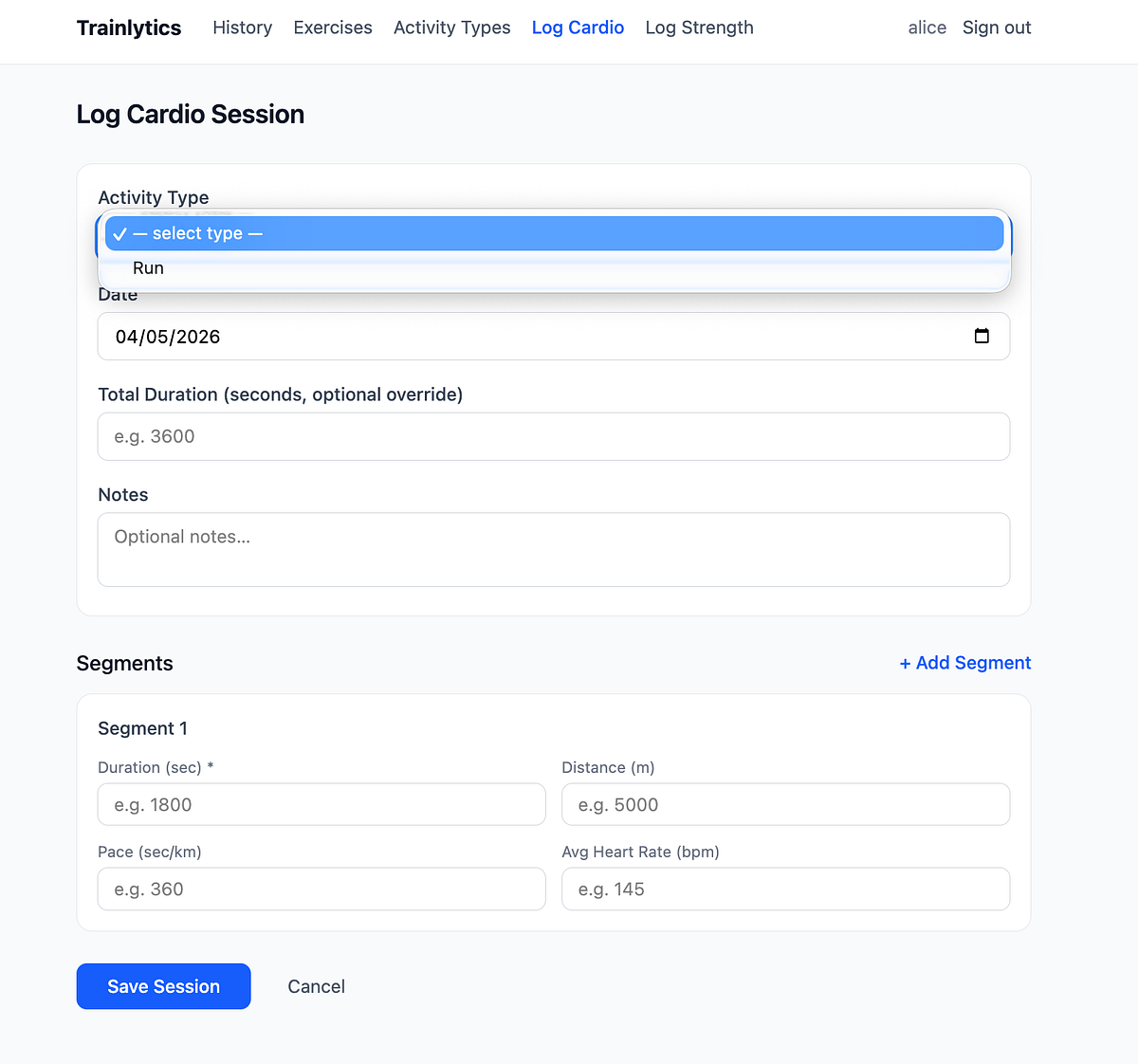
After the manual review, it’s also useful to use reflection and ask the new agent to verify whether the implementation aligns with the plan, as well as to go through the points defined in validation.md.
In theory, spec-driven development suggests that the feature phase ends with validation. In practice, it rarely works that cleanly. You will likely find that some parts of the implementation don’t work as expected. At that point, you have two options:
- Add a couple more iterations to your
plan.mdand continue refining the feature (this works well for smaller changes), or - If the issues are more substantial, treat them as part of the next feature phase and handle them during replanning.
One important thing to watch out for: it can be tempting to simply explain the issue to the LLM agent and ask for fixes, instead of updating the specs and reworking the implementation. Try to resist that shortcut. Keeping the specification as the source of truth is what makes the approach robust.
Once all checks are complete, we can create and merge the pull request.
At this point, we already have a working application and the results are genuinely satisfying. Even more surprisingly, the whole process took just a bit more than two hours end-to-end (including drafting this article while the agent was working).
Replanning
With such good progress, you might feel the urge to continue building. I understand that, but in the current AI era, the main value of a human lies in thinking and architecture. So this is actually the right moment to step back and reflect: do we still want to continue in the same direction, and what should we change in our product and process?
When I started using the application myself, I realised it wasn’t yet ready to fully support my use case. That means we need to reprioritise so I can start using it in my day-to-day life as soon as possible. So, I did it with the following prompt.
Let's revise our plan in roadmap.md.
I would prioritise the next phases as follows:
1. Strength session templates
I can live without planning, but I need templates, because I often struggle
to remember all the exercises in a session.

The idea is:
- If a template already exists in the log, show all stats (exercises, sets,
reps, weight, etc.). Allow editing these values and committing changes
- If anything is changed, ask whether the user wants to update the template

2. UI improvements
The current design is not yet sleek enough, so I'd prioritise a round of UI
improvements:
- Add the logo and product motto to the website
- Add a settings tab to manage activity types and exercises
- Create a single screen to log both cardio and strength sessions
- Improve the history screen with richer activity details
- Allow adding titles to activities (strength/cardio sessions) and segments
- Support specifying time, not only date
- Add more color to the interface (I like shades of blue)
- For cardio exercises, adjust units to: minutes, kilometers, and min/km pace

3. Basic analytics
Add simple analytics to the history screen showing weekly stats at
the top of the page (e.g. total minutes and calories split between cardio
and strength).
Replanning is also a good moment to revisit our process itself. For example, I noticed that we haven’t updated roadmap.md consistently, and the specs are starting to drift. It would also be useful to introduce a changelog, so we have a clear history of how the product has evolved over time.
Let’s ask agent to do it for us.
Please review plan.md, update roadmap.md to reflect completed work,
and create a CHANGELOG.md file with a concise summary of the changes.
Now that we’re aligned on direction and have the right setup in place, let’s keep building.
The next phase
Now we can follow the same process and iterate through phases. Since this is a repeatable cycle, it’s a good moment to discuss possible automations.
So far, we’ve been writing all prompts manually, but these workflows can also be automated as “skills” in Claude Code or other LLM coding agents.
Also, there are already implementations of spec-driven development that can be used out of the box. One of the most popular is Spec Kit by GitHub.
You can install it like this.
uv tool install specify-cli --from git+
specify version # to check that it works
Next, you need to initialise the skills in Claude. This sets up the .specify/ folder and installs slash commands into .claude/commands/
specify init . --integration claude
# there are 30 integrations with agents so specify the one you're using
You’ll know it worked when see the speckit commands in the Claude Code.
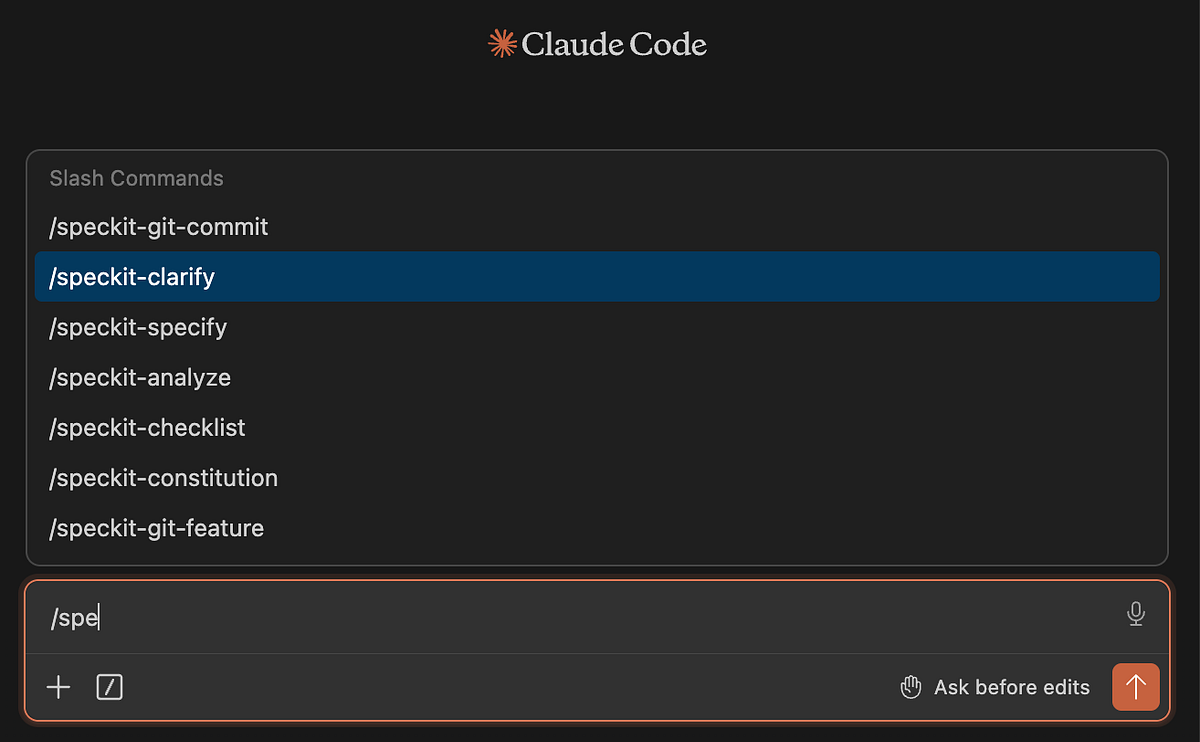
Once installed, you can follow a similar workflow: start by defining the constitution, then iterate through feature loops.
One difference is that in Spec Kit, the constitution is more focused on high-level concerns like code quality, testing standards, UX consistency, and performance requirements.
To be honest, I slightly prefer the approach proposed by JetBrains, because it keeps more context in the constitution itself. But as always, there is no silver bullet and Spec Kit may work better depending on your use case. It’s also convenient that you have SDD workflow already implemented for you.
Using Spec Kit, I ran through the two phases described above, and it worked well. After the first feature phase, development naturally becomes a continuous improvement cycle rather than a linear process. And with that, I think it’s time to wrap up this story.
Summary
In total, it took me around 4.5 hours to build a usable end-to-end product for tracking and analysing my data. There is still plenty of room for improvement, and I’ll continue iterating on it. I can already see several potential UI enhancements, and I’d also like to eventually integrate AI to make the app more intelligent.
Frankly speaking, it has been an interesting experience working through such a structured development flow. In my day-to-day work, I often rely on one-off LLM chats to make changes, without maintaining a full trace of decisions and specifications in the repository.
However, there is no one-size-fits-all approach here.
- If you just want to make a small improvement or run some ad-hoc analysis in yet another Jupyter notebook, writing full specifications upfront is probably overkill.
- But when you’re working on a larger project (especially with other people) spec-driven development would definitely be my default approach.
It’s also interesting to observe how the role of an engineer is shifting: from writing code directly to focusing more on architectural decisions, review, and system design.
And while it may sound a bit extreme today, I do think we’re gradually moving toward a world where English becomes the primary “programming language” interface. We’re already seeing early attempts in this direction, such as CodeSpeak, which explore more natural-language-driven programming paradigms. I will try CodeSpeak in my next article, so stay tuned.
Reference
This article is inspired by the “Spec-Driven Development with Coding Agents” short course from DeepLearning.AI.


