Build AI agents with Amazon Bedrock AgentCore using AWS CloudFormation


Agentic-AI has become essential for delivering production-ready AI applications, yet many developers struggle with manually configuring agent infrastructure in multiple environments. Infrastructure as code (IaC) enables the consistent, secure, and scalable infrastructure required by autonomous AI systems. It reduces manual configuration errors with automated resource management and declarative templates, reducing deployment time from hours to minutes while facilitating infrastructure consistency across environments to help prevent unpredictable agent behavior. It provides version control and rollback capabilities for rapid recovery from problems, critical to maintaining agent system availability, and enables automated scaling and resource development with parameterized templates that scale from lightweight development to production-grade deployments. For agent applications that operate with minimal human intervention, IaC reliability, automatic verification of security standards, and seamless integration into DevOps workflows are essential for robust autonomous operations.
To simplify deployment and resource management, Amazon Bedrock AgentCore services are now supported by various IaC frameworks such as AWS Cloud Development Kit (AWS CDK), Terraform and AWS CloudFormation templates. This integration brings IaC capabilities directly to AgentCore so developers can provision, configure, and manage their AI agent infrastructure. In this post, we use CloudFormation templates to create an end-to-end weather forecaster application. Examples of using CDK and Terraform can be found in the GitHub Sample Library.
Building a job scheduler agent based on weather
The sample creates a weather activity planner, which displays a functional application that processes real-time weather data to provide personalized activity recommendations based on your area of interest. The application consists of several integrated components:
- A collection of real-time weather data – The application retrieves current weather conditions from authoritative weather sources such as weather.gov, which collects important data points including temperature readings, rain probability forecasts, wind speed estimates, and other relevant atmospheric conditions that influence the suitability of outdoor activity.
- Weather analysis engine – The application processes raw weather data using customized logic to assess the suitability of an outdoor work day based on several weather factors:
- Temperature comfort points – Activities receive reduced eligibility points when temperatures drop below 50°F
- Rainfall risk assessment – A chance of rain greater than 30% causes the adjustment of outdoor activity recommendations
- Climate impact assessment – Wind speeds above 15 mph affect the overall comfort and safety ratings of various activities
- A personalized recommendation system – The application processes the results of weather analysis with the user's preferences and location-based awareness to generate suggestions for relevant activities.
The following diagram shows this flow.
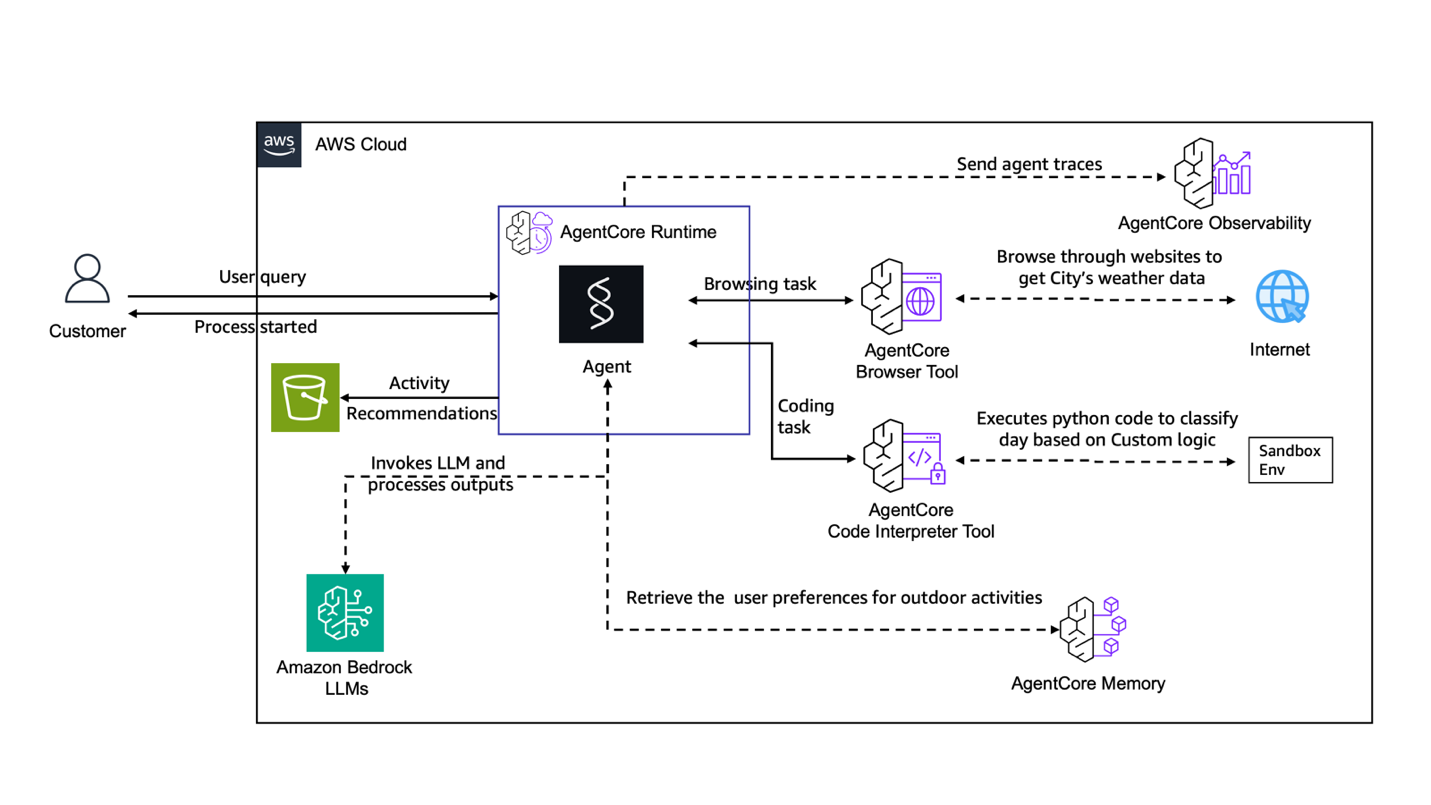
Now let's look at how this can be done using AgentCore resources:
- AgentCore Browser – With automatic browsing of weather data from sources like weather.gov
- AgentCore code interpreter – Using Python code that processes weather data, performs calculations, and applies scoring algorithms
- AgentCore runtime – By hosting an agent that organizes the flow of the request, manages the data processing pipelines, and coordinates between the different components
- AgentCore Memory – To store user preferences as long-term memory
The following diagram shows this structure.
It uses the CloudFormation template
- Download the CloudFormation template from github for End-to-End-Weather-Agent.yaml on your machine
- Open CloudFormation from the AWS Console
- Click Create a stack → For new resources (standard)
- Choose a template source (upload file) and choose your template
- Enter the name of the stack and change any required parameters if needed
- Review the configuration and enable IAM capabilities
- Click Submit and monitor the progress of the deployment in the Events tab
Here are the practical steps for deploying a CloudFormation template
Running and testing the application
Adding visibility and monitoring
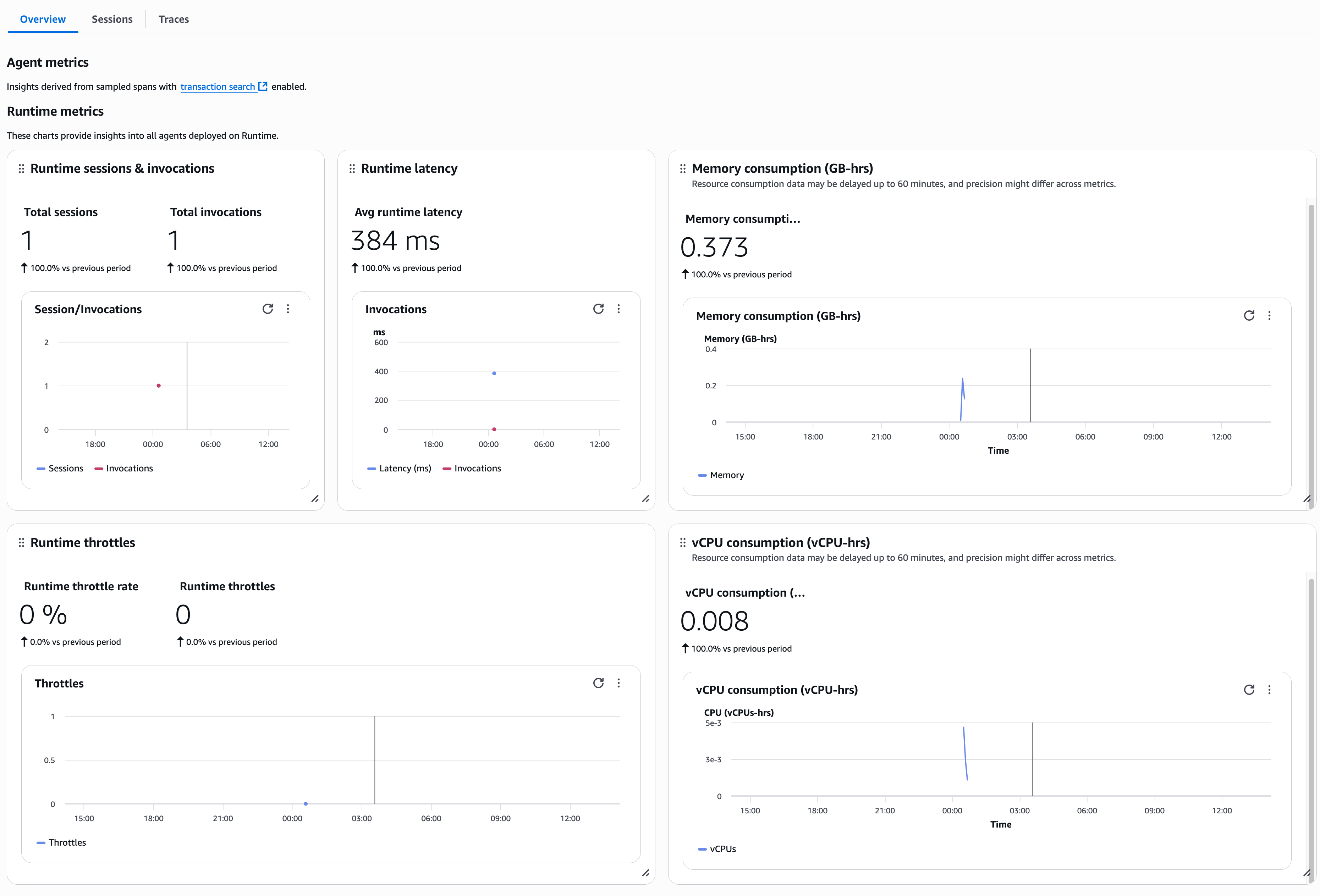
AgentCore Observability provides significant benefits. It provides quality and reliability with detailed workflow visualization and real-time performance monitoring. You can achieve accelerated time-to-market by using Amazon CloudWatch-enabled dashboards that reduce manual data integration from multiple sources, making it possible to take corrective actions based on actionable insights. The flexibility to compile in an OpenTelemetry compatible format supports existing tools like CloudWatch, DataDog, Arise Phoenix, Lang Smithagain LangFuse.
This service provides end-to-end traceability across frameworks and base models (FMs), captures key metrics such as token usage and tool selection patterns, and supports both automated deployment of AgentCore Runtime-hosted agents and configurable monitoring of agents deployed in other services. This comprehensive approach to recognition helps organizations achieve faster development cycles, more reliable agent behavior, and improved performance visibility while building reliable AI agents at scale.
The following screenshot shows the metrics in the AgentCore Runtime UI.
Customize your use case
The AWS CloudFormation workflow template is designed with modular components that can be easily configured for various applications. For example, you can customize the AgentCore Browser tool to collect information from web applications (such as financial websites for investment guidance, social media feeds to monitor sentiment, or ecommerce sites to track prices), modify AgentCore Code Interpreter algorithms to process your business insights (such as sales forecasting, insurance generation), AgentCore quality checks to maintain relevant user preferences or business context (such as customer profiles, inventory levels, or project requirements), and reconfigure Strands Agents tasks to organize workflows specific to your domain (such as supply chain optimization, customer service automation, or compliance monitoring).
Best practices for deployment
We recommend the following practices for your use:
- A modular component architecture – Design AWS CloudFormation templates with different classes for each AWS service.
- Parametric template design – Use AWS CloudFormation parameters for configurable objects to facilitate reusable templates across locations. For example, this can help associate the same base container with multiple agent deployments, help point to two different build configurations, or set a custom LLM parameter to enable your agents.
- AWS Identity and Access Management (IAM) security and least privilege – Use well-defined IAM roles for each AgentCore component with resource-specific Amazon Resource Names (ARNs). See our documentation on AgentCore security considerations.
- Complete monitoring and visibility – Enable CloudWatch logging, custom metrics, AWS X-Ray deployment tracking, and alerts across components.
- Version control and continuous integration and continuous delivery integration (CI/CD). – Store templates on GitHub with automatic validation, comprehensive testing, and AWS CloudFormation StackSets for consistent multi-region deployments.
You can find a comprehensive set of best practices in CloudFormation best practices
Clean resources
To avoid incurring future costs, remove the resources used in this solution:
- In the Amazon S3 console, manually delete the content inside the bucket that you created for the template deployment and then delete the bucket.
- In the CloudFormation console, select Stacks in the navigation pane, select a large stack, and then select Delete.
The conclusion
In this post, we presented an automated solution for deploying AgentCore services using AWS CloudFormation. These preconfigured templates enable rapid deployment of AI-powered systems without the complexity of manual component setup. This automation helps save time and facilitates consistent and repeatable deployments so you can focus on building AI workflows that drive business growth.
Try some examples from our infrastructure as code samples :
About the writers
 Chintan Patel is a Senior Solution Architect at AWS with extensive experience in solution design and development. He helps organizations across a variety of industries modernize their infrastructure, leverage Generative AI technologies, and maximize their cloud investments. Outside of work, he enjoys spending time with his kids, playing pickleball, and experimenting with AI tools.
 Shreyas Subramanian he is a Chief Data Scientist and helps customers by using Generative AI and deep learning to solve their business challenges using AWS services like Amazon Bedrock and AgentCore. Dr. Subramanian contributes leading research in deep learning, Agentic AI, basic models and optimization techniques with several books, papers and patents to his name. In his current role at Amazon, Dr. Subramanian works with various scientific leaders and research groups inside and outside of Amazon, helping to guide customers to better use modern algorithms and methods to solve critical business problems. Besides AWS, Dr. Subramanian is an expert reviewer of AI papers and funding for organizations such as Neurips, ICML, ICLR, NASA and NSF.
 Kosti Vasilakakis is an AWS PM on the Agentic AI team, where he led the design and development of several Bedrock AgentCore services from the ground up, including Runtime. He previously worked on Amazon SageMaker from its early days, introducing AI/ML capabilities that are now used by thousands of companies around the world. Earlier in his career, Kosti was a data scientist. Outside of work, he builds manufacturing automation, plays tennis, and explores the wilderness with his family.


